We are not the first to bring Android to iOS. Earlier projects brought Android’s runtime along with the application. Dalvik was built for Android, including a just-in-time compiler (JIT) that ordinary iOS apps are not permitted to use. Disabling it removes an important source of Dalvik’s performance. Dalvik was designed around interpretation and JIT compilation, not ahead-of-time compilation (AOT), so taking away the JIT leaves an interpreter rather than an optimized native app.
Our approach is different. We compile the application into native code for iOS and remove the code it does not use. It becomes a proper iOS application, with access to OS capabilities through Codename One APIs and native interfaces. You get native execution, a UI you control and a path to improve the application after the initial port.
You can now compile classic Android apps into native Codename One apps. Activities, XML layouts and AndroidX code work on iOS, desktop and the web through the compatibility layer. Each imported view is a Codename One component underneath, so you can replace screens individually and mix the two APIs as you migrate.
Try the imported gallery in your browser. The same gallery produces an 8.73 MB compressed iOS app bundle, including the compatibility code it uses and the runtime. We built both versions locally; the table below separates the compressed bundle from its unpacked size.
The framework and compatibility layer are open source and free for commercial use. You can build locally with your own tools. The optional cloud build service has free and paid plans.
Coming This Week
Today we cover the Android migration path, with real gallery screens and the build pipeline. This week’s follow-ups cover full stack authentication, database upgrades, testing and the tools that make these applications practical to build:
- Saturday, October 10: Easy Full Stack Authentication and Login in the Style of Spring. Token renewal, access rules and tests that cross the network.
- Sunday, October 11: Update DB Schema in Production with Flyway like Syntax. Ordered migrations for devices that skip releases and servers that share a database.
- Monday, October 12: How Do You Test Spring Compatibility?. Write behavior tests in Spring, then keep the same assertions when you port to Codename One.
- Tuesday, October 13: Try Real Java in Your Browser, Compiler Errors Included. The compiler and translator now run inside the Playground page.
- Wednesday, October 14: PGO for Faster Apps and Generational/Adaptive GC. Profile-guided native builds for Pro and Enterprise, plus adaptive GC and performance gates.
- Thursday, October 15: Smaller Simpler Maven Projects. Minimal projects are now the default, with platform modules added when you need them.
Keep the app working while you change it
A migration usually has an awkward middle. The original application still needs releases while its replacement slowly acquires features. For a small team, that can mean maintaining two incomplete products.
The compatibility layer lets you start with the existing application structure. From a Codename One Maven project, import an Android Studio module:
mvn cn1:import-android-project -Dcn1.android.import=/path/to/MyAndroidApp
mvn cn1:run
The importer copies the module’s src/main, reconciles its namespace with the manifest and reports which Gradle dependencies the compatibility runtime covers. Read that report before deciding the app is portable. A successful import is the start of testing, not a certificate for every screen.
The Android interop guide covers manual import, Kotlin sources and the supported APIs. Use a Codename One release containing this change, or build current master while it is being released.
What you are looking at
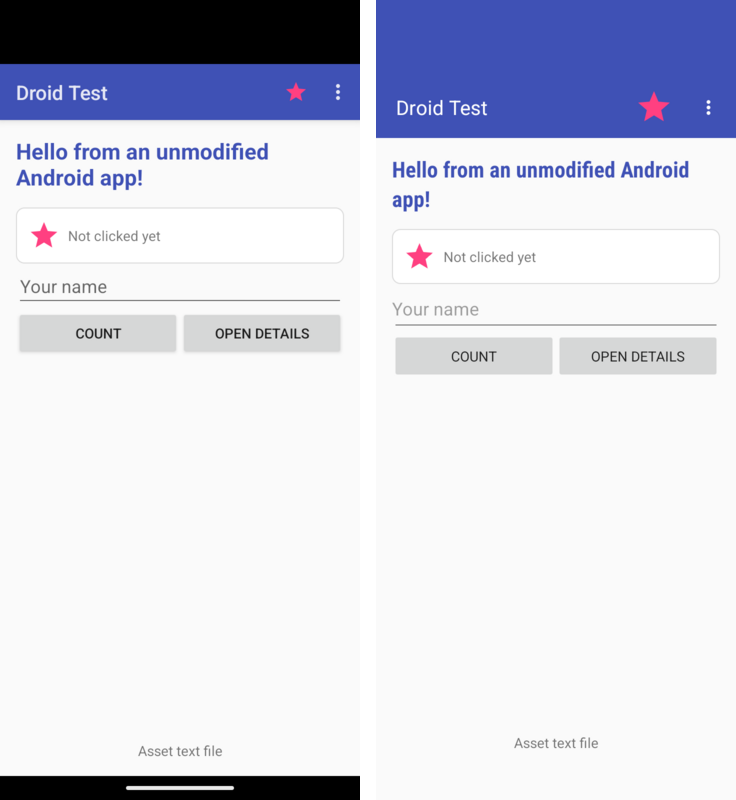
These are captures of the same gallery sources on the same Android 16 emulator, at 720 by 1600 pixels and 320 dpi. The left app uses the Android framework. The right app uses the compatibility layer. They are both Android captures; this comparison measures the rendering difference, not iOS behavior.
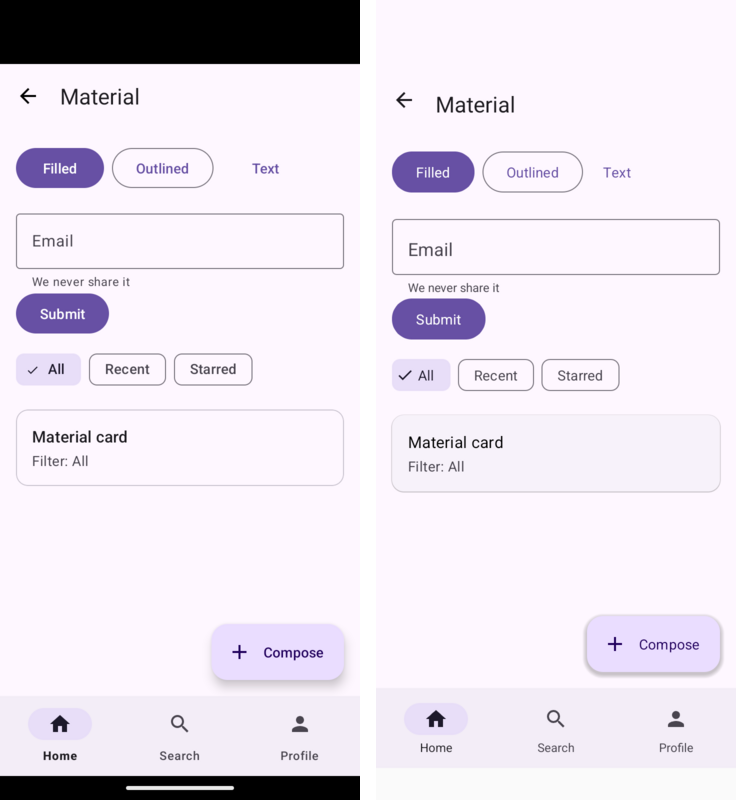
There are visible differences. The Codename One Android build uses a narrower bold face, draws under the status bar differently and has its own Material shadows. Custom rendering gives you control over those pixels across platforms; it does not make every widget pixel-identical to Android.
Try the Android gallery in your browser
Open the interactive Android gallery, or download its source project. Tap Count, open Details, then use the overflow menu to try the other screens. This is the imported Android sample compiled to JavaScript, not a video or a recreation in HTML.
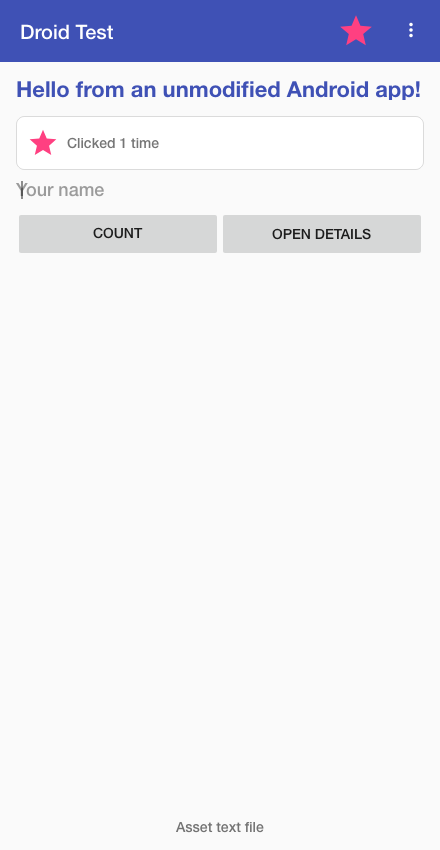
The browser build at a 440 by 850 viewport. The counter and activity navigation run through the compatibility layer.
Is it Efficient?
We built the gallery from master revision ebe0e64be3 as an unsigned ARM64 Release device app with Xcode 27.0, then enabled release symbol stripping. It contains the sample’s activities and resources, the reachable compatibility code, Codename One and the native runtime.
| Artifact | Size, 1 MB = 1,048,576 bytes |
|---|---|
| ARM64 native executable, stripped | 19.19 MB |
| App bundle, sum of file sizes | 22.33 MB |
| ZIP of that unsigned app bundle | 8.73 MB |
The build relocated 1,316 compatibility classes and emitted 862 compatibility translation units for this app. Across the whole application, its method-removal pass discarded 24,616 methods, and field elimination removed 220 never-read instance fields. Those counts describe different stages; they are not a measurement of bytes saved by the Android layer alone.
The ZIP is a compression measurement, not an IPA, an App Store download estimate or an installed-device measurement. Signing and distribution change packaging. We built the device binary locally but did not run it on a physical iPhone. The measurement record includes exact byte counts, configuration and the executable hash. The reproduction notes describe the build.
This is the gallery’s footprint, not a minimum hello-world figure. It demonstrates what the retained Android-compatible surface costs in a real package without claiming that the package contains the whole Android OS.
How Android code reaches an iPhone
A runtime-container approach preserves an Android execution environment around the app. Our build resolves the supported APIs into the application’s own code. There is no Dalvik or ART runtime bundled with this layer.
The resource compiler generates constructors for activities and layout classes. Inflation can call those constructors directly, without discovering classes by reflection. A later pass moves android.*, AndroidX and Material references under the compatibility namespace. Even the Android target uses that relocated implementation, avoiding a collision with the OS classes.
ParparVM can then remove unreachable classes and methods from the native build. Supporting an API in the library does not mean every application must retain every implementation. Resources, reachable screens and native libraries still cost space. This is why an app measurement matters more than the size of the compatibility JAR.
The result is an application you can develop beyond its Android origins. The compatibility layer gets the existing screens running; Codename One APIs and native interfaces give you somewhere to go next.
Replace one screen, keep the next
The following excerpt from the compiled interop example puts an Android custom view inside a Codename One form. androidContext is the installed Android runtime’s context, and MyChartView is the example’s android.view.View subclass:
android.view.View chart = new MyChartView(androidContext);
form.add(BorderLayout.CENTER, chart.getPeer());
The reverse direction matters too. A Codename One app can install an imported module and start one of its activities. Here SettingsActivity belongs to that module:
AndroidRuntime rt = AndroidRuntime.getInstance();
if (rt == null) {
    rt = AndroidRuntime.install(new com.codename1.generated.android.AndroidAppImpl());
}
Context app = rt.getApplication();
Intent intent = new Intent(app, SettingsActivity.class);
intent.addFlags(Intent.FLAG_ACTIVITY_NEW_TASK);
app.startActivity(intent);
When the final activity finishes, the Codename One form that opened it returns. You can build new navigation in Codename One while keeping an imported screen for settings or data entry. Shared application logic can call Codename One APIs directly as you remove dependencies on Android-specific behavior.
Start with one complete user journey. Check its inputs, back navigation and persistence on each target. Then choose the next screen based on product value. The migration can stop at a useful intermediate state.
Find the boundary before it finds you
Import requires the application’s source. APK execution and Compose UI are outside this layer.
Parcel is an in-process value container here; it does not reproduce Android IPC or serialization snapshots. SQLite uses one connection, so concurrent database work needs care. Reflection-based class loading cannot be carried onto iOS. MotionLayout and CoordinatorLayout are outside the supported surface, and some Material details differ.
Those are reasons to read the limitations, not reasons to rewrite every supported screen. The gallery and port tests give you concrete starting coverage. Your dependencies and workflows determine the rest. The implementation is in PR #5941.
More This Week
Easy Full Stack Authentication and Login in the Style of Spring
Last week’s native backend gave us the application structure. This week adds a security stack that connects server access rules to the app making the requests. It includes form login, JWT resource servers and OAuth, with MFA and passkey support for applications that need them.
If you have used Spring Security, the configuration will look familiar. This excerpt from the security example defines a stateless API and requires a scope for reading orders:
@Bean
@Order(1)
SecurityFilterChain api(HttpSecurity http) {
    http.securityMatcher("/api/**")
        .authorizeHttpRequests(auth -> auth
            .requestMatchers("/api/orders/**").hasAuthority("SCOPE_orders:read")
            .anyRequest().authenticated())
        .sessionManagement(session ->
            session.sessionCreationPolicy(SessionCreationPolicy.STATELESS))
        .oauth2ResourceServer(oauth2 -> oauth2.jwt(Customizer.withDefaults()));
    return http.build();
}
On the client, OidcRequestAuthorizer attaches credentials to requests for your API and coordinates token renewal. If several requests need a fresh token at once, they wait for one refresh exchange. A rejected refresh clears the session and returns control to your sign-in UI.
We test that connection end to end. One test supplies an invalid access token, checks that renewal recovers the request, then tries to reuse a spent refresh token and expects the session to end. The client networking code and backend both participate. Browser credentials and redirects have separate test boundaries, which Saturday’s article explains alongside the native port coverage.
Saturday’s authentication deep dive covers the client setup, persistent server stores and failure cases. The backend security guide and client identity guide have the configuration details.
Update DB Schema in Production with Flyway like Syntax
The backend’s security stores need database tables, and those tables need to evolve after deployment. Your app has the same problem: a customer who skips three releases still needs the right local database when they return.
We now have a shared migration engine for the client and server, using familiar Flyway-style filenames. Keep the original schema in V1__create_note.sql, then add a new file for the next change:
-- V2__add_note_created.sql
ALTER TABLE note ADD COLUMN created BIGINT;
UPDATE note SET created = 0 WHERE created IS NULL;
On the client, put these files in common/src/main/db/migration and call Migrations.migrate(db) after opening the database. The annotation ORM does that when it opens the entity manager. On the server, scripts go in the backend module’s src/main/resources/db/migration and run before the application accepts requests.
History and checksums let the engine detect changed scripts. Repeatable migrations handle objects such as views, and a database newer than the application is refused before old code changes its data. For servers, a database lock coordinates instances that start together.
Sunday’s database migration article covers baselines, skipped releases and recovery after a failed migration. It also explains why a MySQL schema change and a transactional PostgreSQL migration need different recovery plans. The server migration reference includes Maven commands for inspecting and validating history before deployment.
How Do You Test Spring Compatibility?
The Codename One backend uses Spring-style syntax to ease porting, but it is not Spring compatible. How do you know whether the port behaves like the original? Write tests in your Spring application first, then run the same requests and assertions against the Codename One implementation.
The backend now includes @BackendTest, dependency injection and a MockMvc API for carrying those checks across. Change the framework imports and test setup while keeping the behavior you expect. In both applications, the request assertion can look like this:
@Autowired
private MockMvc mvc;

@Test
void greetsByName() throws Exception {
    mvc.perform(get("/greet/{name}", "Ada"))
            .andExpect(status().isOk())
            .andExpect(jsonPath("$.greeting").value("Hello, Ada"));
}
Run it in Spring before the port, then in Codename One after adapting the test setup. A changed status or response is something to investigate, not a reason to rewrite the expected value. Add denied requests and state-changing operations so the suite covers more than the successful response. TestRestTemplate can also cross a real HTTP connection when transport behavior is part of the contract.
The next step is running the tests against compiled native code. The build generates direct test calls and produces reports beside the JVM results. Strict mode makes unsupported test cases fail rather than disappear into a green run. Mockito remains a JVM option; explicit test implementations can run in both environments.
Monday’s testing article starts with the Spring test, shows the Codename One changes and finishes with local native test commands. The testing guide documents the supported APIs and the setup for an existing backend module.
Try Real Java in Your Browser, Compiler Errors Included
The Playground now compiles Java as you type. We replaced BeanShell with our Java compiler and the ParparVM translator, both running inside the browser. Source becomes bytecode, the translator produces JavaScript, and the preview loads the new classes. Your source stays in the page.
That means records and lambdas go through actual type checking. Here is part of the example in Tuesday’s post:
record Item(String name, int count) {}

Item item = new Item("Orders", 3);
Label label = new Label(item.name() + ": " + item.count());
Change 3 to "three" and the compiler points to the constructor mismatch. Fix it and the preview can run again. The screenshot below shows that deliberate mistake in the public Playground:
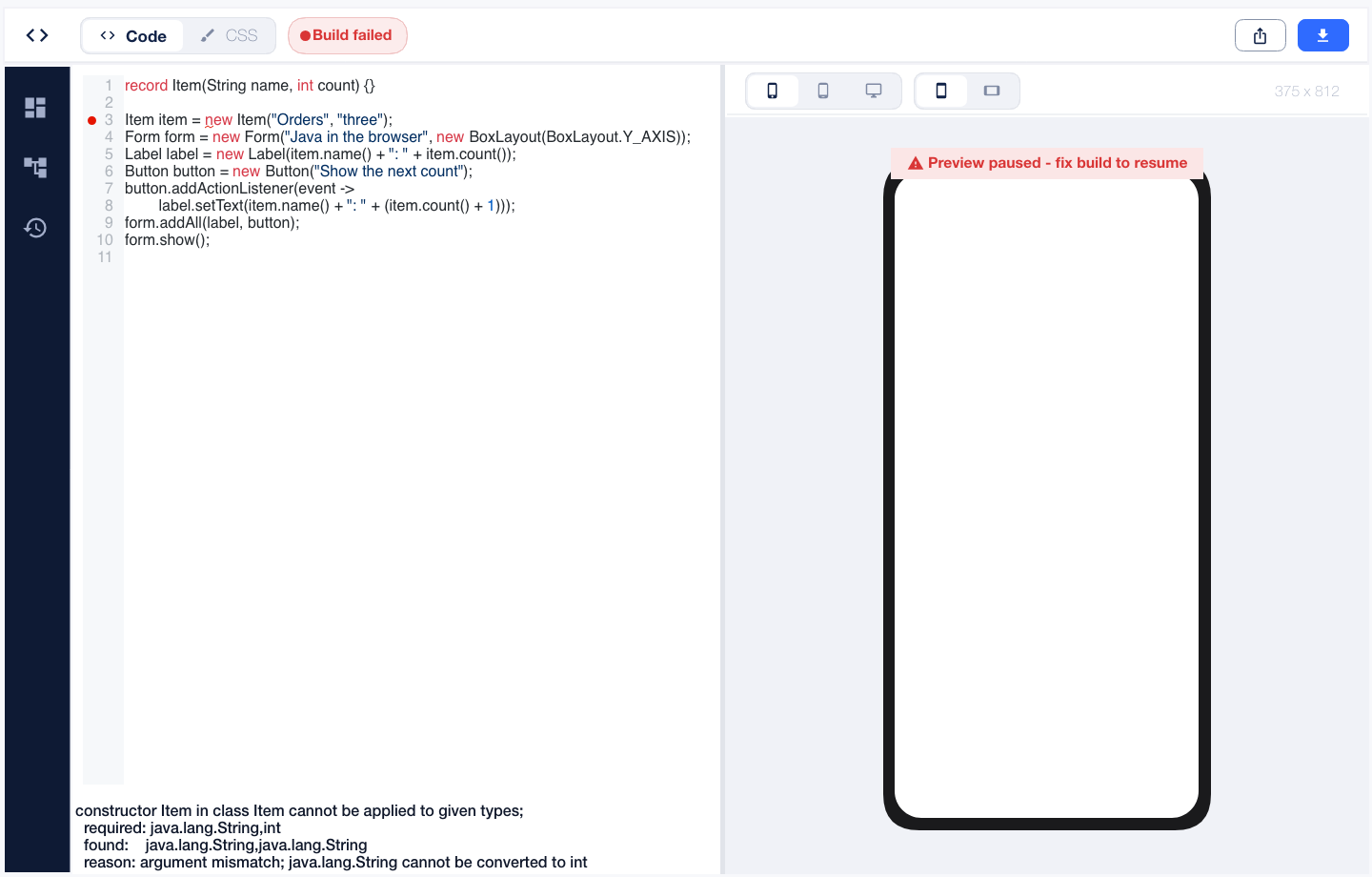
The rebuild also removes 161 generated BeanShell adapter source files, totaling about 23.8 MB. That is removed source code, not a browser download measurement. Incremental translation emits the new user classes without rebuilding the entire host application.
Tuesday’s Playground article gives you the full interactive example and explains how a Java compiler can run inside its own translated output. You can try it now.
PGO for Faster Apps and Generational/Adaptive GC
Profile-guided optimization (PGO) is now available on Pro and Enterprise cloud builds. The build service runs your application, records which code executes, then compiles it again using that profile. The compiler can make better decisions about inlining, branch layout and where to place frequently used functions. Your users get the optimized native binary.
This works for iOS, native macOS and native Linux. The profile applies to translated Java, the Codename One runtime and your native sources. For an iOS build, enable it in codenameone_settings.properties:
codename1.arg.ios.pgo=true
codename1.arg.pgo.trainingSeconds=90
The service handles both compilations and the training run. If you already have Pro or Enterprise, you can enable it in your next supported cloud build. If you are choosing a plan, PGO is now another reason to look at Pro: the build service can optimize using execution data from your own app.
Training is unattended, so the best candidates do representative work from a clean launch. Code behind a login or button may never be reached. Wednesday’s article shows how the training works and how to compare the result against your ordinary build.
ParparVM now switches between concurrent collection and a generational phase when allocation behavior makes that worthwhile. If almost every new object dies quickly, resetting young pages avoids tracing and sweeping those objects individually. The collector can spend less CPU keeping track of garbage.
Giving that phase more memory can reduce collection frequency. It can also make the next full collection worse. During development, one bad transition retained enough young objects to push a stress test’s page count from 3,446 to 10,538. Deciding when to leave the generational phase mattered as much as deciding when to enter it. Low available memory now sends the collector back to the concurrent path.
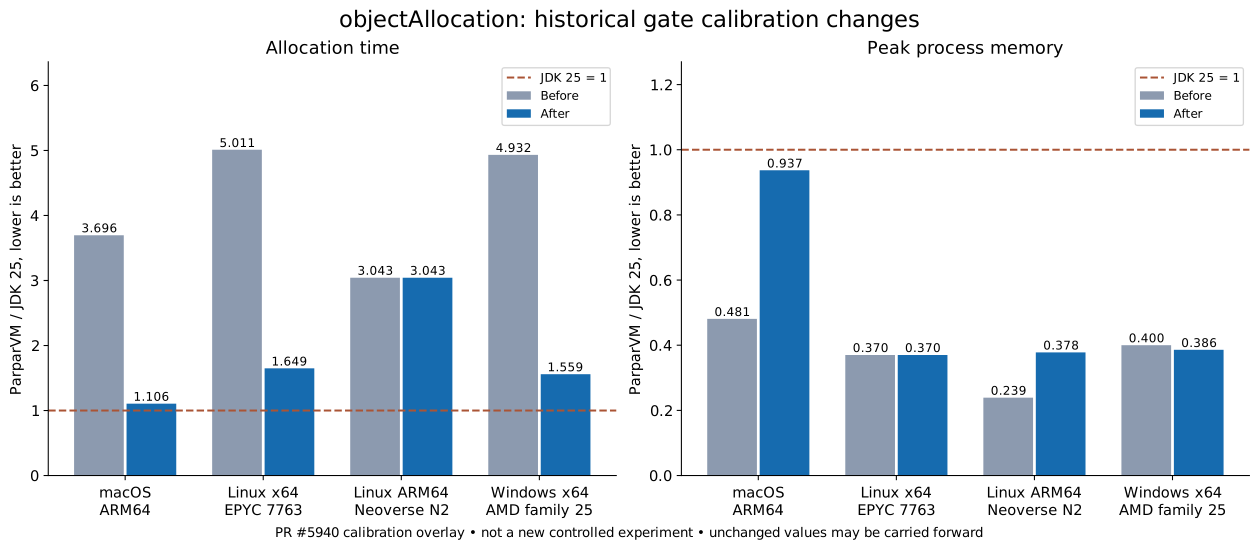
Historical allocation-workload calibration ratios, with JDK 25 equal to 1. Lower is better. These are gate records, not a new controlled benchmark.
The macOS record shows the trade clearly: its time ratio falls from 3.696 to 1.106, while its peak memory ratio rises from 0.481 to 0.937. That is a substantial CPU improvement with a substantial memory cost. It also explains why our performance gate tracks both metrics across its five desktop and server OS/architecture combinations. Mobile and browser behavior have separate port coverage.
These GC records use no PGO. They measure separate runtime work that benefits ordinary builds too. Wednesday’s PGO and adaptive GC article leads with the premium build feature, then explores the collector’s memory budget, transition failures and regression gate.
Smaller Simpler Maven Projects
Last week we introduced minimal Gradle projects. Maven now gets the same treatment, and the smaller layout is the default for new apps. You start with two POMs:
my-app/
    pom.xml
    common/
        pom.xml
        codenameone_settings.properties
        src/main/java/
        src/main/resources/
The simulator and platform builds still work from that project. Native implementations can live in directories such as ios/src/main/objectivec without needing another Maven module. Add a platform POM when you need separate dependencies or build configuration for that target.
The archetype can generate selected platform modules, all of them, or none. It also has app-with-backend and backend-only project types, so a standalone server does not need an empty client module next to it. Existing projects keep their structure.
Thursday’s Maven article shows the commands, native source locations and optional layouts. The archetype reference has the configuration details.
Final Word
This week marks a major milestone for Codename One. For years, we ran on Android. Now we have flipped the script: Android runs on Codename One. The same application can reach iOS, the web and desktop, and its next version can grow beyond the Android APIs it started with. A lot more is coming in this area.
The backend has made a major leap since last week too. With full stack authentication, database migrations and Spring-style testing in place, we now have a substantial backend implementation nearing beta. You can build the client and server together, then test the connection between them with the same tools you use to build the applications.
Discussion
Which screen would you move first if your Android app could reach iOS or the browser before the rewrite was finished?