If Codename One didn’t exist, Kotlin Multiplatform is probably the platform I’d choose. I prefer Java, but Kotlin is a good language, and KMP was one of the strongest platforms we measured against in the Flutter post this week. Its first take on UI leaned on heavyweight native widgets, the way React Native does. The team learned from that, and Compose Multiplatform today is a good product built by people who care about performance.
So this post isn’t about KMP being bad. KMP is good. This is also good, and in a few ways better. Your Compose code now builds as a Codename One app, so it reaches more targets and did less work per frame on our benchmark. You don’t have to pick one forever: the same commonMain builds both ways.
What you keep
There’s no transpiler here. kotlinc compiles your Kotlin for the JVM with the Compose compiler plugin, exactly as it does today. The Compose runtime and kotlinx.coroutines are the upstream jars. The UI layer (androidx.compose.ui, foundation, material3 and animation) is our reimplementation, written over Codename One components and graphics. Then ParparVM compiles everything ahead of time to a native binary.
Dispatchers.Main is the Codename One event dispatch thread, so your coroutines behave the way you expect. Measuring follows Compose’s rules: the modifier chain is walked outermost first, under Compose constraints. LazyColumn and LazyRow compose only what’s on screen.
Bringing a KMP module over is one command:
mvn cn1:import-kmp-project -Dcn1.kmp.import=/path/to/MyKmpApp
It copies commonMain and your JVM source set into common/src/main/kmp, leaving out the file that opens a desktop window. A whole app is a ComposeForm:
class MyApp : Lifecycle() {
    override fun runApp() {
        ComposeForm { LayoutScreen() }.show()
    }
}
The numbers, and what they don’t mean
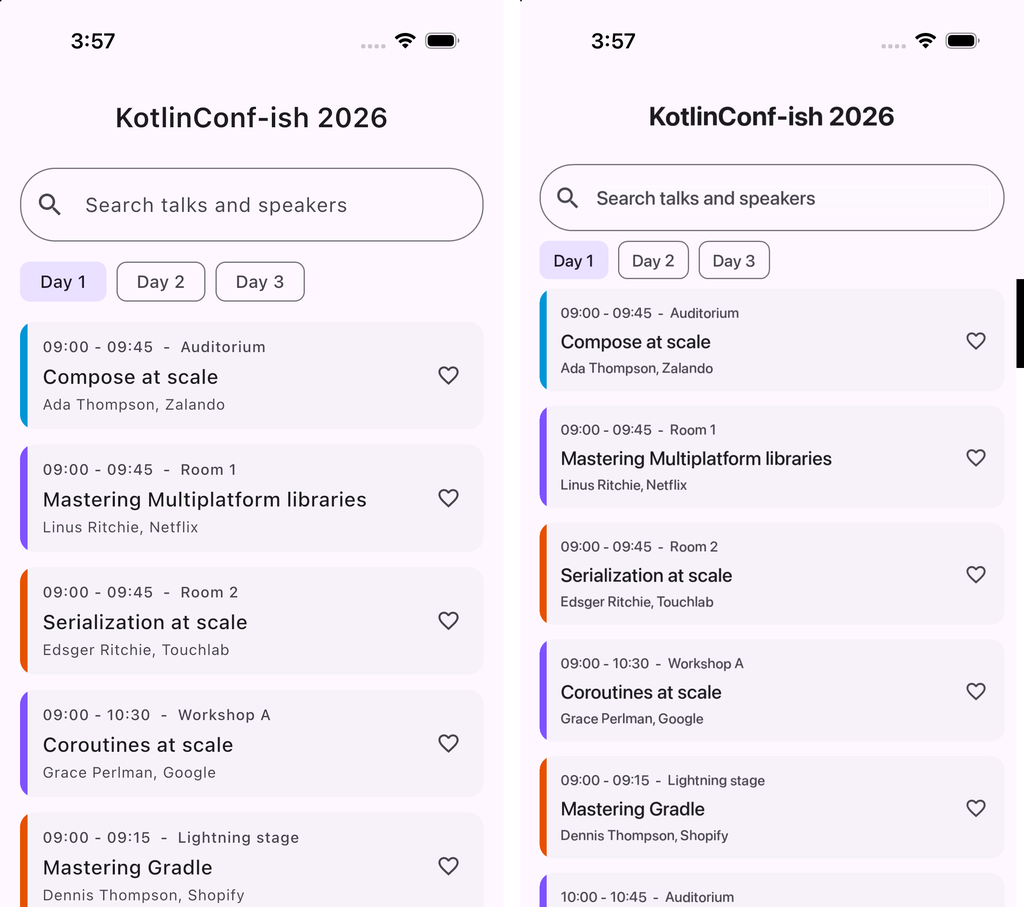
The benchmark is Keynote, a Compose conference schedule app, built three ways: Compose on Codename One, Compose Multiplatform, and the same app written in plain Java on Codename One. All three were release builds on an iPhone 17 Pro simulator with Xcode 27, five runs each.
| Compose on Codename One | Java on Codename One | Compose Multiplatform | |
|---|---|---|---|
| Executable, stripped | 16.8 MB | 8.9 MB | 22.9 MB |
| App bundle | 18.3 MB | 10.2 MB | 22.9 MB |
| Cold start | 961 ms | 805 ms | 1008 ms |
| Warm start, median | 580 ms | 572 ms | 604 ms |
| Recomposition on a day change, median | 4.58 ms | 1.49 ms | 19.24 ms |
| Scroll work per frame, median | 4.04 ms | 1.76 ms | 17.03 ms |
| Frame interval, median | 35.45 ms | 34.79 ms | 33.35 ms |
| Memory footprint | 47 MB | 47 MB | 48 MB |
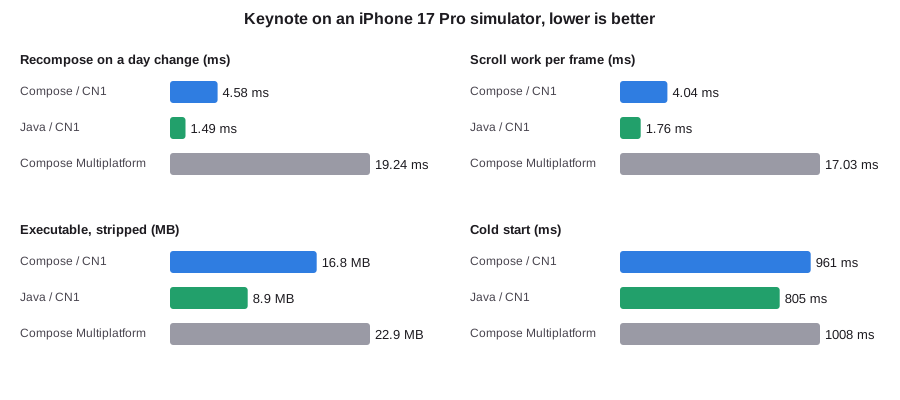
All three apps hit the same frame rate, and Compose Multiplatform is slightly ahead there. On a fast machine, a simple screen keeps up either way. What differs is how much CPU each one burns to get there: about 4 ms a frame for Compose on Codename One against about 17 ms for Compose Multiplatform. On a phone that’s battery life, heat, and headroom for the frame where your screen isn’t simple.
A few caveats, because they matter:
- This is the simulator, not a phone. Scrolling is programmatic, not a finger fling.
- Compose Multiplatform’s first frame marker fires before Skia draws, so the start-up figures lean in its favor.
- An empty UIKit app takes 640 to 750 ms to start in this setup, so most of every start-up figure is iOS itself.
Why imperative Java is faster and smaller still
Look at the middle column. The same screen, written imperatively in Java, handles a day change in 1.49 ms, a third of the Compose version on the same engine, and its executable is about half the size.
The benchmark is tilted toward Compose, too. The Java version was written to mirror the Compose app screen for screen, so it rebinds cards the way a recomposition would, and carries some of that model’s overhead. A Java screen written from scratch the Codename One way would do less.
Declarative UI pays for its model by recomposing, diffing and remembering, which is work an imperative screen never does, because it changes the one label that changed. The usual argument is that the model buys you something back. Here is the same session card both ways. Compose:
@Composable
fun SessionCard(s: Session, favorite: Boolean, onFavorite: () -> Unit, onOpen: () -> Unit) {
    Card(onOpen, Modifier.fillMaxWidth()) {
        Row(verticalAlignment = Alignment.CenterVertically) {
            Box(Modifier.width(6.dp).height(84.dp).background(Color(s.track.color)))
            Column(Modifier.weight(1f).padding(12.dp)) {
                Text(s.timeLabel + "  -  " + s.room, style = MaterialTheme.typography.labelMedium)
                Text(s.title, style = MaterialTheme.typography.titleMedium, maxLines = 2)
                Text(s.speaker.name + ", " + s.speaker.company,
                    style = MaterialTheme.typography.bodySmall)
            }
            FavoriteButton(favorite, onFavorite)
        }
    }
}
Codename One, with the styling in CSS where it belongs:
class SessionCard extends Container {
    private final Label time = new Label("", "SessionTime");
    private final Label title = new Label("", "SessionTitle");
    private final Label speaker = new Label("", "SessionSpeaker");
    private final Button heart = new Button("", "Favorite");
    private Session session;

    SessionCard(Schedule app) {
        super(new BorderLayout(), "SessionCard");
        add(BorderLayout.CENTER, BoxLayout.encloseY(time, title, speaker));
        add(BorderLayout.EAST, heart);
        heart.addActionListener(e -> app.toggleFavorite(session));
    }

    void bind(Session s) {
        session = s;
        time.setText(s.timeLabel() + "  -  " + s.room);
        title.setText(s.title);
        speaker.setText(s.speaker + ", " + s.company);
    }
}
Put them side by side and the claimed advantages don’t hold up:
- Readability. Both are a box with three lines of text and a button. Neither is shorter in any way that matters. The Java version names its parts, so
titleis a field you can find, not the secondTextcall in a nested lambda. - Testability. Compose tests find nodes by test tags you add for the purpose. A Codename One test holds the component, calls
bind, and asserts ontitle.getText(). The test framework and the simulator’s MCP tools drive both the same way. - Debugging. This is where imperative code wins outright. Set a breakpoint in
bindand you see the one call that changed the text, with a stack that leads back to your code. In Compose, the same change runs through the snapshot system, the runtime that schedules recomposition, and generated code from the compiler plugin, and “why did this recompose?” is a question you need a dedicated tool to answer.
Compose is a fine way to write UI, and if your team already has it, bring it. But it isn’t simpler than the imperative code it replaced, and on this screen it costs two to three times the CPU and twice the binary. Codename One lets you choose per screen. Keep Compose where you have it, and write the hot screen in Java:
val form = Form("Mixed", BorderLayout())
form.add(BorderLayout.NORTH, Label("Codename One"))
form.add(BorderLayout.CENTER, ComposeView { ListScreen() })
form.show()
ComposeView is an ordinary Container, so a Compose screen and a Codename One component share a form, a theme and an event thread.
What’s different on our side
- More targets. iOS, Android, the web, native macOS, Windows and Linux with no JVM, plus watchOS and tvOS. The Keynote benchmark itself hasn’t been built for watchOS, tvOS, Windows or Linux yet.
- Java too. Your team can write Java and Kotlin in one project, and share code with a Java backend.
- Smaller. 16.8 MB of executable against 22.9 MB, or 8.9 MB if the screen is in Java.
- Build errors instead of surprises. A composable or modifier we haven’t implemented fails the build with its original name and source line. It doesn’t render wrong on a device.
What doesn’t work yet
LazyColumn(reverseLayout = true) throws; it isn’t implemented. Box, Row and Column aren’t inline functions here, as they are upstream, because a public inline function can’t call our internal layout code. The Compose runtime’s inline functions are JVM 11 bytecode, so the build targets 11. On Gradle, the plugin refuses to build until org.jetbrains.kotlin.plugin.compose is applied, and it tells you the line to add.
Try it
The Kotlin Multiplatform chapter covers the import, mixing Compose with Codename One components, and the benchmark. The Keynote source and its harness are in scripts/kmp-bench in the repository. If you run KMP in production, I’d love to hear which composable you hit first that we don’t have.
Tomorrow: Your Swing and JavaFX Code on iPhone, Android and the Web.