Every business app ends at a PDF. The invoice, the boarding pass, the signed work order, the monthly statement, the report the regional manager prints and brings to a meeting. And every team I know solved it the same painful way: a server-side library for generating, a different viewer per platform, a web view on Android that renders differently from the one on iOS, and a print button that works on one of them.
Now one package does all of it, on the phone, the desktop, the web and the server.
Writing a PDF
com.codename1.pdf has two ways in. The canvas is for things with a fixed design, like a ticket:
PdfDocument doc = new PdfDocument().setTitle("Ticket");
PdfPage page = doc.addPage(PdfPageSize.A5);
PdfCanvas c = page.getCanvas();
c.setFillColor(0x1565c0).fillRect(0, 0, page.getWidth(), 60);
c.setFillColor(0xffffff).setFont(PdfFont.HELVETICA_BOLD, 20).drawText("Boarding pass", 16, 38);
c.setFillColor(0x212121).setFont(PdfFont.HELVETICA, 12).drawText("Gate B12, seat 14C", 16, 150);
byte[] pdf = doc.toByteArray();
Paths, curves, clipping, transforms, alpha, embedded TrueType fonts, JPEG and PNG images, links and bookmarks are all there. Anything you draw on a mutable Image can go into a document as pixels.
The layout is for things that flow, like an invoice with sixty lines. You add paragraphs and tables, and it breaks pages, repeats table headers and runs a decorator on each page for the footer:
PdfLayout layout = new PdfLayout(doc, PdfPageSize.A4, 48);
layout.add(new PdfParagraph("Invoice 1042", PdfFont.HELVETICA_BOLD, 22).setSpaceAfter(12));
layout.add(new PdfParagraph("Payment is due within ", body, 11)
        .append("30 days", PdfFont.HELVETICA_BOLD, 11)
        .appendLink(". Contact us", "mailto:[email protected]", body, 11, 0x1565c0));
PdfTable items = new PdfTable(4, 1, 1.5f).setHeaderRows(1).setFont(body, 10);
items.addCell("Item").addCell("Qty").addCell("Price");
layout.add(items);
layout.finish();
Hebrew and Arabic work too, with right-to-left layout and Arabic letter shaping. Plenty of PDF libraries still print Hebrew backwards.
The same code on the server
Nothing in the package touches the UI, so your Codename One backend generates documents with the same classes. Return doc.toByteArray() as application/pdf from an endpoint, or mail statements from a scheduled job.
shared module] --> A[App
offline receipt on the phone] L --> B[Backend
monthly statements by mail] A --> V[PdfViewer] B --> V V --> P[Printer.printPDF]
That’s where the money is. The class that lays out an invoice is written once and shared. The technician’s tablet makes the PDF on site with no signal, and the server makes the identical PDF for the accounting archive. Nobody keeps two templates in sync.
Viewing a PDF, the same way everywhere
PdfViewer renders PDFs in pure Java:
PdfViewer viewer = new PdfViewer(pdf);
Form form = new Form("Invoice", new BorderLayout());
form.add(BorderLayout.CENTER, viewer);
form.show();
viewer.setPage(2);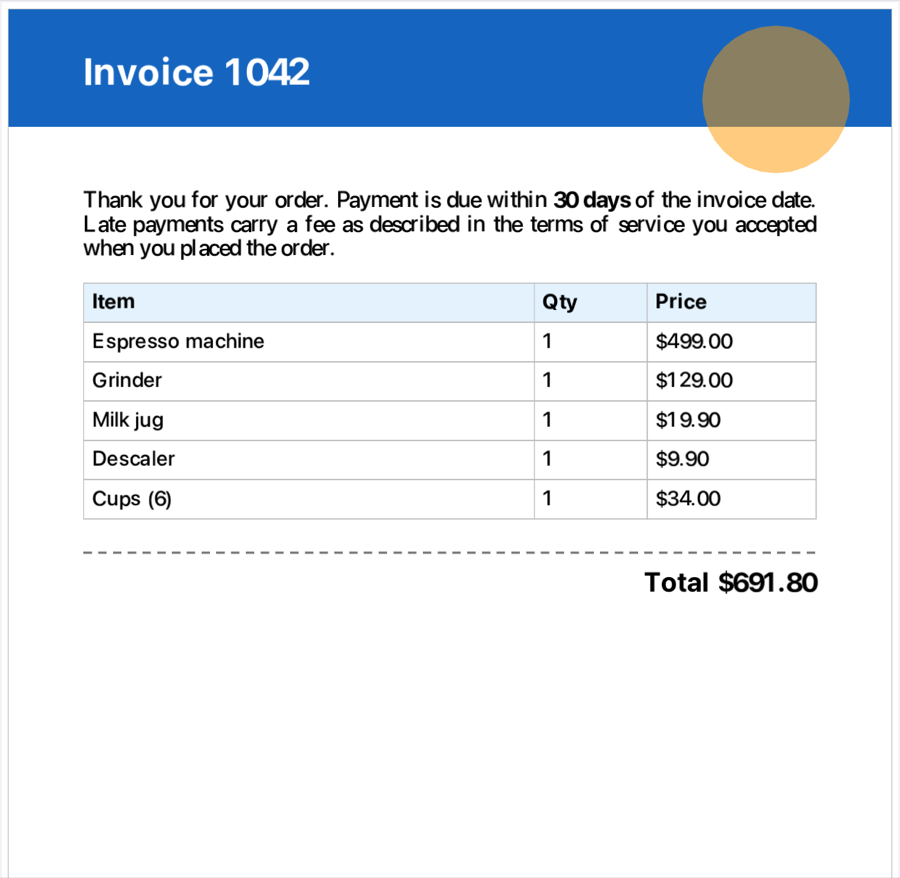
It doesn’t hand the file to the platform, so it doesn’t inherit the platform’s quirks. The same file draws the same pixels on iOS, Android, the desktop and the web, and our CI holds it to a screenshot on every one of them. It handles what real-world files throw at you: JPEG 2000, JBIG2 and CCITT scans, shadings, soft masks, TrueType, CFF, Type 1 and Type 3 fonts, form fields and annotations. renderPage(index, scale) gives you any page as an Image for thumbnails.
PdfReader extracts text and metadata, rebuilds files with broken cross-reference tables, and opens encrypted documents:
PdfReader reader = PdfReader.open(data, password);   // RC4, AES-128 and AES-256
Log.p(reader.getTitle() + ": " + reader.getPageCount() + " pages");
String firstPage = reader.extractText(0);
Either the user or the owner password opens it. That matters for the bank statements, payslips and insurance documents your users actually receive, which are almost always password protected.
And printing
if (Printer.isPrintingSupported()) {
    Printer.printPDF(path, null);
}
That’s it. Generate, show, print, with no per-platform branch.
Everything connects
PDF on its own is a feature. PDF connected to everything else is what an enterprise buys.
A dispatcher plans the week on a Gantt chart, and SchedulePrinter.writePdf turns the whole project into a paginated PDF, with the time scale and the task table repeated on every page, ready to mail to the client. A finance team filters a DataGrid of a million rows down to one region and sends the result as a report. A manager signs in through the company’s Okta with SAML, sees only their own tenant’s invoices, and downloads the month as one statement generated on the server. A Kanban card for a repair carries the signed work order as an attachment.
That’s the list every enterprise app needs on day one: single sign-on, tenant isolation, grids, schedules, boards, documents, printing. Normally it’s six vendors, six licenses and six security reviews. Here it’s one framework, one language and one test suite.
Codename One is great for an indie developer shipping their first app. For an enterprise developer it’s fantastic, because the parts the enterprise demands are already there, and they already talk to each other.
Tomorrow: Fieldline, a complete field service app: scheduling, dispatch, maps and an optimizer, ready to ship.