Latest posts from Codename One.
Blog
Insights, release updates, tutorials, and engineering notes from the Codename One team.

Questions of the Week 33
This has been a very busy week, we published new information on the properties approach which I’m excited about but I’m not sure if I can drum up your enthusiasm… Steve made a big post about mysql support too. Todays library update includes new simulator code that might break some apps if you’ve refactored stuff around so be vigilant and let us know if something suddenly stops working. On stack overflow things were as usual: ...
Connecting to a MySQL Database from Codename One
In the following series of blog posts I’m going to shift some attention to server-side development in so much as it can complement a Codename One client application. In this post I’ll demonstrate how you can combine a MySQL database, a web-service layer, and a Codename One client to produce a “Contacts” app. I’m going to steal the Contacts code from the Kitchen Sink demo for the UI, but I’ll implement a different datasource that loads the contacts from a remote MySQL database instead of from the phone’s internal contacts. ...

Fail Fast & Margin/Padding Performance
One of the frustrating parts in Codename One is builds failing in the cloud, the expectation is that a build that passes locally would pass in the cloud and that is something we strive to have at all times. One of the more common failures for new developers is due to refactoring of the main class or changing the signatures of the methods e.g. adding a throws clause to start(). ...
Properties
We usually just add a new feature and then tell you about it in these posts but properties is a special case and this post is intended not just as a tutorial but as a solicitation of feedback… We committed properties as a deprecated API because we aren’t sure yet. This could be a very important API moving forward and we want as much peer review as possible over this. ...

TIP: How to Ask a Question
I deal with a lot of questions every day and unfortunately most of them are phrased in a way that forces me to guess. There are some guidelines on how to ask a question but I think they are mostly pretty bad. Asking a question “correctly” helps you tremendously both in getting a correct answer faster and also in solving your own question. Following these three rules will significantly improve your questions: ...

Questions of the Week 32
I practically had a vacation from blogging these past two weeks with all the great posts from Steve. I’ve put some work into something interesting but it’s not yet ready for prime time. If you follow the git commits you might have noticed we’ll discuss it when we think it’s ready. This week we (thankfully) aren’t releasing a plugin update and just releasing the standard weekly release as usual. Hopefully, things will cool down a bit and we’ll be able to sprint to the 3.6 release easily. ...
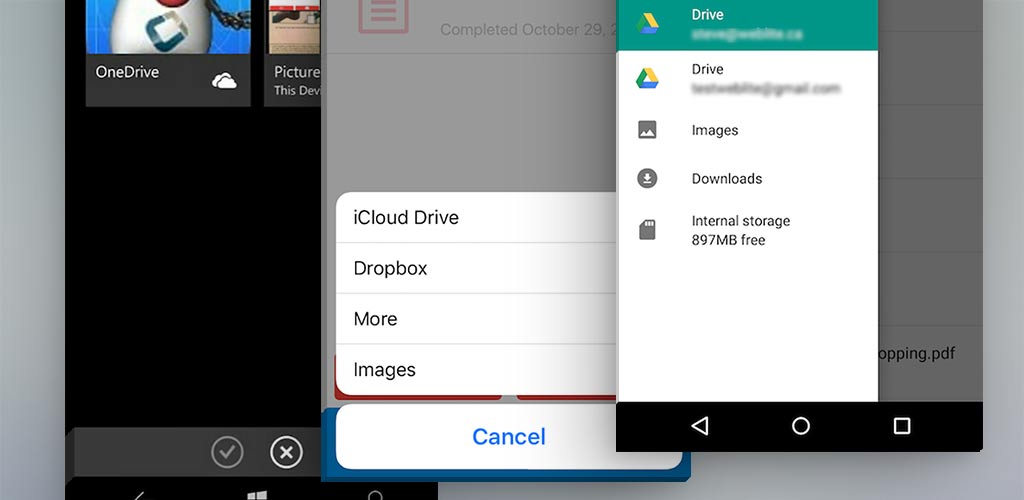
Native File Open Dialogs
Codename One has always provided access to the device’s photos and videos via Display.openGallery() but it hasn’t provided an API to open arbitrary file types because this type of functionality was not available on most mobile platforms. Times have changed and most platforms now offer support for more than just images and photos, so we decided to provide access to this functionality as a cn1lib. Here is a short introduction to the cn1-filechooser library. ...

UWP Native Interfaces – Mix C# and Java
The next plugin update will add support for native interfaces in UWP. This opens the door for you to really dig into the native features of Windows if you wish to do so. Crucially, this will also allow us to push forward with windows support on some of the cn1libs that require native functionality. As a proof of concept, I have updated the CN1WebSockets library to support windows. It now works on all major platforms: iOS, Android, Javascript, UWP (Windows 10), Simulator, and Desktop builds. If you require sockets in your app, I highly recommend web sockets, as it is the most portable option currently available. ...

CSS Tip: Using CSS to Import Images
The Codename One CSS plugin is a handy tool to style your app with CSS. This includes setting borders, padding, margin, fonts, colors, and pretty much everything else that you might otherwise do in the resource editor. However, there are some other cool things that this plugin can do for you, such as importing multi-images into your resource file. Let me demonstrate with a small snippet. __ In order to use CSS with your Codename One project, you will need to install CSS support in your project first. I’ll use the MemeMaker demo as an example of how to do this. It has a CSS file located at “css/theme.css” within the project directory, and I’ve loaded this CSS file in my app’s init() method using this code: ...

TIP: Get Stack State (trace) from Java Processes
One of the most frustrating things that can happen to developers is when you manage to reproduce a rare bug but you are not in the debugger when you did that. My kingdom for a stack trace… But this is also pretty frustrating when you work on a tool like Codename One’s designer or GUIBuilder and they suddenly freeze with no visible error. How do you provide a viable bug report for that? ...

Questions of the Week 31
We try to space out plugin updates as much as reasonably possible but unfortunately we need to push out an update this week to fix a critical regression in the new GUI builder. Hopefully it is more stable now and we can go back to working on new features. Steve made a couple of very interesting posts this week and we have a few more from him in the coming weeks. ...

Cool Text Effects for Your Mobile App on iPhone (iOS), Android etc.
FontBox is a mature java library for loading, manipulating, and rendering fonts in Java. It gives you direct access to the font glyphs so that you can perform effects or transformations on them. A couple of years ago, I ported FontBox to Codename One, but since CN1 didn’t yet include support for drawing shapes, I made it dependent upon the CN1Pisces library, which did support drawing shapes. This was cool but it had some major limitations; the main one being that FontBox fonts could only be used to draw strings on Pisces graphics contexts, which can only be rendered to an image – not directly to the screen. This meant that you couldn’t just use a FontBox font in your app (e.g. in a label or a button). You could only use it to write on an image. ...