
Three connectivity features landed together this week, and they belong in one place because they build on each other. WebSockets moved into the core; the GraphQL client uses that same WebSocket support for subscriptions; and gRPC reuses the exact code-generation pattern GraphQL and OpenAPI already follow. This post is a tutorial for all three. By the end, you will have a live chat, a typed GraphQL client, and a typed gRPC client, and you will see how little code each one takes.
These features come from PR #5133 (WebSockets) and PR #5141 plus PR #5099 (the typed clients).
Part 1: WebSockets, no cn1lib required
WebSockets used to require the cn1-websockets cn1lib. They are now part of the framework as com.codename1.io.WebSocket, implemented natively on every port (a hand-rolled RFC 6455 handshake on JavaSE and Android, NSURLSessionWebSocketTask on iOS, the browser WebSocket on JavaScript), with no third-party dependencies pulled into your build.
If you’re using cn1-websockets you can keep using it. There’s no change required from you. We moved the package up one level, so there’s no conflict.
Step 1: open a connection
The new API is a final, fluent class with lambda handlers. You build it, attach handlers, and connect:
// Good practice although in reality all current Codename One Platforms support WebSockets
if (!WebSocket.isSupported()) {
    return;
}
WebSocket ws = WebSocket.build("wss://echo.example.com/socket")
    .onConnect(() -> Log.p("connected"))
    .onTextMessage(text -> addIncoming(text))
    .onClose((code, reason) -> Log.p("closed " + code + " " + reason))
    .onError(ex -> Log.e(ex))
    .connect();
There is no URL-in-constructor subclassing trap from the old API; the connection is an object you hold. send(...) has a String and a byte[] overload, getReadyState() returns a WebSocketState, and close() does a clean close handshake.
Step 2: build the chat screen
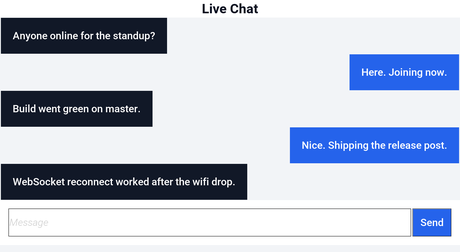
Here is a compact chat form. Outgoing messages are added immediately; incoming ones arrive on the onTextMessage handler, and because the handler can touch the UI we wrap that in callSerially:
private WebSocket ws;
private Container conversation;

private void showChat(Form parent) {
    Form chat = new Form("Live Chat", BoxLayout.y());
    conversation = chat.getContentPane();

    TextField input = new TextField("", "Message", 20, TextField.ANY);
    Button send = new Button("Send");
    send.addActionListener(e -> {
        String text = input.getText();
        if (text.length() > 0 && ws != null) {
            ws.send(text);
            addBubble(text, true);
            input.clear();
        }
    });
    Container bar = BorderLayout.centerEastWest(input, send, null);
    chat.add(BorderLayout.SOUTH, bar);

    ws = WebSocket.build("wss://chat.example.com/room/general")
        .onTextMessage(text -> Display.getInstance()
            .callSerially(() -> addBubble(text, false)))
        .connect();

    chat.show();
}

private void addBubble(String text, boolean mine) {
    Label bubble = new Label(text);
    bubble.setUIID(mine ? "ChatBubbleMe" : "ChatBubbleThem");
    Container line = FlowLayout.encloseIn(bubble);
    line.getStyle().setAlignment(mine ? Component.RIGHT : Component.LEFT);
    conversation.add(line);
    conversation.animateLayout(150);
}
That is a working real-time chat. The screen it produces, rendered in the simulator:
Step 3: negotiate a subprotocol when you need one
If your server speaks a named subprotocol, set it during the handshake and read back what the server chose:
WebSocket ws = WebSocket.build(url)
    .subprotocols("graphql-transport-ws")
    .onConnect(() -> Log.p("using " + ws.getSelectedSubprotocol()))
    .connect();
That graphql-transport-ws value is not an accident; it is exactly what the GraphQL subscriptions in the next part use.
One reason to trust this implementation: our own screenshot CI now runs on it. The pipeline that ships rendered PNGs from each device back to the host machine uses a WebSocket as its transport, so the same code your app calls is carrying the binary payloads that validate the framework on every commit.
Part 2: a typed GraphQL client
cn1:generate-graphql turns a GraphQL schema into a typed client, and @GraphQLClient is the interface you write against. The runtime lives in com.codename1.io.graphql, and a GraphQLResponse<T> carries data and errors together so partial results survive.
Step 1: declare the client
@GraphQLClient("https://swapi.example.com/graphql")
public interface StarWarsApi {
    @Query("query HeroName($episode: Episode) { hero(episode: $episode) { name homeworld { name } species { name } filmConnection { totalCount } } }")
    void hero(@Var("episode") Episode episode,
              OnComplete<GraphQLResponse<HeroData>> callback);

    @Subscription("subscription OnReview($ep: Episode!) { reviewAdded(episode: $ep) { stars } }")
    GraphQLSubscription onReview(@Var("ep") Episode ep,
                                 GraphQLSubscription.Handler<ReviewData> handler);

    static StarWarsApi of(String endpoint) {
        return GraphQLClients.create(StarWarsApi.class, endpoint);
    }
}
The build-time processor emits the implementation and a bootstrap that registers it; you never write the HTTP plumbing. The generator has two modes. The precise operations mode emits per-selection types from your operation documents; the schema-only quick-start mode auto-selects fields to a bounded depth (cn1.graphql.maxDepth).
Step 2: call it and render the result
StarWarsApi api = StarWarsApi.of("https://swapi.example.com/graphql");
api.hero(Episode.EMPIRE, response -> {
    if (!response.isOk()) {
        return;
    }
    Container list = heroForm.getContentPane();
    for (Hero h : response.getResponseData().heroes) {
        MultiButton row = new MultiButton(h.name);
        row.setTextLine2(h.homeworld + " . " + h.species);
        row.setUIID("HeroRow");
        list.add(row);
    }
    heroForm.revalidate();
});
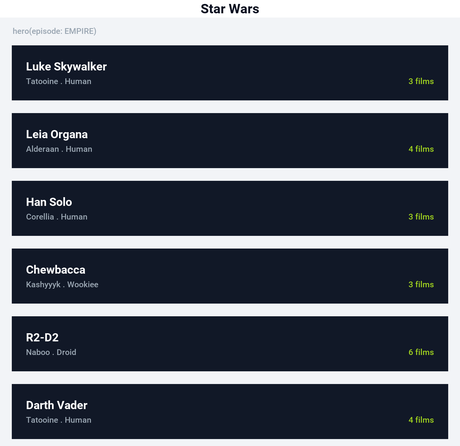
The list this populates, rendered in the simulator:
Step 3: subscriptions ride the core WebSocket
A @Subscription returns a GraphQLSubscription backed by the core WebSocket using the graphql-transport-ws protocol from Part 1. New events arrive on the handler:
GraphQLSubscription sub = api.onReview(Episode.JEDI, review ->
    Display.getInstance().callSerially(() -> showStars(review.stars)));
// later
sub.close();
This is the payoff of putting WebSockets in the core: the GraphQL layer did not need its own socket implementation, it just used the frameworks.
Part 3: a typed gRPC client
cn1:generate-grpc does the same trick for proto3. Point it at your .proto files and it emits hand-editable @ProtoMessage, @ProtoEnum, and @GrpcClient sources; the annotation processor generates the binary protobuf codecs and call sites into target/generated-sources so your source tree stays clean. There is no protoc dependency.
Step 1: the proto
syntax = "proto3";
service Greeter {
  rpc SayHello (HelloRequest) returns (HelloReply);
}
message HelloRequest { string name = 1; }
message HelloReply  { string message = 1; }
Step 2: call the generated client
GreeterGrpc g = GreeterGrpc.of("https://api.example.com");
HelloRequest req = new HelloRequest();
req.name = "world";
g.sayHello(req, "Bearer " + token, response -> {
    if (response.isOk()) {
        renderGreeting(response.getResponseData().message);
    }
});
The wire protocol is gRPC-Web binary (application/grpc-web+proto), the standard variant for mobile and browser clients, which works with Envoy, the official grpcweb Go proxy, and the gRPC-Web filter in modern gRPC servers. Version one covers unary RPCs, all scalar types, nested messages, enums, and repeated fields; streaming, map<K,V>, well-known types, and import are out for now and the parser errors cleanly when it meets one.
Enums bind across all of it
All three connectors share the build-time JSON and XML mapper, and that mapper now binds enums. Previously an enum field was treated as a nested reference, found no mapper, and silently did not serialize. It now writes with name() and reads with valueOf (unknown values decode to null), and it handles List<Enum>, across both JSON and XML. That is why the GraphQL Episode above is a real enum rather than a String, and it is a welcome fix for anyone using @Mapped directly.
Keep your tokens out of the binary
The gRPC and GraphQL samples pass a bearer token, so the rule bears repeating: never hard-code a token, and never check it into source or embed it in the app. Fetch it from your backend at runtime and store it with SecureStorage. A shipped binary can be unpacked, so anything baked into it is effectively public.
These connectors learn from real specs. If a schema or a proto file does not generate the client you expected, please file an issue at github.com/codenameone/CodenameOne/issues with the source attached.
The previous deep dive covered native Mac builds and desktop integration, and the release post has the full index. Tomorrow’s post is the new advertising API.
Discussion
Join the conversation via GitHub Discussions.