Last week we put spreadsheets with live formulas in core. This week the other two office formats joined them. Your app can now open a Word document, let the user edit it with spell checking, and save it back as DOCX or PDF. It can open a PowerPoint or Keynote deck, edit a slide, and present it with a clock and speaker notes. On iOS, Android, the desktop and the web, from the same code.
Why a mobile framework needs an office suite
Users don’t think in apps. They think in jobs. The inspector fills a report and needs it as a Word file for the client. The salesperson walks into a meeting with a deck and a tablet. The teacher grades an essay on a phone. Today each of those means bouncing the user out to another app, losing the context, and hoping the file comes back intact.
That’s the theme of this whole release: convergence. An app that does one small thing is a feature somebody else will ship inside a bigger app. The bigger app needs documents, decks and spreadsheets, so they belong in the framework.
Word processing
com.codename1.wordprocessing models a document as an immutable list of blocks (paragraphs, tables and pictures) on a page spec. Every edit makes a new document that shares the unchanged blocks, so undo costs almost nothing.
| Format | Read | Write |
|---|---|---|
| DOCX | yes | yes |
| ODT | yes | yes |
| RTF | yes | yes |
| HTML | yes | yes |
| Markdown, with GitHub tables | yes | yes |
| Plain text | yes | yes |
| DOC (Word 97 to 2003) | yes | |
| yes |
DOCX and ODT keep styles, lists, tables with merged cells, inline and floating pictures with text wrap, footnotes, comments, tracked changes, sections with columns, headers and footers, and tab stops. Converting is two lines:
Document d = Document.read(in, Document.Format.DOCX);
d.write(out, Document.Format.PDF);
DocumentView shows a document as pages and edits it the way DataGrid edits a sheet. Tap places the caret, drag selects, typing edits through the model with undo, and pinch zooms. Page breaks match the PDF export exactly, because both are measured the same way. DocumentEditor goes one step further and embeds live Codename One components inside the document, so a form field or a chart can sit in the middle of a page.
Spell and grammar checking
com.codename1.spellcheck uses Hunspell dictionaries, the same format LibreOffice and Firefox use, or the platform’s own checker. It skips numbers, acronyms, URLs and email addresses, and keeps a user dictionary and an ignore list.
SpellChecker spell = SpellChecker.forLanguage("en_US");
for (ProofIssue i : spell.check(text)) {
    List<String> fixes = spell.suggest(text.substring(i.start, i.end), 5);
}
GrammarChecker.english() adds rules for repeated words, the choice between “a” and “an”, sentence capitals and spacing, and you can add your own. Proofreader combines both for an editor. English dictionaries for the US, Canada and Australia ship in the box; the spellcheck.languages build hint picks which, and any Hunspell dictionary loads with SpellChecker.create.
Presentations
com.codename1.presentation reads PPTX, ODP, PPT and Keynote, and writes PPTX, ODP and PDF with one page per slide.
Presentation deck = Presentation.read(in, Presentation.Format.forFileName(path));
for (String w : deck.getWarnings()) {
    Log.p("While reading: " + w);
}
form.add(BorderLayout.CENTER, new SlideShow(deck));
Anything a reader can’t convert, like an embedded video, shows up in getWarnings() and the rest of the slide still loads. Nothing silently disappears.
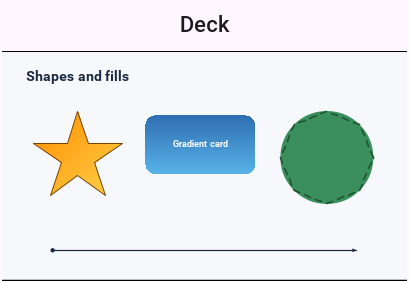
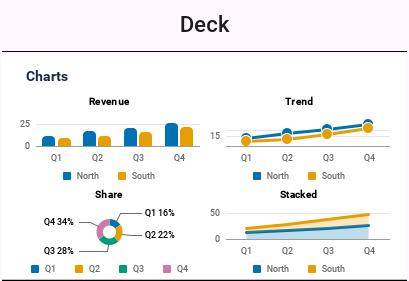
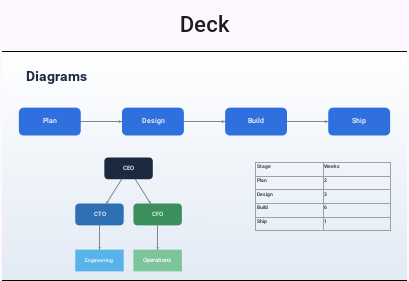
Charts on slides aren’t pictures. They’re live charts from the new chart package, so they animate in when the slide appears. Diagrams are laid out by the same graph engine as last week’s flowcharts, and slide text is edited by the same DocumentView as a Word document. That reuse is why this fit in a week.
Running the show
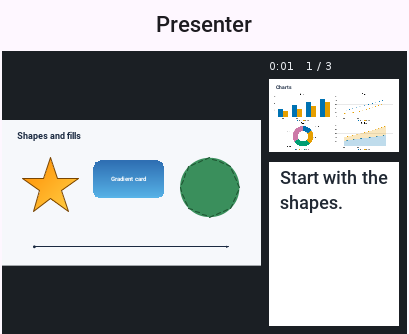
SlideShow plays the deck. Tap or swipe to move forward, and each slide plays its builds one click at a time (appear, fade, fly in, zoom, wipe, pulse), then its transition (fade, push, cover, uncover, wipe, zoom, from any side). Hidden slides are skipped. Presenter mode puts the current slide, the next slide, your notes and a clock on the screen you’re looking at.
Editing slides
SlideView is an editor with thumbnails, the slide and a notes pane. Drag to move, pull a handle to resize, rotate with snapping to 15 degrees, and double tap a shape to type into it. Every drag and every text edit is one undo step.
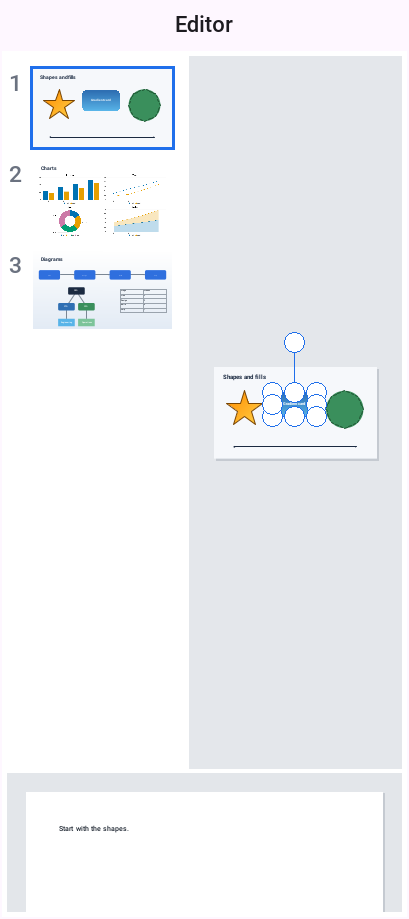
The screen, the PDF export and SlideRenderer.toImage all paint with the same code, so a thumbnail, a printout and the projector agree.
What you can build with it
- A field report app that fills a DOCX template and emails it as PDF.
- A sales app that opens the latest deck from the CRM and presents it offline on a tablet.
- A classroom app where students write essays with spell checking and teachers mark them up with comments and tracked changes.
- A note-keeping app that imports Markdown and exports Word for the people who still want Word.
Each of those used to be a commercial SDK per platform. Now it’s a dependency you already have. The Presentations chapter of the developer guide has the full API. Tomorrow: Photoshop, Sketch, Figma and Rive.