Codename One ships a portable LLM client, a streaming chat component, speech-to-text and text-to-speech APIs, built-in vision and language services, and a portable LiteRT inference API. The builders add native frameworks and dependencies when application bytecode references the corresponding entry point.
This chapter introduces every piece in turn:
com.codename1.ai— provider-agnostic chat, embeddings, tool calls, and image generation.com.codename1.components.ChatView— a theme-aware chat surface that streams tokens in place.com.codename1.media.SpeechRecognizerandcom.codename1.media.TextToSpeech— on-device speech-to-text and speech synthesis.com.codename1.security.SecureStoragenon-prompting overloads — silent reads for secrets the network layer needs on every call, such as LLM API keys.com.codename1.ai.vision— OCR, barcode, face, labeling, pose, segmentation, document correction, and camera-frame pipelines.com.codename1.ai.inference— reusable LiteRT sessions for.tflitemodels.com.codename1.ai.language— language identification, translation, and smart reply.
com.codename1.util.AsyncResource. Use .ready(…) for the success
path, .except(…) for errors, and .cancel() to abort an in-flight
request. The streaming chat call also dispatches deltas through a
StreamingListener; both listener callbacks and ready callbacks fire
on the EDT.The com.codename1.ai package
The LlmClient class is the single entry point. Static factories return
a configured client for each supported provider. Every client speaks the
same ChatRequest and ChatResponse value types, so the call site does
not change when you swap providers:
// OpenAI (also drives Ollama, vLLM, llama.cpp, and other
// OpenAI-compatible endpoints).
LlmClient openai = LlmClient.openai(apiKey);

// Local Ollama on the default port (http://localhost:11434).
LlmClient ollama = LlmClient.ollama("llama3.2");

// Any OpenAI-compatible endpoint (Together, Groq, Fireworks, vLLM, null).
LlmClient together = LlmClient.localOpenAiCompatible(
        "https://api.together.xyz/v1",
        apiKey,
        "meta-llama/Llama-3.3-70B-Instruct-Turbo");

// Anthropic and Google Gemini, both via their OpenAI-compatible
// endpoints. The wire format is identical; only the base URL,
// default model, and auth differ.
LlmClient anthropic = LlmClient.anthropic(apiKey);
LlmClient gemini = LlmClient.gemini(apiKey);
All five factories return the same LlmClient API. OpenAI, Ollama,
vLLM, and llama.cpp share the canonical wire format. Anthropic’s
https://api.anthropic.com/v1/chat/completions and Google’s
https://generativelanguage.googleapis.com/v1beta/openai/chat/completions
implement the same shape, so the framework speaks to all three through
one network layer. Default models pick a sensible production-grade
target per provider (gpt-4o-mini, claude-sonnet-4-5,
gemini-2.0-flash, llama3.2); override per request with
ChatRequest.builder().model(…).
A first chat
ChatRequest is a builder. The bare minimum is a model identifier and
one user message:
ChatRequest req = ChatRequest.builder()
        // No model named: the request uses the client's default, which
        // LlmClient#setDefaultModel sets and the simulator's Ollama
        // redirect sets for you. Naming a cloud model here would ask a
        // local server for one it has never heard of.
        .addMessage(ChatMessage.system("Reply in haiku."))
        .addMessage(ChatMessage.user("Describe a Codename One app."))
        .temperature(0.7f)
        .maxTokens(200)
        .build();

openai.chat(req).ready(resp -> {
    Dialog.show("Reply", resp.getText(), "OK", null);
}).except(err -> {
    Log.e(err);
});
ChatResponse.getText() concatenates every text part of the assistant
message. getFinishReason() returns one of "stop", "length",
"tool_calls", "content_filter", or "error". getUsage() returns
prompt, completion, and total token counts when the provider reports
them; the fields return -1 when the provider omits them.
Streaming tokens
chatStream(…) opens an SSE connection and dispatches deltas through
a StreamingListener on the EDT. The returned AsyncResource resolves
to the final aggregated ChatResponse when the stream completes;
calling cancel() on the resource closes the underlying socket:
StringBuilder buffer = new StringBuilder();

// Open the assistant bubble first. appendToLastMessage() writes to
// whichever bubble is newest, which is nothing at all on a fresh view
// and the user's own message once one has been added.
ChatBubble streaming = chatView.beginAssistantStream();

openai.chatStream(req, new StreamingListener.Adapter() {
    @Override
    public void onContentDelta(String delta) {
        buffer.append(delta);
        streaming.appendText(delta);
    }

    @Override
    public void onError(Throwable t) {
        Log.e(t);
    }
}).ready(resp -> {
    // getUsage() is null when the provider omits token accounting, which
    // OpenAI-compatible endpoints commonly do.
    if (resp.getUsage() != null) {
        Log.p("Total tokens: " + resp.getUsage().getTotalTokens());
    }
});
The decoder reassembles fragmented SSE deltas before invoking the
listener, so onContentDelta always receives a complete token chunk.
Tool-call fragments are reassembled the same way and surfaced through
onToolCallDelta(index, id, name, argumentsFragment); name is non-null
on the first fragment and id is present on the first call.
Tool calling
Tool describes a callable function with a JSON schema. Pass a
ToolHandler to make it executable; the model can then call the tool
and the handler returns the JSON result that gets fed back into the
conversation:
Tool weather = new Tool(
        "get_weather",
        "Return the current weather for a city.",
        "{\"type\":\"object\",\"properties\":{" +
            "\"city\":{\"type\":\"string\"}}," +
            "\"required\":[\"city\"]}",
        argumentsJson -> {
            Map<String, Object> args = JSONParser.parseJSON(argumentsJson);
            // Serialize rather than concatenate: the city is a value the
            // model produced, and a quote or backslash in it would emit
            // malformed JSON that cannot be sent back as a tool result.
            Map<String, Object> result = new HashMap<String, Object>();
            result.put("tempC", Integer.valueOf(22));
            result.put("city", args.get("city"));
            return JSONParser.toJson(result);
        });

ChatRequest req = ChatRequest.builder()
        // No model named: the client's default applies, which the
        // simulator's Ollama redirect sets for you. Naming a cloud model
        // asks a local server for one it does not have.
        .addMessage(ChatMessage.user("What is the weather in Tel Aviv?"))
        .tools(Collections.singletonList(weather))
        .toolChoice(ToolChoice.AUTO)
        .build();

openai.chat(req).ready(resp -> {
    if (resp.getToolCalls().isEmpty()) {
        // ToolChoice.AUTO lets the model answer without reaching for a
        // tool, and that answer is this response. There is nothing to
        // send back.
        Log.p(resp.getText());
        return;
    }

    // Otherwise the response is the model asking for the tools, not the
    // answer. Run every call it asked for, then send the conversation
    // back once with a result for each: the assistant message names all
    // of them, and a follow-up carrying only some is rejected as an
    // incomplete tool-call sequence.
    ChatRequest.Builder followUp = ChatRequest.builder()
            .addMessage(ChatMessage.user("What is the weather in Tel Aviv?"))
            .addMessage(resp.getAssistantMessage());
    for (ToolCall call : resp.getToolCalls()) {
        try {
            String result = call.execute(Collections.singletonList(weather));
            followUp.addMessage(ChatMessage.toolResult(call.getId(), result));
        } catch (Exception err) {
            // execute() runs your own handler, so it can fail for any
            // reason, and this callback has nowhere to propagate to.
            // The turn still needs a result for this id.
            Log.e(err);
            followUp.addMessage(ChatMessage.toolResult(call.getId(),
                    "{\"error\": \"the tool failed\"}"));
        }
    }
    openai.chat(followUp.build()).ready(answer -> Log.p(answer.getText()));
});
ToolChoice covers the four standard modes:
ToolChoice.AUTO— the model picks at will (default).ToolChoice.NONE— the model must not call any tool.ToolChoice.REQUIRED— the model must call exactly one tool.ToolChoice.named("get_weather")— force a specific tool.
Structured output
Constrain a response to JSON with ResponseFormat.JSON_OBJECT. The
client adds the provider-specific flag, and ChatResponse.getText()
returns a string the runtime can hand to JSONParser:
ChatRequest req = ChatRequest.builder()
        // No model named: the client's default applies, and the
        // simulator's Ollama redirect sets that for you. Naming a
        // cloud model asks a local server for one it lacks.
        .responseFormat(ResponseFormat.JSON_OBJECT)
        .addMessage(ChatMessage.system(
            "Return a JSON object with keys city and population."))
        .addMessage(ChatMessage.user("Tel Aviv"))
        .build();
Multi-modal messages
Attach an image to a user message by adding an ImagePart. The part
accepts either inline bytes plus a MIME type or a remote HTTPS URL:
ImagePart photo = new ImagePart(receiptBytes, "image/jpeg");
ChatMessage msg = ChatMessage.userWithImage(
        "Extract the line items from this receipt.", photo);

ChatRequest req = ChatRequest.builder()
        // No model named: the client's default applies, and the
        // simulator's Ollama redirect sets that for you. This request
        // carries an image, so whichever default is in play has to
        // accept one -- the redirect's own default is text-only, so
        // point cn1.ai.ollamaModel at a vision-capable model to run
        // this locally.
        .addMessage(msg)
        .build();
Embeddings
embed(EmbeddingRequest) returns one Embedding vector per input. Use
the vectors for semantic search, deduplication, or downstream
clustering:
EmbeddingRequest req = EmbeddingRequest.builder()
        // Embeddings need an embedding model, and the client carries a
        // single default that is normally a chat one -- so name it here.
        // Against a local Ollama, name an embedding model you pulled.
        .model("text-embedding-3-small")
        .addInput("a cat sat on the mat")
        .addInput("a feline rested on the rug")
        .build();

openai.embed(req).ready(resp -> {
    float[] v0 = resp.getData().get(0).getVector();
    float[] v1 = resp.getData().get(1).getVector();
    // Compute cosine similarity, persist to Storage, etc.
});
Image generation
ImageGenerator mirrors the LLM client shape. The OpenAI factory drives
DALL-E 3 today; the on-device factory routes through the optional
cn1-ai-stablediffusion cn1lib (when present in the consumer project):
// Through your own endpoint, as the credentials section requires:
// ImageGenerator.openai(apiKey) would put the billable provider key on
// the device. ImageGenerator.onDevice() is the other option, and needs
// the cn1-ai-stablediffusion cn1lib.
ImageGenerator gen = ImageGenerator.openAiCompatible(
        "https://api.example.com/ai/v1", sessionToken);
GenerateImageRequest req = new GenerateImageRequest(
        "A pastel watercolor of a Tel Aviv beach at sunset");
req.setSize("1024x1024");
req.setQuality("hd");

gen.generate(req).ready(image -> {
    Label preview = new Label(image);
    Display.getInstance().getCurrent().add(preview).revalidate();
});
DALL-E 3 supports count = 1 only. Larger batches require a different
underlying model; pass it via setModel(…).
Conversation persistence
ConversationStore wraps Storage to serialize a list of
ChatMessage values to JSON under a named key:
ConversationStore store = new ConversationStore("chat-history");
List<ChatMessage> history = store.load();        // empty list on first call

history.add(ChatMessage.user("Hello"));
ChatResponse resp = openai.chat(
        ChatRequest.builder().messages(history).build())
    .get();                                       // blocking helper, EDT-safe
history.add(resp.getAssistantMessage());
store.save(history);
Tokenizer.estimateMessages(history) returns a rough token count so you
can trim the oldest turns before the conversation outgrows the model’s
context window.
Prompt templates
PromptTemplate does simple {placeholder} substitution. Unknown
placeholders pass through unchanged so partially-filled templates are
safe to log:
PromptTemplate t = PromptTemplate.of(
        "Translate the following from {source} to {target}: {text}");
t.put("source", "English");
t.put("target", "French");
t.put("text", "good morning");

ChatMessage user = t.asUser();                    // wraps the rendered string
Retry policy
RetryPolicy.exponentialBackoff() returns a sensible default (four
attempts, 500ms initial delay, 30s cap, jitter). Wrap any chat call in a
retry loop yourself, or attach the policy to a higher-level wrapper.
LlmException.getRetryAfterSeconds() returns the provider’s
Retry-After header value when present, or -1, so the policy can honor
rate-limit hints.
Simulator redirect for offline development
The JavaSE simulator pings localhost:11434 at startup. When Ollama is
running, the simulator exports the flag cn1.ai.ollamaDetected=true. A
second system property, cn1.ai.simulatorRedirect, controls whether the
simulator transparently routes LlmClient.openai(…) calls to the
local Ollama endpoint instead:
| Value | Behavior |
|---|---|
| The default on a device. Calls go to the configured provider, even in the simulator. |
| The default in the simulator. If Ollama is reachable, route
OpenAI calls through it. Otherwise behave like |
| Force redirect to Ollama. Use this in offline-only development environments. |
The redirect target is also configurable: cn1.ai.ollamaUrl defaults to
http://localhost:11434/v1, and cn1.ai.ollamaModel defaults to
llama3.2. Unchanged production code therefore runs offline against a
local model without any conditional wiring at the call site.
Storing the API key
SecureStorage
protects data at rest and can’t change that. A leaked provider key is
billable by whoever holds it, against your account, with no way to scope
the damage to one user.Keep the key on your server and proxy the provider calls through it. The
device then authenticates to your endpoint with a short-lived,
user-scoped token, which expires on its own and can be revoked for one
user without touching anyone else. That token is worth caching with the
non-prompting SecureStorage overloads:
// Your server keeps the provider key and proxies the calls. The device
// holds only a short-lived, user-scoped token for your own endpoint, so
// a stolen one expires and can be revoked for that user alone.
SecureStorage store = SecureStorage.getInstance();
boolean saved = store.set("ai.session.token", sessionTokenFromServer);

// Treat the store as a cache, not as the source of truth. When the write
// fails -- no secure storage on this port, or the keychain refused it --
// reading back gives either nothing or the previous, now expired, token.
// The one just issued is the good one, so use it and let persistence be
// best effort.
String token = saved ? store.get("ai.session.token") : sessionTokenFromServer;
if (token == null) {
    token = sessionTokenFromServer;
}
LlmClient client = LlmClient.localOpenAiCompatible(
        "https://api.example.com/ai/v1", token, "gpt-4o-mini");
The ChatView component
ChatView is a scrollable, theme-aware chat surface that handles the
list of bubbles, the streaming append, the typing indicator, and the
input strip in one component. Drop it into a Form with a single
BorderLayout.CENTER:
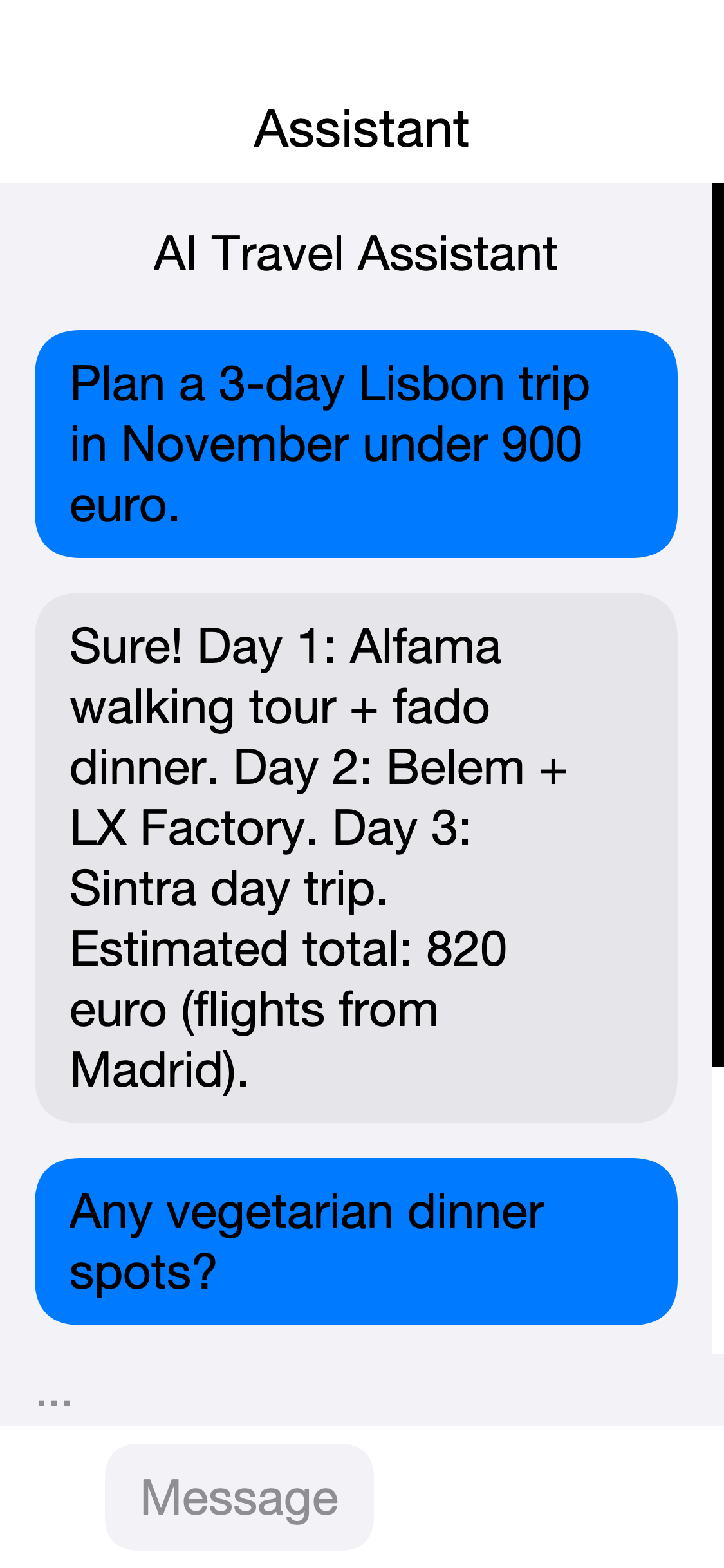
ChatView rendered in the JavaSE simulator under the iOS Modern themeThe component exposes thread-safe addMessage, appendToLastMessage,
and setTypingIndicatorVisible methods, so background callbacks from
chatStream(…) can mutate the view directly:
Form chat = new Form("Assistant", new BorderLayout());
ChatView view = new ChatView();
chat.add(BorderLayout.CENTER, view);

view.addMessage(ChatMessage.assistant("How can I help?"));

// One request at a time. A second send while the first is still
// streaming builds its request without the first reply, and the two
// completions then append to the history in whatever order they finish,
// producing turns like user A, user B, assistant B, assistant A.
boolean[] sending = {false};

view.setOnSend(e -> {
    if (sending[0]) {
        return;
    }
    sending[0] = true;
    String text = view.getInput().getText();
    view.getInput().clear();
    view.addMessage(ChatMessage.user(text));
    view.setTypingIndicatorVisible(true);

    // Snapshot the history before opening the assistant bubble. The view
    // records streamed text as it arrives, so completed replies are
    // already in there; the one thing to leave out is the empty
    // placeholder that beginAssistantStream() is about to append.
    //
    // No model named: the client's default applies, and the simulator's
    // Ollama redirect sets that for you.
    ChatRequest req = ChatRequest.builder()
            .messages(new ArrayList<ChatMessage>(view.getHistory()))
            .build();

    ChatBubble streaming = view.beginAssistantStream();
    // The proxy client from the credentials section: on a device
    // LlmClient.openai(apiKey) would need the billable provider key to
    // be present there, which that section says not to do.
    client.chatStream(req, new StreamingListener.Adapter() {
        @Override public void onContentDelta(String d) {
            // Append to the bubble this send opened, not to whichever is
            // newest: a second send while this one is still streaming
            // would otherwise divert this response into that bubble.
            streaming.appendText(d);
        }
    }).ready(resp -> {
        sending[0] = false;
        view.setTypingIndicatorVisible(false);
    }).except(err -> {
        // Without this the indicator stays up for good on a failure, and
        // the guard above would block every later send.
        sending[0] = false;
        view.setTypingIndicatorVisible(false);
        Log.e(err);
    });
});
chat.show();
ChatBubble and ChatInput are public, so subclass them for custom
rendering. Override ChatView.createBubble(message) to swap in a
custom subclass when the view builds the message list.
Theming
ChatView exposes the following UIIDs out of the box:
| UIID | Applies to |
|---|---|
| The outer container. |
| The scrollable message column. |
| The container for a user message. |
| The container for an assistant message. |
| The container for a system message. |
| The inner |
| The animated typing dots. |
| The input strip. |
| The text field inside the strip. |
| The send button. |
| The attach button. |
| The voice button. |
Style them from theme.css to align with the rest of the app. Hide the
voice or attach button by leaving its listener unset; the corresponding
Button instance is hidden when no ActionListener is registered.
One-call binding to an LLM
LlmChatBinding.bind(view, client, baseRequest) wires the input bar
directly to chatStream(…). Every send replays the conversation
history, dispatches the response into the view, and updates the typing
indicator. Use it for prototypes, or as a reference implementation when
you need a custom send pipeline:
LlmChatBinding.bind(view,
        // The proxy client from the credentials section, not
        // LlmClient.openai(apiKey): a shipped build must not carry the
        // provider key on the device.
        client,
        // The template's messages are sent ahead of the conversation on
        // every request, so this is where a system prompt belongs.
        // build() also rejects an empty message list.
        ChatRequest.builder()
                .addMessage(ChatMessage.system("You are a helpful assistant."))
                .build());
Speech recognition and TextToSpeech
The new media APIs route through Display and into the implementation
hooks on CodenameOneImplementation, so the call surface is identical
on every platform. The default implementation returns false from
isSupported() and is a no-op for recognize/speak.
SpeechRecognizer
iOS uses SFSpeechRecognizer, Android uses android.speech.SpeechRecognizer,
and the JavaSE simulator stays unsupported unless the optional
cn1-ai-whisper cn1lib is on the classpath. Call stop() to end an
active session early; partial results stop firing immediately.
TextToSpeech
if (TextToSpeech.isSupported()) {
    TtsOptions opts = new TtsOptions()
            .setLanguageTag("fr-FR")
            .setRate(1.0f);
    TextToSpeech.speak("Bonjour", opts);
}
iOS uses AVSpeechSynthesizer, Android uses
android.speech.tts.TextToSpeech, and the JavaSE simulator falls back
to say on macOS, espeak on Linux, and the platform SAPI bridge on
Windows.
getAvailableVoices() returns the platform-specific voice identifiers
when the OS exposes them; setVoiceId(…) accepts any of those
strings, or null to use the default voice for the configured
language.
On-device vision
The vision API is three layers deep, and most applications only need the first one. Start with the finished screen, drop to a component when the screen has to look like your own, and drop to a single analyzer when you are working on one image at a time.
Scanning a barcode or QR code
CodeScanner is an entire scanner screen in one call. It opens the
camera, decodes, restores the form you came from, and hands back the
code. This is the replacement for the cn1-codescan cn1lib:
if (!CodeScanner.isSupported()) {
    ToastBar.showErrorMessage("This device cannot scan codes");
    return;
}

CodeScanner.scan().ready(code -> {
    if (code == null) {
        return;                       // the user backed out
    }
    resultLabel.setText(code.getValue());
}).except(error -> Log.e(error));
The result completes with null when the user backs out — the cn1lib’s
scanCanceled() — and fails through except when the camera can’t be
opened, which is its scanError(). There is no third callback to
implement.
CodeScannerOptions rewords the screen and restricts which symbologies
end the scan, so a stray product barcode in the frame doesn’t complete a
QR scan:
CodeScanner.scan(new CodeScannerOptions()
        .title("Boarding pass")
        .hint("Hold the pass flat inside the frame")
        .formats(BarcodeFormat.PDF417, BarcodeFormat.AZTEC))
    .ready(code -> {
        if (code != null) {
            checkIn(code.getValue());
        }
    })
    .except(error -> Log.e(error));
The BarcodeFormat constants are the portable symbology names every
backend maps onto, so no format literals are needed.
CodeScanner. Import
com.codename1.ai.vision.CodeScanner. The other two are the
cn1-codescan cn1lib’s com.codename1.ext.codescan.CodeScanner and the
long-deprecated com.codename1.codescan.CodeScanner in core, whose
getInstance() returns null on current targets.Analyzing the live camera
VisionCameraView is a component that owns the camera and runs an
analyzer over its frames. It handles the session, the frame conversion,
the dropping of frames that inference has fallen behind, and the hop
back to the EDT; the
application implements one listener. It works with every analyzer, not
just barcodes:
FaceDetector detector = new FaceDetector();
VisionCameraView<Face[]> view = new VisionCameraView<>(detector);
view.setFacing(CameraFacing.FRONT);
view.setListener(new VisionPipelineListener<Face[]>() {
    @Override
    public void result(Face[] faces, VisionImage source) {
        shutter.setEnabled(faces.length == 1);
        statusLabel.setText(faces.length == 1
                ? "Looking good"
                : "Fit exactly one face in the frame");
    }

    @Override
    public void error(Throwable error) {
        Log.e(error);
    }
});

Form form = new Form("Selfie", new BorderLayout());
form.add(BorderLayout.CENTER, view);
form.add(BorderLayout.SOUTH, BoxLayout.encloseY(statusLabel, shutter));
form.show();
// The camera is opened when the form is shown and released when the
// user navigates away. Call view.close() when the screen is finished
// with for good, which also releases the detector.
The analyzer is constructed by the application rather than named by a feature constant. That’s deliberate: the builders decide which native vision dependency to package from the analyzer classes an application references, so building the analyzer in your own code is what keeps a face-detection app from also carrying the barcode and pose models.
The camera opens when the view is shown and is released when the user
navigates away, so a form transition can’t leave the hardware held.
close() additionally releases the analyzer, for a screen that’s
finished with for good.
setScaleType(…), and the mirroring a front camera asks for, are
honored in the simulator. The iOS and Android previews render fixed at
fill-and-crop and unmirrored, because neither port implements the
preview-scaling hook on CameraImpl yet. Treat both as requests rather
than guarantees on a device.The analyzers
Each analyzer takes a VisionImage and returns a typed result. Create
one, reuse it across a sequence of images, and close it when finished.
Check isSupported() before offering the feature: availability depends
on the target, the linked backend, and the OS version.
VisionImage accepts JPEG, PNG, NV21, or RGBA8888 data.
VisionImage.fromFile(path) reads a gallery or captured photo,
VisionImage.fromImage(image) takes one already in memory — passing an
EncodedImage’s original bytes straight through rather than re-encoding — and `VisionImage.fromCameraFrame(frame) copies a live frame’s
callback-owned buffers and preserves its rotation.
BarcodeScanner decodes codes from a still image:
BarcodeScanner scanner = new BarcodeScanner();
scanner.process(VisionImage.fromFile(photoPath)).ready(codes -> {
    for (Barcode code : codes) {
        if (BarcodeFormat.matches(code, BarcodeFormat.EAN_13,
                BarcodeFormat.UPC_A)) {
            lookUpProduct(code.getValue());
        }
    }
    scanner.close();
}).except(error -> {
    Log.e(error);
    scanner.close();
});
TextRecognizer reads text. Over a file:
TextRecognizer recognizer = new TextRecognizer();
recognizer.process(VisionImage.fromFile(photoPath)).ready(result -> {
    textArea.setText(result.getText());
    recognizer.close();
}).except(error -> {
    Log.e(error);
    recognizer.close();
});
Or from the live camera, stopping at the first block that looks like the value being hunted for:
VisionCameraView<TextRecognitionResult> view =
        new VisionCameraView<>(new TextRecognizer());
view.setListener(new VisionPipelineListener<TextRecognitionResult>() {
    @Override
    public void result(TextRecognitionResult text, VisionImage source) {
        for (TextRecognitionResult.TextBlock block : text.getBlocks()) {
            // Every frame is analyzed until one block looks like the
            // value being hunted for.
            if (block.getText().startsWith("SN-")) {
                accept(block.getText());
                return;
            }
        }
    }

    @Override
    public void error(Throwable error) {
        Log.e(error);
    }
});
FaceDetector returns bounds, head angles, and named landmarks. Cropping
a photo to the face it contains:
Image photo = EncodedImage.create(jpegBytes);
FaceDetector detector = new FaceDetector();
detector.process(VisionImage.fromImage(photo)).ready(faces -> {
    if (faces.length > 0) {
        Rectangle box = faces[0].getBounds()
                .toBounds(0, 0, photo.getWidth(), photo.getHeight());
        preview.setIcon(photo.subImage(box.getX(), box.getY(),
                box.getWidth(), box.getHeight(), true));
    }
    detector.close();
}).except(error -> {
    Log.e(error);
    detector.close();
});
Read individual landmarks with face.getLandmark(…) and the
FaceLandmarks constants. Not every backend fills in every field:
getSmilingProbability() and getTrackingId() are negative when
unavailable, and Apple Vision reports neither.
ImageLabeler classifies what an image contains:
ImageLabeler labeler = new ImageLabeler(new VisionOptions()
        .minimumConfidence(0.6f)
        .maximumResults(5));

labeler.process(VisionImage.fromFile(photoPath)).ready(labels -> {
    StringBuilder summary = new StringBuilder();
    for (ImageLabel label : labels) {
        summary.append(label.getText())
               .append(" (")
               .append(Math.round(label.getConfidence() * 100))
               .append("%)\n");
    }
    resultLabel.setText(summary.toString());
    labeler.close();
}).except(error -> {
    Log.e(error);
    labeler.close();
});
The label text is the portable part. ImageLabel.getIndex() is a model
class index that differs between backends and is -1 on Apple Vision, so
branch on getText().
PoseDetector locates body joints. Backends detect different subsets of
the skeleton, so look joints up by name and handle a missing one:
VisionCameraView<Pose> view = new VisionCameraView<>(new PoseDetector());
view.setListener(new VisionPipelineListener<Pose>() {
    private boolean wasUp;

    @Override
    public void result(Pose pose, VisionImage source) {
        Pose.Landmark wrist = pose.getLandmark(PoseLandmarks.RIGHT_WRIST);
        Pose.Landmark shoulder =
                pose.getLandmark(PoseLandmarks.RIGHT_SHOULDER);
        if (wrist == null || shoulder == null
                || wrist.getConfidence() < 0.6f) {
            return;                    // this frame did not see the arm
        }
        // Y grows downwards, so "above" is the smaller value.
        boolean up = wrist.getPosition().getY()
                < shoulder.getPosition().getY();
        if (up && !wasUp) {
            reps++;
            statusLabel.setText(String.valueOf(reps));
        }
        wasUp = up;
    }

    @Override
    public void error(Throwable error) {
        Log.e(error);
    }
});
SelfieSegmenter separates a person from the background.
SegmentationMask.cutOut(…) applies the mask to the source image and
rescales it, since the mask has the model’s resolution rather than the
frame’s:
EncodedImage photo = EncodedImage.create(jpegBytes);
SelfieSegmenter segmenter = new SelfieSegmenter();

segmenter.process(VisionImage.encoded(jpegBytes)).ready(mask -> {
    // Below 60% foreground confidence becomes transparent, so whatever
    // is painted behind this image shows through.
    Image person = mask.cutOut(photo, 0.6f);
    preview.setIcon(person);
    segmenter.close();
}).except(error -> {
    Log.e(error);
    segmenter.close();
});
SegmentationMask.toMaskImage(rgb) renders the mask itself as a
translucent tint, for highlighting the subject rather than cutting it out.
DocumentScanner flattens a photographed page:
DocumentScanner scanner = new DocumentScanner();
if (!scanner.isSupported()) {
    // Google's Android document scanner is an interactive flow rather
    // than an analyzer, so Android reports this unsupported.
    scanner.close();
    return;
}
scanner.process(VisionImage.fromFile(photoPath)).ready(result -> {
    List<Image> pages = new ArrayList<>();
    for (int i = 0; i < result.getPageCount(); i++) {
        pages.add(EncodedImage.create(result.getPage(i)));
    }
    show(pages);
    scanner.close();
}).except(error -> {
    Log.e(error);
    scanner.close();
});
Drawing the results
Bounds and points are normalized to the range 0 through 1 rather than
pixels, so one observation maps onto an image of any size.
VisionRect.toBounds(component) and VisionPoint.toPoint(component)
convert them into the absolute coordinates a paint method draws in:
class FaceOverlay extends Label {
    private Face[] faces = new Face[0];

    FaceOverlay(Image photo) {
        super(photo);
    }

    void setFaces(Face[] value) {
        faces = value;
        repaint();
    }

    @Override
    public void paint(Graphics g) {
        super.paint(g);
        g.setColor(0x34c759);
        for (Face face : faces) {
            // Results are normalized to 0..1, so the same observation maps
            // onto whatever size this component happens to be.
            Rectangle r = face.getBounds().toBounds(this);
            g.drawRect(r.getX(), r.getY(), r.getWidth(), r.getHeight(), 3);
        }
    }
}
The mapping stretches the whole normalized range across the destination,
which is right when the destination has the same aspect ratio as the analyzed
image. A live preview scaled with ScaleType.CROP doesn’t, which is the
other half of why overlays belong on still images.
Scripting results in the simulator
The desktop has no on-device vision models. Rather than report every analyzer as unsupported — which would leave a scanner screen impossible to build without a device — the simulator returns whatever you script under Simulate > Vision:
Vision Supported turns the whole API off, so the
isSupported()branch can be exercised.Analysis outcome switches between the scripted result, an empty result,
VisionException.UNSUPPORTED, and a backend error. Every screen needs the "nothing found" and "it failed" paths, and this is how to reach them.The remaining items set the scripted values: the decoded code and its format, the recognized text, the image labels, how many faces are found and whether they’re smiling, and whether a body pose is detected.
The scripted results carry plausible geometry, so overlay and debounce code can be written and debugged before the app ever reaches a device. Nothing in this section applies to a device build.
Backends and options
An image whose stored pixels aren’t already upright needs its rotation
declared: VisionImage.encoded(bytes, rotationDegrees). The one-argument
overload, and fromFile(…), assume the pixels are upright and don’t
inspect EXIF metadata; fromCameraFrame(…) takes the rotation from the
frame. VisionOptions.minimumConfidence(…) clamps finite and infinite
values to the range 0 through 1 and rejects NaN.
Android uses ML Kit. iOS and Mac native builds default to Apple Vision and Core Image. iOS can select ML Kit explicitly:
VisionOptions options = new VisionOptions()
        .backend(VisionBackends.mlKitTextRecognition())
        .minimumConfidence(0.5f);

new TextRecognizer(options)
        .process(VisionImage.encoded(jpegBytes))
        .ready(result -> Log.p(result.getText()))
        .except(error -> Log.e(error));
Reading non-Latin text
TextRecognizer reads the Latin script by default. Select a writing
system with VisionOptions.textScript(…) to read Chinese, Devanagari,
Japanese, or Korean:
TextRecognizer recognizer = new TextRecognizer(new VisionOptions()
        .textScript(TextScript.japanese()));

recognizer.process(VisionImage.encoded(jpegBytes))
        .ready(result -> Log.p(result.getText()))
        .except(error -> Log.e(error));
The selector names a script rather than a language, because that’s what the underlying recognizers are organized by. One script covers every language written in it, and each script model also reads the Latin characters mixed into the same page. Recognize one script per analyzer; create a second analyzer when a screen needs both.
Android maps each script to the matching ML Kit recognizer. Apple
platforms map it to the Vision recognition languages for that script,
asking the OS which languages it supports rather than assuming a list.
When the OS recognizes none of them, the analysis fails with
VisionException.UNSUPPORTED rather than returning Latin OCR of the
page. Select VisionBackends.mlKitTextRecognition() to use ML Kit’s
model for that script on iOS instead.
Each script is a separate model, and referencing TextScript.japanese()
is what adds it: the ML Kit script bundle on Android, and on iOS the
matching pod when the ML Kit backend was also selected. An application
that never names a script carries only the Latin model, and one that
names Japanese doesn’t carry the Korean or Devanagari models.
On an iOS simulator, the Apple barcode backend uses Vision barcode request revision 1. Newer simulator runtimes can otherwise complete a barcode request without reporting valid QR codes. Physical devices use the latest revision supplied by the OS. Test newer symbologies such as Micro QR on a device, or select the matching ML Kit backend.
Create and reuse an analyzer when processing a sequence. Call close()
when the analyzer is no longer needed. Before showing a feature, call
its isSupported() method: availability can depend on the target,
linked backend, and OS version.
VisionPipeline attaches an analyzer to a CameraSession frame stream
and keeps only the newest pending frame. Live OCR and pose detection
therefore can’t build an unbounded queue when inference is slower than
the camera. While an analysis is busy, the pipeline reuses the pending
buffer when newer same-sized frames replace it. Results and errors are
delivered on the Codename One EDT.
CameraFrame.getRawBytes() can be null even after requesting NV21 or
RGBA8888 when a port can’t expose that format. JPEG bytes remain available;
VisionImage.fromCameraFrame(…) automatically selects that fallback.
DocumentScanner currently performs still-image rectangle correction on
Apple platforms. Google’s Android document scanner is an interactive
camera flow rather than an analyzer for an existing VisionImage, so the
Android backend reports it as unsupported rather than launching a UI flow.
Vision feature and dependency selection
The Java package is always part of core. The builders scan the concrete analyzer classes and retain only the native adapter and dependency for each class the application actually uses:
| API | Android | Apple default / optional backend |
|---|---|---|
| ML Kit text recognition | Vision / |
| ML Kit bundle for that script | Vision recognition languages / |
| ML Kit barcode scanning | Vision / |
| ML Kit face detection | Vision / |
| ML Kit image labeling | Vision / |
| ML Kit pose detection | Vision / |
| ML Kit selfie segmentation | Vision / |
| Unsupported for still images | Core Image perspective correction |
CodeScanner selects the same barcode dependency BarcodeScanner does,
because it builds one internally; an application that references only the
ready-made screen still gets the decoder. CodeScanner and
VisionCameraView additionally select the camera natives, so neither has
to be paired with a com.codename1.camera reference to work.
The optional iOS ML Kit pod is added only when both the analyzer and its
feature-specific selector are referenced. For example,
VisionBackends.mlKitBarcodeScanning() adds only the barcode pod.
Current Google ML Kit iOS pods require iOS 15.5. Selecting one of these
optional backends automatically raises the effective application and
CocoaPods deployment target to 15.5 when the configured target is lower.
Referencing one Android analyzer doesn’t compile or package the other
five adapters.
Portable LiteRT inference
InferenceSession loads .tflite data from bytes, a bundled resource,
or a private file. Android uses LiteRT and can request NNAPI. iOS uses
TensorFlow Lite Objective-C and may request the Core ML delegate. Both
mobile implementations fall back to CPU unless
allowFallback(false) is set. Android and iOS reject strict
Accelerator.NPU sessions: NNAPI can mix delegated and CPU operations,
and the Core ML delegate can schedule work across the Neural Engine, GPU,
and CPU. Neither reports that the entire graph ran on the requested NPU.
With fallback enabled, NPU selection is a best-effort accelerator
preference.
On iOS, strict Accelerator.CORE_ML sessions are also rejected because
the delegate doesn’t report whether unsupported model operations remained
on LiteRT’s CPU path.
The JavaSE simulator and targets without
a native LiteRT runtime, including Mac native, return false from
InferenceSession.isSupported().
InferenceSession.open(
        ModelSource.resource("/models/classifier.tflite"),
        new InferenceOptions().accelerator(
                InferenceOptions.Accelerator.AUTO))
    .ready(session -> {
        Tensor input = Tensor.floats("serving_default_input",
                new int[] {1, 224, 224, 3}, pixels);
        session.run(new Tensor[] {input})
                .ready(outputs -> {
                    try {
                        consume(outputs[0]);
                    } finally {
                        session.close();
                    }
                })
                .except(error -> {
                    try {
                        Log.e(error);
                    } finally {
                        session.close();
                    }
                });
    })
    .except(error -> Log.e(error));
Open is asynchronous because model initialization can allocate native
resources. A session is reusable and supports multiple named inputs,
multiple outputs, and resizeInput(…). A session serializes its mutable
native interpreter: while run(…) is pending, another run, input resize,
or input/output metadata query throws IllegalStateException. Tensor data is
copied across the port boundary. Always close the session.
Bundle small models as resources. For larger models use
ModelCache.fetch(url, cacheKey, sha256), which downloads over HTTPS,
verifies the supplied SHA-256 digest, and reuses the app-private cached
file. The initial URL must use HTTPS. Ports that expose redirect responses
reject a redirect to HTTP and discard the temporary download. iOS follows
redirects below the portable network layer, so iOS requires the SHA-256
argument and rejects the unpinned two-argument overload. Supply the digest
on every platform for every third-party or remotely mutable model.
Interrupted downloads restart through a temporary .download file and are
never promoted to the cache until verification succeeds. Concurrent calls for
the same cache key and content identity share one download but receive
independent asynchronous resources. Canceling one caller suppresses only that
caller’s notification; it doesn’t cancel the shared download or the other
callers. When a cache key already has an active download, a request with a
conflicting URL or digest fails instead of sharing the temporary file.
On-device language services
LanguageIdentifier, Translator, and SmartReply share
LanguageOptions. Its minimum-confidence threshold clamps to 0 through 1 and
rejects NaN. Translation models are downloaded and cached by ML Kit when a
language pair is first used. Android and iOS builders
select language-id, translate, and smart-reply independently, so
using language identification alone doesn’t package the other two
SDKs.
LanguageOptions options = new LanguageOptions()
        .backend(LanguageBackends.mlKitTranslation());
if (Translator.isSupported(options)) {
    Translator.translate("Where is the station?", "en", "fr",
            options)
        .ready(value -> Log.p(value))
        .except(error -> Log.e(error));
}
LanguageBackends.auto() selects ML Kit on Android and Apple’s Natural
Language framework for language identification on iOS. The Apple default
keeps arm64 simulator builds native and adds no third-party dependency.
LanguageBackends.mlKitLanguageIdentification() opts identification into
the ML Kit iOS pod. iOS translation and Smart Reply are explicit opt-ins:
use LanguageBackends.mlKitTranslation() or
LanguageBackends.mlKitSmartReply() respectively. Merely referencing
Translator or SmartReply doesn’t add a pod or exclude the arm64
simulator. Selecting one of those ML Kit backends requires the x86_64
simulator slice and raises an iOS deployment target below 15.5.
The static language methods are convenient for one operation and close their
temporary backend after either success or failure. For repeated work, call
LanguageIdentifier.open(…), Translator.open(…), or
SmartReply.open(…), reuse the returned feature session, and close it when
the last pending operation completes. Reusable sessions retain backend state
and, on Android, cache ML Kit clients and translation clients per language
pair.
Mac native and the other unsupported targets return false from the
language service isSupported() checks. Completion and failure callbacks
arrive on the EDT.
Platform availability
The public API and the unsupported fallback are present on every Codename One target. Vision has native implementations on Android, iOS, and macOS; Apple Vision is the default on Apple targets and Android uses ML Kit. Language services and LiteRT inference have native implementations on Android and iOS. JavaSE, JavaScript, native Windows, native Linux, watchOS, and tvOS report unsupported for these new APIs; Mac native reports unsupported for language and LiteRT. No target sends data to a cloud inference service. Large portable runtimes or model payloads for the remaining targets remain appropriate opt-in libraries.
No build hints or cn1lib coordinates are required for the built-in
mobile implementations. The local Maven plugin and BuildDaemon use the
same PlatformFeatureCatalog, so local and cloud builds make the same
dependency decisions.
Migrating from the AI cn1libs
The old com.codename1.ai.mlkit.* and com.codename1.ai.tflite
packages aren’t compatibility aliases. Remove those dependencies and
move directly to com.codename1.ai.vision,
com.codename1.ai.language, or com.codename1.ai.inference. Result
coordinates are normalized floats rather than packed
platform-specific integer arrays. cn1-ai-whisper and
cn1-ai-stablediffusion remain cn1libs because their native payloads
and models are intentionally large.
Remove the retired cn1lib dependency before adding the built-in class. During migration, the builders deduplicate identical CocoaPods names and preserve an explicitly declared user version constraint. Removing the old library is still required because compatibility aliases would keep its old native-interface and packaging contracts alive.
Putting it all together
The pieces compose well. The following loop captures a photo,
extracts text with the multi-modal gpt-4o model, speaks the result,
and streams the same text into a ChatView:
Capture.capturePhoto(evt -> {
    // A cancelled capture arrives as a null event or a null source
    // depending on the port, and reading either would fail rather than
    // simply returning the user to the app.
    if (evt == null || !(evt.getSource() instanceof String)) {
        return;
    }
    String path = (String) evt.getSource();
    byte[] bytes = readAllBytes(path);
    if (bytes == null || bytes.length == 0) {
        // Nothing to describe. Sending an empty ImagePart produces a
        // data URL with no payload, which the provider rejects.
        return;
    }
    ImagePart img = new ImagePart(bytes, "image/jpeg");

    ChatRequest req = ChatRequest.builder()
            // No model named here: the request uses whatever default the
            // client carries. Whichever it is, it has to accept images.
            .addMessage(ChatMessage.userWithImage(
                "Describe the photo in one sentence.", img))
            .build();

    chatView.addMessage(req.getMessages().get(0));
    ChatBubble streaming = chatView.beginAssistantStream();
    StringBuilder full = new StringBuilder();

    // The same proxy client as the credentials sample above: on a device
    // LlmClient.openai(apiKey) would need the billable provider key to be
    // present here, which is exactly what that section says not to do.
    client.chatStream(req, new StreamingListener.Adapter() {
        @Override public void onContentDelta(String d) {
            full.append(d);
            // Append to the bubble this capture opened: a second photo
            // started mid-stream would otherwise take this text.
            streaming.appendText(d);
        }
    }).ready(resp -> {
        TextToSpeech.speak(full.toString());
    });
});
This sample sends an image, so whichever model the client reaches has to accept one — for a shipped app, whatever your proxy is configured with.
Note that the simulator’s Ollama redirect doesn’t apply here. It wraps the
public-provider factories, and localOpenAiCompatible returns its client
directly, which is the point: a proxy is a real endpoint and isn’t something to
swap out behind your back. To try this against a local model, build the client with
LlmClient.ollama(…) and name a vision-capable model you’ve pulled.
The photo leaves the device either way. Nothing here runs a model on the phone,
so cover that in your privacy policy — and note that the client is the proxy
client from the previous section, not LlmClient.openai(apiKey), because that
one needs the billable provider key to be present on the device.