This chapter covers Codename One’s modern sign-in stack: OpenID Connect, Sign in with Apple, Google, Facebook, Microsoft Entra ID, Auth0 and Firebase Authentication.
The stack is rebuilt around two new primitives:
com.codename1.io.oidc.OidcClient— a full OpenID Connect / OAuth 2.0 client with PKCE, discovery, refresh and token persistence.com.codename1.io.oidc.SystemBrowser— routes the sign-in step through the platform’s hardened sign-in surface where one exists:ASWebAuthenticationSessionon iOS and Android Custom Tabs. Elsewhere it falls back toBrowserWindow, and what that means differs: the Web port opens a real top-level browser window, while JavaSE renders a JavaFXWebViewinside the app. The desktop one is an embedded view, so a provider that blocks those can refuse a simulator sign-in that works on a device. The Web one has a constraint of its own — it’s awindow.open()call, and it happens after the discovery request comes back rather than inside the click that started the sign-in, so a browser that has already expired the transient activation blocks it. Tell your users to allow popups for the site, or start the flow from anOidcClientyou configured ahead of time instead ofdiscover(). And point the redirect URI at a page on the app’s own origin: the port watches the popup by reading its location, the same-origin policy blocks that read once the popup navigates elsewhere, and the fallback reports the authorization URL again — so a callback hosted anywhere else never gets recognized andauthorize()simply never completes. That applies to Apple’sform_postbridge too, which has to live on that origin rather than beside the Services ID.
Every provider-specific class is a thin layer on top of these primitives, so once you learn the underlying client you understand the whole stack.
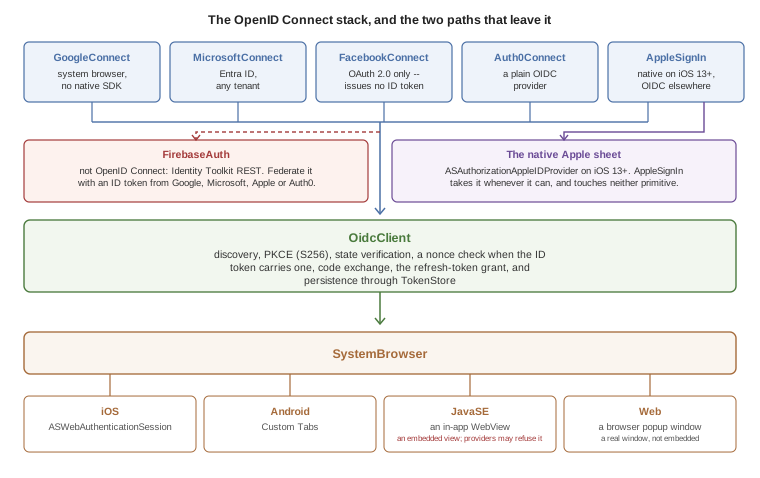
Two places step outside it, and both are deliberate. AppleSignIn calls the native Apple sheet whenever the platform offers one, which on iOS 13+ means neither primitive is involved; the OpenID Connect path is what it falls back to everywhere else. And FirebaseAuth isn’t an OpenID Connect provider at all — you reach it by handing it an ID token you already obtained, which FacebookConnect can’t give you because Facebook’s flow issues an access token and nothing else.
com.codename1.io.Oauth2 class is deprecated. It opens an in-app WebBrowser, which modern identity providers (Google, Apple, Microsoft, Facebook) now refuse to render — they detect the embedded view and block the page. The new OidcClient works the same on every supported platform without that limitation. See Migrating from Oauth2 for a migration recipe.Why the change
Identity providers tightened their rules in 2023 and 2024:
Google — the legacy
GoogleSignInSDK has been replaced by Google Identity Services (GIS). GIS expects PKCE and discourages embedded WebViews.Apple — Sign in with Apple, mandatory for App Store apps that offer any other social login, requires a native ASAuthorizationAppleIDProvider call on iOS 13+ or a web flow with
form_postresponse_mode.Microsoft — Entra ID (formerly Azure AD) requires PKCE for public clients and forwards all browser flows through Microsoft Authenticator when installed.
Facebook — Facebook Login still supports OAuth 2.0 but its embedded-WebView detection now blocks unknown user agents.
The old Oauth2 class drove the entire flow through com.codename1.components.WebBrowser, which is an embedded view. That model no longer works on a Codename One device build for these providers.
Quick start — any OpenID Connect provider
If your identity provider publishes a standard .well-known/openid-configuration document (Google, Microsoft, Apple, Auth0, Okta, Keycloak, AWS Cognito, Authentik, and most others do) you can sign users in with about ten lines of code.
OidcClient.discover("https://accounts.google.com").ready(new SuccessCallback<OidcClient>() {
    public void onSucess(OidcClient client) {
        client.setClientId("YOUR_CLIENT_ID")
              .setRedirectUri("com.example.app:/oauth2redirect")
              .setScopes("openid", "email", "profile");
        client.authorize().ready(new SuccessCallback<OidcTokens>() {
            public void onSucess(OidcTokens tokens) {
                // tokens.getAccessToken() -- bearer for API calls
                // tokens.getIdToken()      -- JWT with user identity claims
                // tokens.getEmail()        -- convenience accessor
            }
        }).except(new SuccessCallback<Throwable>() {
            public void onSucess(Throwable err) {
                System.out.println("Sign-in failed: " + err.getMessage());
            }
        });
    }
});
That call:
Fetches
accounts.google.com/.well-known/openid-configuration.Generates a PKCE pair (S256), a
state, and anonce.Opens the OS system-browser sheet at the discovered authorization endpoint.
Exchanges the code for tokens on the discovered token endpoint.
Verifies
state, the issuer the response names, and the ID token, and persists the tokens via the defaultTokenStore.
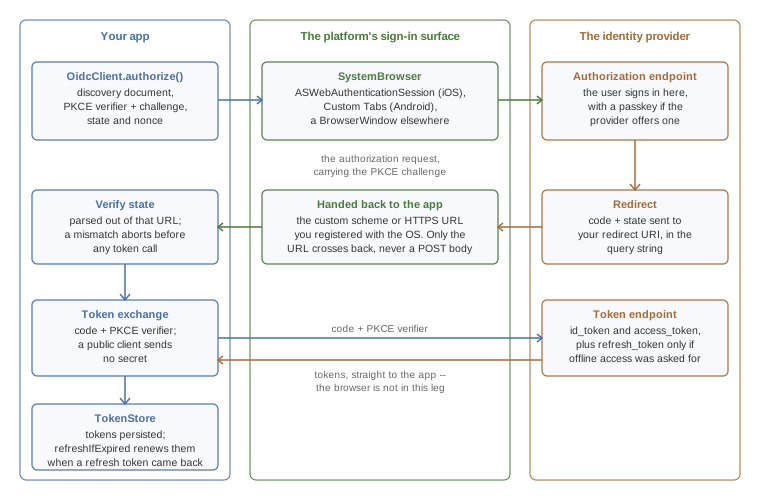
The token exchange is the leg worth noticing: it goes straight from your app to the provider’s token endpoint, carrying the PKCE verifier, and the browser has already done its job by then. A provider that treats your app as a public client wants no secret on that request, which is the arrangement PKCE exists to make safe. Apple is the exception on its non-native path and wants a client_secret JWT your server mints, which is what One-time Apple setup is about.
Only the redirect URL crosses back from the browser, which is why Apple’s non-iOS path needs a server in front of it: AppleSignIn asks for response_mode=form_post, so Apple POSTs code and state to your redirect URI rather than putting them in the query string, and OidcClient parses the URL alone. The page at that URI has to turn the POST into a redirect carrying the same parameters, or the sign-in fails with STATE_MISMATCH.
Whether the token endpoint hands back a refresh token is up to the request: the quick start above asks for openid, email and profile and nothing more, so Google returns none and there is nothing for refreshIfExpired to renew. GoogleConnect.signIn adds access_type=offline and prompt=consent for exactly that reason.
What’s verified before you get the tokens
OidcClient doesn’t hand over tokens it hasn’t checked. A sign-in that fails one of these checks fails with an OidcException, and nothing is stored.
The authorization response. Its
statehas to be the one the request carried. If the response names an issuer with theissparameter, that issuer has to be the provider you configured. A provider whose discovery document setsauthorization_response_iss_parameter_supportedalways names itself, so a response withoutissis refused for that provider. The error isissuer_mismatch. This stops an answer from one provider being taken for another’s when an app signs in with several.The ID token’s claims.
issis the provider,audis your client ID,exphasn’t passed, andnonceis the one the request carried. When the token has anat_hash, it has to match the access token that came with it. The device’s clock may be five minutes off, andsetIdTokenClockSkewchanges that.The ID token’s signature. The provider’s keys are fetched from its
jwks_urionce and kept. They’re fetched again when a token names a key that isn’t among them, but not more than once in 60 seconds. A token that names an unknown key within 60 seconds of the last fetch is refused without another request to the provider.RS256,RS384,RS512,ES256andES384are accepted. An unsigned token is refused. A token signed withHS256or another shared-secret algorithm is refused too, because an app can’t keep the secret that would verify it.
A configuration you build by hand needs a jwksUri for the last check. discover fills it in.
The signature check has no silent fallback. If the platform the app runs on can’t verify a signature of the token’s algorithm, the token is refused and the error says so. For a provider whose ID tokens can’t be verified on a platform you ship to, or one that signs them with HS256, turn the check off explicitly. There is no other way to have such a token accepted:
// Only for a provider whose ID tokens this platform can't verify.
client.setVerifyIdTokenSignature(false);
The claims are still checked then, but they’re only as trustworthy as the TLS connection to the token endpoint. Don’t make a decision on your server from an ID token the app forwards. Verify it there.
Picking a redirect URI
For mobile apps, use a custom scheme unique to your app, for example com.example.app:/oauth2redirect. Register the scheme with the OS via the build hints below so the system browser can hand the redirect back to your app.
For web / simulator runs, use a normal HTTPS URL pointing at a page you control. The Codename One fallback BrowserWindow closes as soon as the URL matches.
iOS
Add the URL scheme to your Info.plist via the standard build hint:
ios.urlScheme=<key>CFBundleURLTypes</key>\n<array>\n <dict>\n <key>CFBundleURLSchemes</key>\n <array>\n <string>com.example.app</string>\n </array>\n </dict>\n</array>
AuthenticationServices.framework is added to the linker automatically whenever your app references anything in com.codename1.io.oidc or com.codename1.social.AppleSignIn — you don’t need to add ios.add_libs=AuthenticationServices.framework manually.
Android
Add an intent filter for the redirect scheme to the application manifest via the android.xintent_filter build hint:
android.xintent_filter=<intent-filter>\n <action android:name="android.intent.action.VIEW"/>\n <category android:name="android.intent.category.DEFAULT"/>\n <category android:name="android.intent.category.BROWSABLE"/>\n <data android:scheme="com.example.app"/>\n</intent-filter>
The androidx.browser:browser:1.8.0 Gradle dependency (for Custom Tabs) is added to your app’s Gradle build automatically whenever it references anything in com.codename1.io.oidc. Override the version with build hint android.customTabsVersion=1.x.y if needed.
Saving and restoring tokens
OidcClient saves the response under a per-issuer + per-client-ID key using com.codename1.io.oidc.TokenStore.DefaultStorageTokenStore (which serializes to com.codename1.io.Storage). To restore on next launch:
client.refreshIfExpired(60).ready(new SuccessCallback<OidcTokens>() {
    public void onSucess(OidcTokens tokens) {
        if (tokens == null) {
            // No saved tokens, or they expired and we have no refresh token.
            client.authorize();
        } else {
            // Reuse `tokens.getAccessToken()` -- still valid (refreshed if needed).
        }
    }
});
If the saved access token is within 60 seconds of expiring and a refresh token is available, refreshIfExpired performs a refresh-token grant in the background and persists the new tokens.
Encrypting tokens at rest
The default token store uses com.codename1.io.Storage, which is sandboxed but not encrypted. SecureStorageTokenStore keeps the tokens in the platform keychain or keystore instead, through com.codename1.security.SecureStorage:
// Encrypted by the platform, read without a prompt.
client.setTokenStore(new SecureStorageTokenStore());

// Behind Face ID or a fingerprint. Reading the tokens prompts the user.
client.setTokenStore(new SecureStorageTokenStore()
        .requireBiometrics("Unlock your notes"));

// Ordinary storage on a platform that has no secure storage.
client.setTokenStore(new SecureStorageTokenStore()
        .allowPlainStorageFallback(true));
The first form encrypts the tokens and reads them without asking the user. That’s the one to use when a token goes out with every request. The second form puts them behind a biometric prompt. Load the tokens once when the app starts if you choose it, because every read prompts.
A platform without secure storage isn’t given a weaker store behind your back. Every operation fails there with an OidcException whose code is storage_unavailable. The third form is the opt-in: on such a platform, and only there, the tokens go to ordinary storage.
Sign in with Apple
com.codename1.social.AppleSignIn consolidates the previous cn1-applesignin cn1lib into core. On iOS 13+ it uses native ASAuthorizationAppleIDProvider; on Android, JavaSE and the Web port it uses the public Apple OIDC issuer through OidcClient.
iOS
The iOS port implements the com.codename1.social.AppleSignInNative interface. No build hints are required beyond enabling the Sign in with Apple capability:
ios.signinwithapple=true
AppleSignIn.getInstance().signIn("name email", new AppleSignInCallback() {
    public void onSuccess(AppleSignInResult result) {
        // result.getIdentityToken()  -- JWT to verify on your server
        // result.getUserId()         -- stable opaque user id, use as PK
        // result.getEmail()          -- may be a real or relay address
    }
    public void onError(String err) { }
    public void onCancel()          { }
});
Preferences so the result is consistent on subsequent sign-ins.Android, JavaSE, Web
Apple requires a separate Services ID (a "web client") for non-iOS environments and a client_secret JWT generated by your server. The recipe lives at One-time Apple setup.
On Android there is a second thing to arrange. The Services ID callback is an HTTPS URL, and the Android sign-in surface hands control back by matching the scheme of the redirect it’s waiting for, so the com.example.app custom scheme registered earlier in this chapter does nothing for it. The callback host and path need their own verified App Link: an android.xintent_filter carrying an android:autoVerify="true" filter for android:scheme="https" on that host, and an assetlinks.json served from it. Deep-Link Routing Section has both, and says how to put that filter and the custom-scheme one in a single hint value — the hint holds one string, so an app doing both needs them together.
One-time Apple setup
In the Apple Developer portal, create a Services ID alongside your App ID. Enable "Sign in with Apple" for both.
Configure the Services ID’s Web Authentication Configuration with the primary App ID and your redirect URI.
Generate an AuthKey private key in the Apple developer portal (
.p8file). Apple doesn’t allow public mobile clients to mint theclient_secretJWT themselves; your backend must do it. See Apple’s docs for the JWT recipe.
Google Sign-In
com.codename1.social.GoogleConnect now offers a modern signIn(…) method that runs entirely through OidcClient:
GoogleConnect.getInstance().signIn(
    // the iOS or Android client for a native build; the Web client
    // belongs with an https redirect, in the simulator or web port
    "YOUR_IOS_OR_ANDROID_CLIENT_ID.apps.googleusercontent.com",
    "com.example.app:/oauth2redirect",
    "openid", "email", "profile"
).ready(new SuccessCallback<OidcTokens>() {
    public void onSucess(OidcTokens t) {
        String email = t.getEmail();
        String idToken = t.getIdToken();
    }
});
signIn works on iOS, Android, JavaSE and Web with the same code, against the Web Application OAuth 2.0 client ID from Google Cloud Console. The redirect URI you supply must match one of the Authorized redirect URIs configured for that client.
The legacy doLogin() / setClientSecret(…) path is still available for source compatibility but is no longer recommended.
Migrating from the legacy Google integration
If you currently rely on GoogleConnect.doLogin() with the Google Sign-In SDK on Android or GIDSignIn on iOS, you can switch to the modern flow without touching your build:
On Android, the legacy code uses
com.google.android.gms.auth.api.Auth.GoogleSignInApi— this is the part Google deprecated. New code viasignIn(…)doesn’t require the native SDK at all.On iOS, the legacy code uses
GIDSignIn(Google Sign-In SDK). The new code usesASWebAuthenticationSessionviaSystemBrowser, which is what Google now recommends for non-broker apps.
Facebook Login
com.codename1.social.FacebookConnect exposes both the old SDK-based doLogin() and a new SDK-free signIn(…) that uses the system browser via OidcClient. Use the new method for the simulator, the web port, and for apps that don’t want to bundle the Facebook SDK at all:
FacebookConnect.getInstance().signIn(
    "FB_APP_ID",
    // This flow is for the simulator and the web port, where the
    // response comes back through the browser, so the redirect is an
    // https URL registered with Facebook. A native Android or iOS build
    // registers a custom scheme instead, as the OidcClient samples above
    // do -- match the redirect to the target you are building.
    "https://example.com/oauth2redirect",
    "public_profile", "email"
).ready(new SuccessCallback<OidcTokens>() {
    public void onSucess(OidcTokens t) {
        String accessToken = t.getAccessToken(); // ID token will be null
        // call https://graph.facebook.com/me with the access token for user data
    }
});
Facebook doesn’t issue OpenID-Connect ID tokens for classic OAuth flows, so getIdToken() returns null. Read user profile fields via the Graph API.
Microsoft / Entra ID
com.codename1.social.MicrosoftConnect wraps the same OIDC client against https://login.microsoftonline.com/{tenant}/v2.0. The default tenant common accepts personal and work / school accounts; pass a tenant GUID, organizations, or consumers to restrict.
MicrosoftConnect. For the vast majority of apps the system-browser flow is sufficient and lets the simulator and web port share the same code path.Auth0
Auth0Connect is the simplest of the providers because Auth0 is a clean OIDC provider; everything beyond withDomain is optional.
Firebase Authentication
Firebase Auth isn’t an OIDC provider — it issues Google-Identity-Toolkit-style tokens via REST endpoints. com.codename1.social.FirebaseAuth wraps those endpoints:
void firebaseEmailSignIn(String email, String password) {
    // withApiKey is not optional: without it every call completes its
    // AsyncResource with IllegalStateException instead of reaching
    // Firebase. Do it once, wherever your app initializes.
    FirebaseAuth auth = FirebaseAuth.getInstance().withApiKey("YOUR_WEB_API_KEY");
    auth.signInWithEmailAndPassword(email, password)
        .ready(user -> {
            // user.getIdToken() is a Firebase token rather than an OIDC
            // one, and it is a bearer credential: send it to your service,
            // never to the log. Anything written with Log or println ends
            // up in logcat and in device diagnostics.
            callMyBackend(user.getIdToken());
        })
        .except(err -> ToastBar.showErrorMessage(err.getMessage()));
}
For federated sign-in (Google / Apple / Microsoft as Firebase providers), first obtain an ID token via the matching *Connect class, then swap it for a Firebase session:
String clientId = "YOUR_IOS_OR_ANDROID_CLIENT_ID.apps.googleusercontent.com";
String redirectUri = "com.example.app:/oauth2redirect";
// without the api key every FirebaseAuth call fails before it is sent
FirebaseAuth.getInstance().withApiKey("YOUR_FIREBASE_WEB_API_KEY");
GoogleConnect.getInstance().signIn(clientId, redirectUri, "openid", "email")
    .ready(new SuccessCallback<OidcTokens>() {
        public void onSucess(OidcTokens g) {
            FirebaseAuth.getInstance().signInWithIdpIdToken(g.getIdToken(), "google.com")
                .ready(new SuccessCallback<FirebaseAuth.FirebaseUser>() {
                    public void onSucess(FirebaseAuth.FirebaseUser u) {
                        // Firebase user is now signed in.
                    }
                });
        }
    });
Refresh the Firebase session at app launch:
FirebaseAuth fa = FirebaseAuth.getInstance().withApiKey(KEY);
if (!fa.isSignedIn()) {
    fa.refresh().ready(new SuccessCallback<FirebaseAuth.FirebaseUser>() {
        public void onSucess(FirebaseAuth.FirebaseUser u) {
            // u is null if no refresh token was stored
        }
    });
}
Passkeys / WebAuthn
Codename One ships a portable WebAuthn client at com.codename1.io.webauthn.WebAuthnClient. It wraps the OS public-key credential APIs (ASAuthorizationPlatformPublicKeyCredentialProvider on iOS 16+, androidx.credentials.CredentialManager on Android API 28+) behind a JSON-friendly Java surface so you can talk to any relying-party server with the same code on every supported platform.
When you actually need this class
If you sign users in via OidcClient against Google, Apple, Microsoft Entra ID, Auth0 or Firebase, the identity provider already supports passkeys. The user’s web browser at the IdP shows the passkey sheet, and OIDC just hands you the resulting ID / access tokens. You don’t have to call WebAuthnClient at all — everything in the rest of this chapter that signs users in via OidcClient already gets passkey-backed sign-in transparently, with no additional code on your side.
Reach for WebAuthnClient when:
Your app talks to your own relying-party server and you want passwordless sign-in / step-up auth backed by a passkey.
You wire up a direct Auth0 or Firebase passkey ceremony (see Auth0 passkeys and Firebase passkeys).
You drive a third-party SDK that emits a WebAuthn challenge.
Quick start — own backend
Pseudo-code (the actual HTTP calls depend on your server library):
// Registration -- enroll a new passkey
String challengeJson = myServer.startPasskeyRegistration(currentUserId); // PublicKeyCredentialCreationOptionsJSON
PublicKeyCredentialCreationOptions opts =
        PublicKeyCredentialCreationOptions.fromJson(challengeJson);

WebAuthnClient.getInstance().create(opts)
        .ready(new SuccessCallback<PublicKeyCredential>() {
            public void onSucess(PublicKeyCredential cred) {
                myServer.finishPasskeyRegistration(cred.toJson()); // server verifies + persists
            }
        })
        .except(new SuccessCallback<Throwable>() {
            public void onSucess(Throwable err) {
                if (err instanceof WebAuthnException) {
                    String code = ((WebAuthnException) err).getError();
                    // "NotAllowedError" -- user dismissed the sheet
                    // "not_supported"   -- platform lacks a passkey impl
                    // ... etc.
                }
            }
        });

// Sign-in -- assert with an existing passkey
String requestJson = myServer.startPasskeySignIn(); // PublicKeyCredentialRequestOptionsJSON
WebAuthnClient.getInstance()
        .get(PublicKeyCredentialRequestOptions.fromJson(requestJson))
        .ready(new SuccessCallback<PublicKeyCredential>() {
            public void onSucess(PublicKeyCredential cred) {
                myServer.finishPasskeySignIn(cred.toJson()); // server verifies signature
            }
        });
PublicKeyCredential#toJson() is in the W3C RegistrationResponseJSON / AuthenticationResponseJSON format, which every WebAuthn server library accepts as-is. On the server, verify the response with one of:
Java — webauthn4j
Node — @simplewebauthn/server
Rust — webauthn-rs
Python — py_webauthn
Do not try to verify the attestation or assertion on the device. The relying-party server holds the credential record and the signature counter; only it can detect cloned authenticators.
Platform requirements
| Platform | Notes |
|---|---|
iOS | iOS 16+. The |
Android | API 28+ via |
JavaSE / desktop, Web port |
|
Build hints
iOS:
ios.entitlements.com.apple.developer.associated-domains=<array>\n <string>webcredentials:example.com</string>\n</array>
Android: nothing beyond the dependency that gets injected automatically. The asset-links file lives on your server; the build doesn’t touch it.
Auth0 passkeys
Auth0Connect exposes two passkey helpers driven by Auth0’s WebAuthn grant (urn:okta:params:oauth:grant-type:webauthn). They drive WebAuthnClient under the hood, so the same iOS / Android platform requirements apply.
Enable Passkeys in the Auth0 dashboard (Authentication → Database → your connection → Authentication Methods → Passkey), and add WebAuthn to the application’s Grant Types.
Firebase passkeys
FirebaseAuth exposes registerPasskey (enroll a passkey for the signed-in user) and signInWithPasskey (sign in with an existing passkey). Both use Firebase Identity Platform’s v2 passkey REST endpoints (accounts/passkeyEnrollment:start|finalize, accounts/passkeySignIn:start|finalize).
Passkey support requires the Identity Platform tier of Firebase Auth (the upgraded plan). The free Firebase Auth tier doesn’t expose the passkey endpoints; the calls will fail with an HTTP 403. Check your project plan in the Firebase console under Build → Authentication → Settings → User account linking.
Mapping WebAuthn errors
WebAuthnException.getError() returns one of the W3C-defined error names:
| Code | Meaning |
|---|---|
| User dismissed the OS sheet, no matching credential, or the authenticator denied the request. |
| The credential being created already exists on the authenticator. |
| Platform doesn’t support the requested algorithm / transport combo. |
| Origin / RP-ID validation failed. Most often an Associated Domain (iOS) or asset-links (Android) misconfiguration. |
| Caller cancelled the ceremony. |
| A constraint (resident key, user verification) couldn’t be satisfied. |
| The platform has no native WebAuthn implementation at all. Caller should fall back to password sign-in. |
| Network failure while POSTing to your relying-party server. |
| The options JSON received from the relying party couldn’t be parsed. |
| The response returned by the authenticator couldn’t be parsed. |
Signing in against a Codename One backend
A Codename One backend can be its own identity provider. Its authorization server speaks OpenID Connect, so the app signs in with the same OidcClient it would use for any other provider. The authorization server covers the server side. This section is the app’s half.
Signing in
Register the app on the server as a public client: no secret, the authorization code and refresh token grants, and the exact redirect URI the app uses. Then discover the server and authorize:
OidcClient.discover("https://api.example.com").ready(discovered -> {
    client = discovered
            .setClientId("notes-app")
            .setRedirectUri("com.example.notes:/oauth2redirect")
            .setScopes("openid", "profile", "notes.read")
            .setTokenStore(new SecureStorageTokenStore());
    client.authorize()
            .ready(tokens -> showNotes())
            .except(err -> showSignInFailed(err));
});
The issuer you pass to discover is the server’s cn1.security.authorizationserver.issuer, without a trailing slash. The redirect URI has to match the registered one exactly. The server doesn’t accept wildcards.
The answer holds an access token, a refresh token and an ID token. The access token is a signed JWT that the server’s resource chain verifies. Its scope claim becomes the caller’s SCOPE_ authorities there.
Sending the token with every request
OidcRequestAuthorizer adds the access token to the app’s requests and renews it when it expires. Create one for the client, give it the base URL of your API, and load the session a previous run saved:
authorizer = new OidcRequestAuthorizer(client).install("https://api.example.com");
authorizer.addSignInRequiredListener((source, reason) -> showSignIn());
authorizer.load().ready(saved -> {
    if (saved == null) {
        showSignIn();
    } else {
        showNotes();
    }
});
From then on every request under that base URL carries Authorization: Bearer …. That includes requests made with Rest, with ConnectionRequest, and by a generated @RestClient client created for that base URL. Tokens the client obtains later reach the authorizer by themselves.
// No header to add: the authorizer covers every request under its base URL.
Rest.get(SERVER + "/api/notes").acceptJson().fetchAsJsonMap(response -> {
    if (response.getResponseCode() == 200) {
        show(response.getResponseData());
    }
});

// A blocking call waits through the renewal too.
Response<String> profile = Rest.get(SERVER + "/api/me").getAsString();
The base URL is matched by origin and by whole path segments. The origin is the scheme, the host and the port. Scheme and host are compared without regard to case, and a port that’s left out is the scheme’s own, so https://api.example.com and https://API.example.com:443 are the same base URL. The path is compared exactly and ends where a segment ends, so /v1 covers /v1/pets and doesn’t cover /v10. When two registrations cover a request, the one with the longer path wins.
A token is never sent to another origin. That holds for a redirect too: a request the server redirects to another host, another port or plain http is sent there without the header. A request redirected to a path outside the base URL goes without it too. This is the behavior where Codename One follows the redirect itself. On iOS the system follows redirects before the app sees them, so don’t have a token-protected API redirect to a host you don’t control.
The authorizer works on the event dispatch thread only. It puts the header on a request when you queue it, and the network thread sends what the request carries. A request you queue from another thread is passed to the event dispatch thread first and queued from there, without making your thread wait. Call the authorizer’s own methods, such as setTokens and signOut, on the event dispatch thread. Called from another thread they wait for it, so don’t call them from a thread the event dispatch thread is itself waiting for.
Renewing before the token expires
The authorizer renews a token before the server has a chance to refuse it. When you queue a request and the access token is within a minute of its expiry, the refresh token is exchanged first. The request is kept out of the queue until the exchange is done, and is then sent once with the new token. Requests queued in the meantime wait for the same exchange.
Nothing blocks while this happens, because the request hasn’t reached a network thread yet. Code that waits for the request gets the one final answer.
Change the minute with setRefreshLeeway. A larger value suits a server whose clock runs ahead of the device’s. A negative value turns renewing ahead of time off:
// Renew a token that has less than two minutes left.
authorizer.setRefreshLeeway(120);
If the server refuses that exchange, the session is over, as the next section describes, and the request is sent without a token so that it’s answered 401. If the exchange can’t reach the server, the request is sent with the token it has, which might still be good.
A token whose response carried no expires_in has no known expiry. It’s renewed only when the server refuses it.
What happens on a 401
A token can still be refused: the server revoked it, restarted with new keys, or the device’s clock is wrong. When the server answers 401 to a request that carried the authorizer’s token, the app doesn’t see that answer. The request is held, and the refresh token is exchanged for a new set of tokens. The request is then sent again with the new access token, and its answer is delivered as usual.
A few rules keep this predictable:
A request is renewed once. If the second attempt is also refused, that
401is delivered.Requests refused at the same moment share one exchange. The server replaces the refresh token every time it’s used, so a second exchange with the old one would fail.
Code that waits for a request waits until the end.
getAsString()and the other blocking methods return the final answer, and so doesaddToQueueAndWait.If the server refuses the refresh token, the session is over. The tokens are removed from memory and from the token store, the held requests deliver their
401, and your sign-in listener runs so you can show the sign-in screen.If the exchange fails because the server can’t be reached, the tokens are kept. The held request delivers its
401, and the next request tries again.
When a renewal fails, the refused request is sent one more time as it was first sent. The 401 you receive is that second answer, handled by your error handlers like any other response.
You can also choose the authorizer for one request:
// Another authorizer for one request.
Rest.get("https://partner.example.org/feed").authorizer(other).fetchAsString(r -> show(r));

// No authorizer for one request, not even the default.
Rest.get(SERVER + "/api/public/status")
        .authorizer(RequestAuthorizer.NONE)
        .fetchAsString(r -> show(r));

// A header you set yourself always wins.
Rest.get(SERVER + "/api/notes").bearer("a-token-from-elsewhere").fetchAsString(r -> show(r));
An Authorization header that’s already on a request always wins. That’s true for a header you set on the request and for a default header set with NetworkManager.addDefaultHeader. The authorizer isn’t asked about such a request, and a 401 to it isn’t renewed.
To sign out, revoke the refresh token and clear the stored session:
OidcTokens current = authorizer.getTokens();
if (current != null && current.getRefreshToken() != null) {
    client.revoke(current.getRefreshToken());
}
authorizer.signOut();
The device grant
A television, a watch or a kiosk has no browser to sign in with and no comfortable keyboard. The device grant lets the user approve such a device from a phone or a computer. The app asks for a code, shows it, and waits:
client.requestDeviceAuthorization().ready(device -> {
    showCode(device.getUserCode(), device.getVerificationUri());
    AsyncResource<OidcTokens> waiting = client.pollDeviceToken(device);
    waiting.ready(tokens -> showNotes());
    waiting.except(err -> {
        if (err instanceof OidcException
                && OidcException.EXPIRED_TOKEN.equals(((OidcException) err).getError())) {
            showCodeExpired();
        } else {
            showSignInFailed(err);
        }
    });
});
The user opens the verification address on another device, signs in and types the code. getVerificationUriComplete() returns the same address with the code in it, which suits a QR code.
pollDeviceToken asks the server at the interval the server chose. It waits five seconds longer each time the server answers slow_down. It stops with an OidcException when the user refuses (access_denied) or the code runs out (expired_token), and it stops when you cancel the resource it returned. The tokens are stored the same way authorize() stores them, so the authorizer picks them up.
The client needs the urn:ietf:params:oauth:grant-type:device_code grant on the server. It needs no redirect URI for this flow.
Passkeys
A backend that declares http.webAuthn(…) serves the two WebAuthn ceremonies, and WebAuthnClient runs the device’s side of each. Passkeys lists the endpoints.
A signed-in user adds a passkey like this:
// The user is signed in, so the authorizer's token goes with both requests.
String options = Rest.post(SERVER + "/webauthn/register/options").getAsString().getResponseData();
WebAuthnClient.getInstance()
        .create(PublicKeyCredentialCreationOptions.fromJson(options))
        .ready(credential -> Rest.post(SERVER + "/webauthn/register")
                .queryParam("label", "My phone")
                .jsonContent()
                .body(credential.toJson())
                .fetchAsString(r -> show(r)));
A user who has one signs in with it:
String options = Rest.post(SERVER + "/webauthn/authenticate/options").getAsString().getResponseData();
WebAuthnClient.getInstance()
        .get(PublicKeyCredentialRequestOptions.fromJson(options))
        .ready(credential -> Rest.post(SERVER + "/login/webauthn")
                .jsonContent()
                .useBoolean(true)
                .body(credential.toJson())
                .fetchAsJsonMap(r -> {
                    if (Boolean.TRUE.equals(r.getResponseData().get("authenticated"))) {
                        // The answer set the session cookie, and later requests send it.
                        showNotes();
                    }
                }));
Both requests of a ceremony have to reach the server with the same cookies, because the server keeps the challenge in the session. ConnectionRequest keeps cookies for you unless you turned them off.
Two server settings matter to an app. The chain has to leave the passkey endpoints out of CSRF protection with csrf.ignoringRequestMatchers("/webauthn/**", "/login/webauthn"), because an app has no page to read a CSRF token from. An Android app’s origin isn’t a web address but android:apk-key-hash: followed by a hash of its signing certificate, and it has to be in the server’s allowed origins.
One-time codes
A backend with a second factor expects a six-digit code after the password. The server uses the same com.codename1.security.Otp class your app has, so an authenticator screen in your app produces codes the server accepts:
String code = Otp.totp(Base32.decode(base32Secret));
A code is good once. The server refuses a code it has already accepted, even inside the same 30 seconds.
Migrating from Oauth2
A typical legacy snippet:
Oauth2 oauth = new Oauth2(
    "https://provider.example.com/oauth2/authorize",
    "CLIENT_ID",
    "https://example.com/callback",
    "openid email",
    "https://provider.example.com/oauth2/token",
    "CLIENT_SECRET");
oauth.showAuthentication(new ActionListener() {
    public void actionPerformed(ActionEvent e) {
        if (e.getSource() instanceof AccessToken) {
            AccessToken t = (AccessToken) e.getSource();
            // null
        }
    }
});
becomes:
OidcConfiguration cfg = OidcConfiguration.newBuilder()
    .authorizationEndpoint("https://provider.example.com/oauth2/authorize")
    .tokenEndpoint("https://provider.example.com/oauth2/token")
    .build();
// An installed app cannot keep a secret, so it is a public client: no
// client secret, and PKCE -- which OidcClient applies to every flow --
// is what protects the code exchange. The redirect has to come back to
// the app, so it is a custom scheme rather than an https URL.
OidcClient client = OidcClient.create(cfg)
    .setClientId("CLIENT_ID")
    .setRedirectUri("com.example.app:/oauth2redirect")
    .setScopes("openid", "email");
client.authorize().ready(new SuccessCallback<OidcTokens>() {
    public void onSucess(OidcTokens t) {
        AccessToken legacy = t.toAccessToken();  // for code that still expects AccessToken
    }
});
Or, if the provider exposes a discovery document:
OidcClient.discover("https://provider.example.com").ready(new SuccessCallback<OidcClient>() {
    public void onSucess(OidcClient client) {
        client.setClientId("CLIENT_ID")
              // Same public-client rules as the sample above: the
              // redirect has to be the custom scheme the app
              // registers, or the browser never hands control back.
              .setRedirectUri("com.example.app:/oauth2redirect")
              .setScopes("openid", "email");
        client.authorize().ready(tokens -> Log.p("signed in"));
    }
});
OidcTokens#toAccessToken() returns a com.codename1.io.AccessToken, so callers that already deal in AccessToken (most subclasses of com.codename1.social.Login) can adopt OidcClient without changing their token type.
Verifying a phone number
Signing a user in by phone number is a flow of its own rather than an OpenID Connect one: your server sends a code to the number and checks the code the user types back, and the device’s part is entering the number, entering the code, and letting the platform offer the code out of the arriving message so the user never types it.
com.codename1.components.PhoneVerification is that screen, and com.codename1.ui.TextArea#ONE_TIME_CODE is the hint that makes the platform offer the code without any messaging permission. See Phone Number Verification.
A universal sign-in demo
A complete sample is included under samples/UniversalSignInDemo in the repository. It renders one button per provider (Apple, Google, Microsoft, Facebook, Auth0, Firebase, generic OIDC) and dumps the resulting tokens to a TextArea so you can inspect them. See its README.md for the credentials wiring.