Codename One builds a Flutter application from its Dart source. The Dart is translated to Java at build time, and the result is an ordinary Codename One application: no Dart VM, no embedded rendering engine and no platform view ship with it. It builds for every platform Codename One targets, and it comes out smaller, quicker to start and lighter on memory than the same application built by Flutter.
Smaller, faster and lighter than Flutter
The charts below come from one application, the Flutter Gallery, built both ways from the same Dart source: once by the Flutter toolchain’s own release build, and once by Codename One. Both builds are measured on the same machine, in interleaved rounds, on every change to the project. Lower is better throughout.
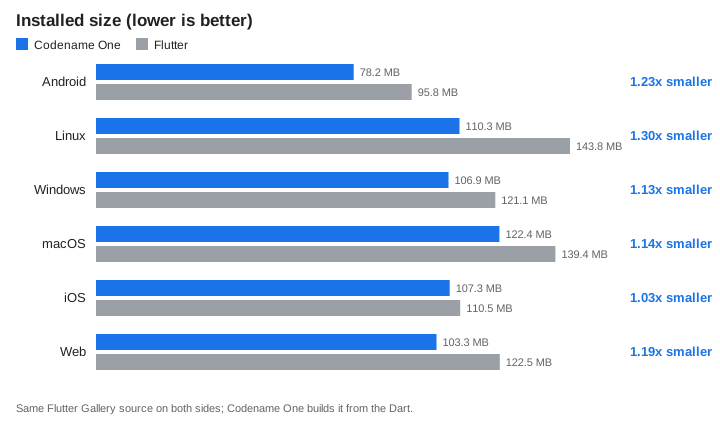
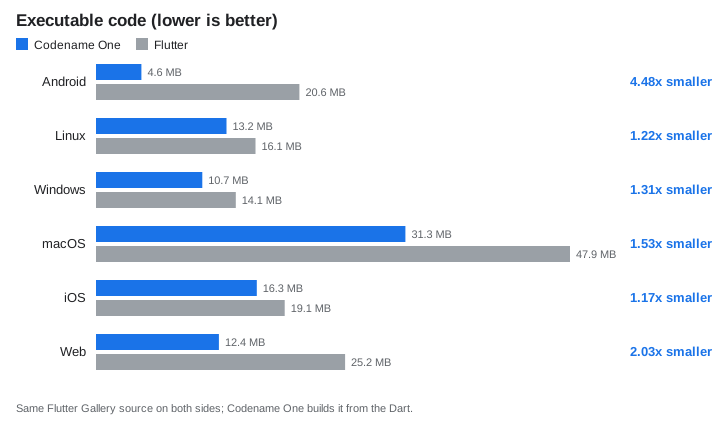
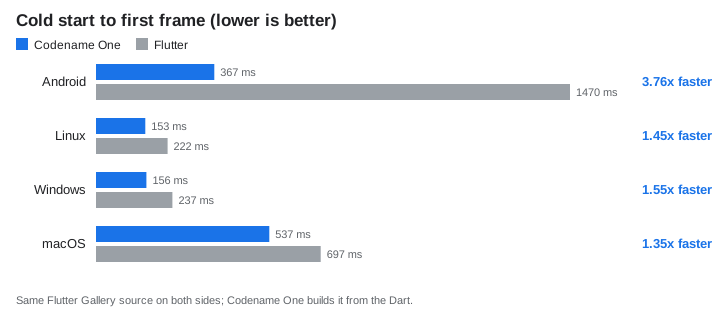
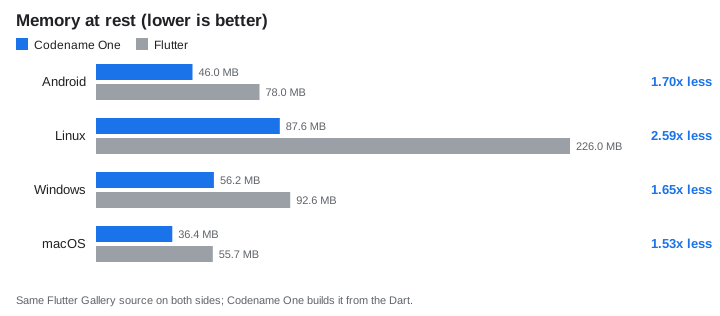
The comparison is tilted toward Flutter. The application is Flutter’s own showcase, written by the Flutter team in Flutter’s idioms, and Codename One runs it as it is. To do that the Codename One build carries a runtime that reimplements Flutter’s widget, element and layout model on top of Codename One components, which is work an application written for Codename One never pays for. The same screens written directly against Codename One’s own components would be smaller and faster again. The numbers above are what a team gets on the day it moves its Flutter code over, before changing a line of it.
Two platforms aren’t measured in full, and the charts leave them out rather than estimate them:
Start-up and memory on iOS. Flutter can’t compile Dart ahead of time for the simulator, so a simulator run would time Flutter’s debug engine against a Codename One release build. iOS sizes come from release device bundles.
Start-up and memory on the web. Timing a browser build needs a driver for the browser’s developer tools, which the benchmark doesn’t have, so it reports web sizes only.
Android start-up and memory come from an emulator rather than a phone. They compare the two builds on one machine; they aren’t phone timings. How the numbers are measured explains how each metric is taken.
What it looks like
The Flutter Gallery’s demos, rendered by Flutter on the left and by Codename One on the right from the same Dart source:
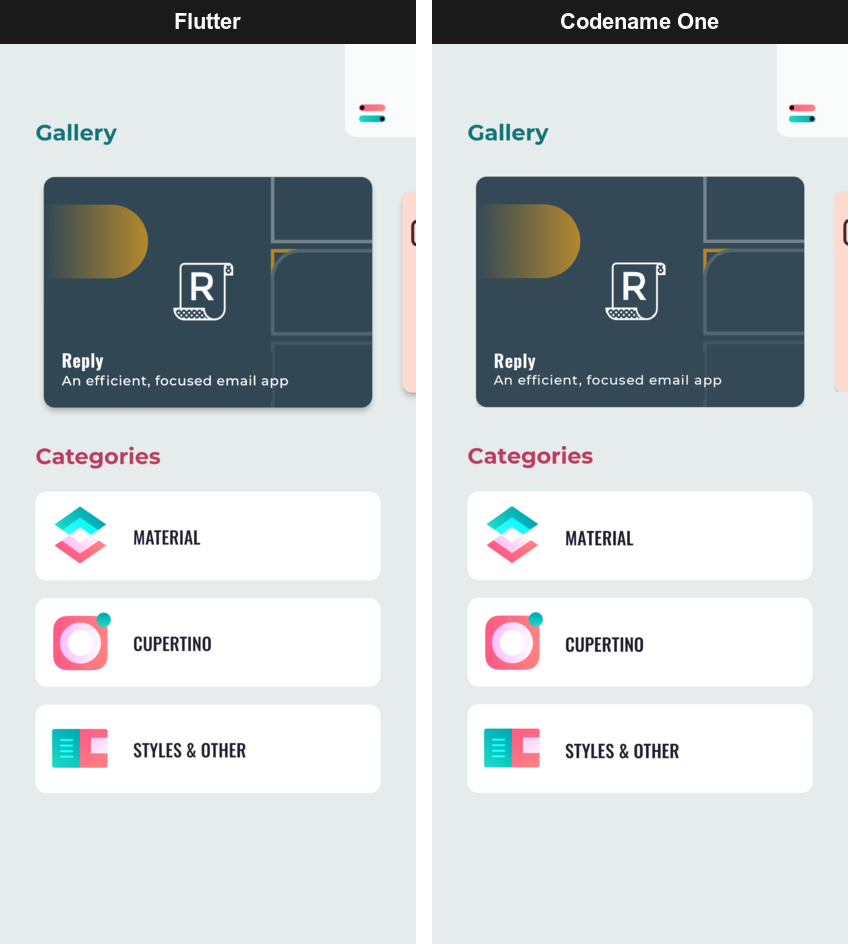
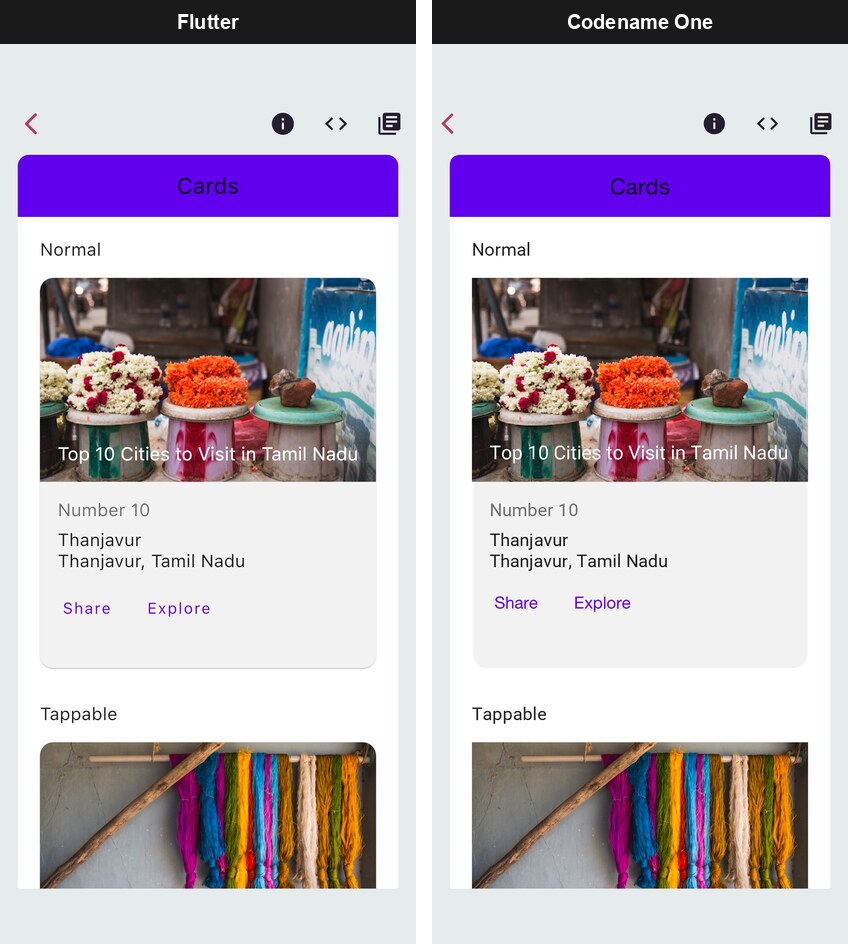
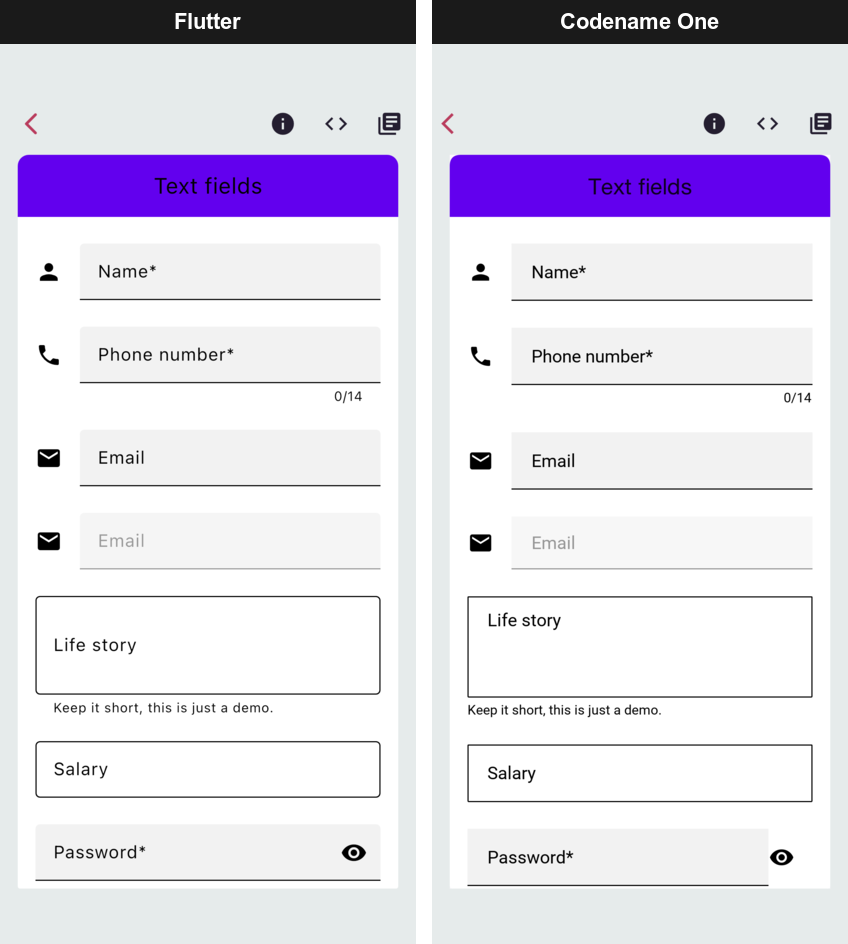
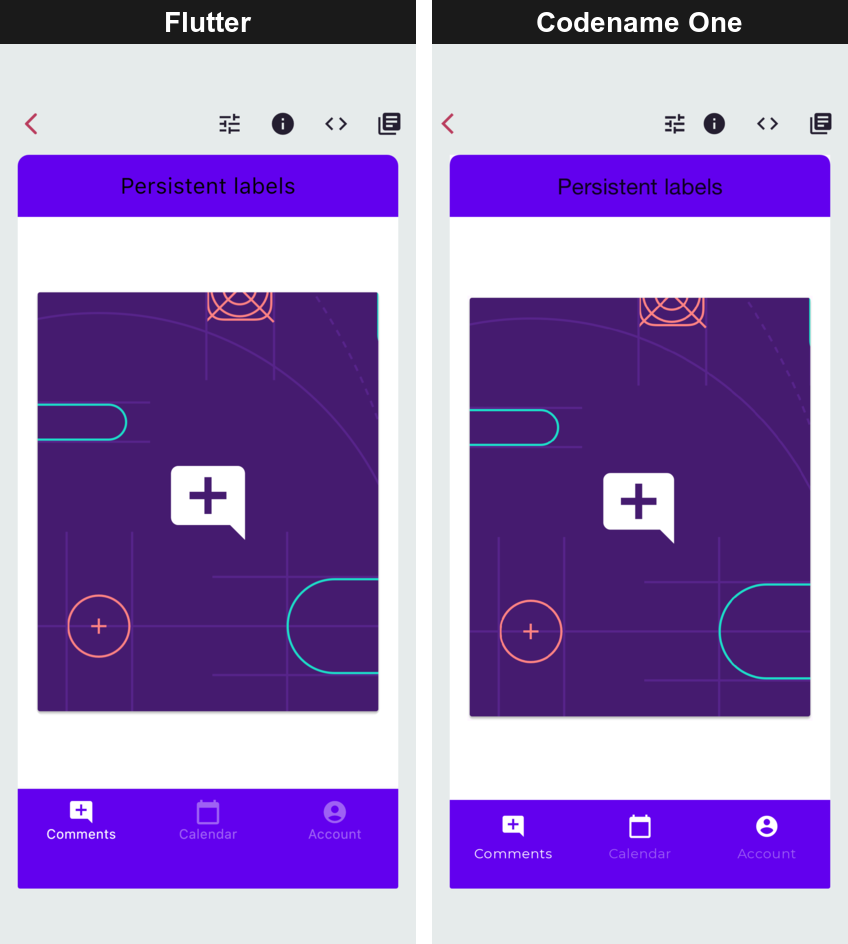
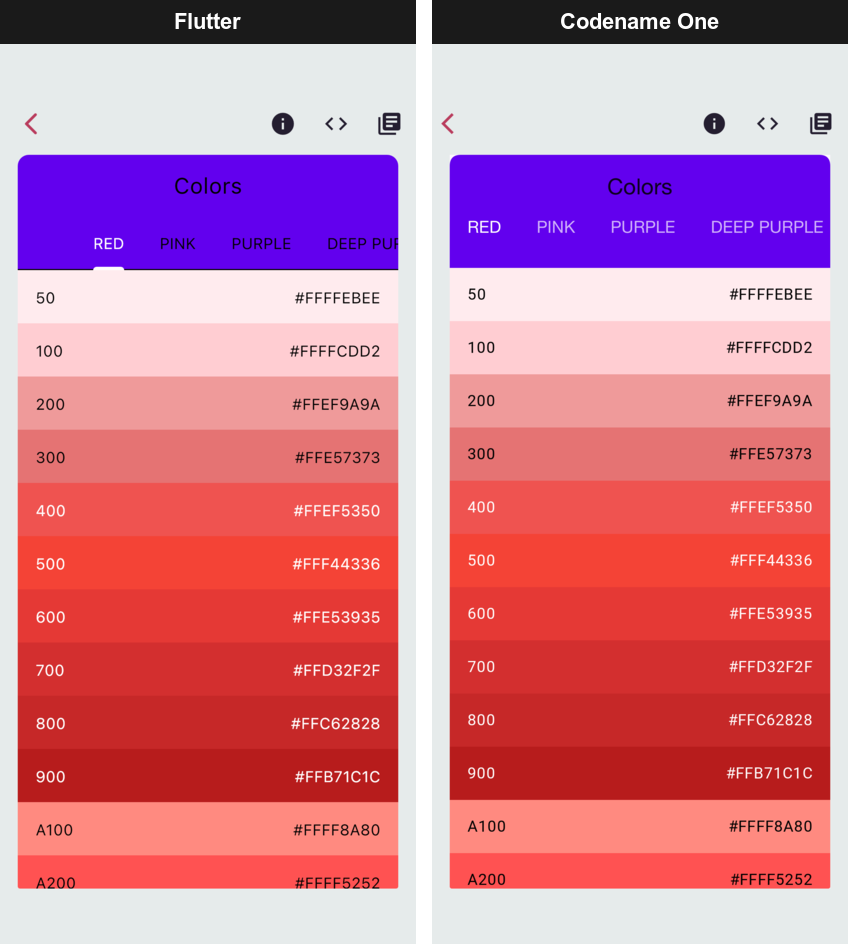
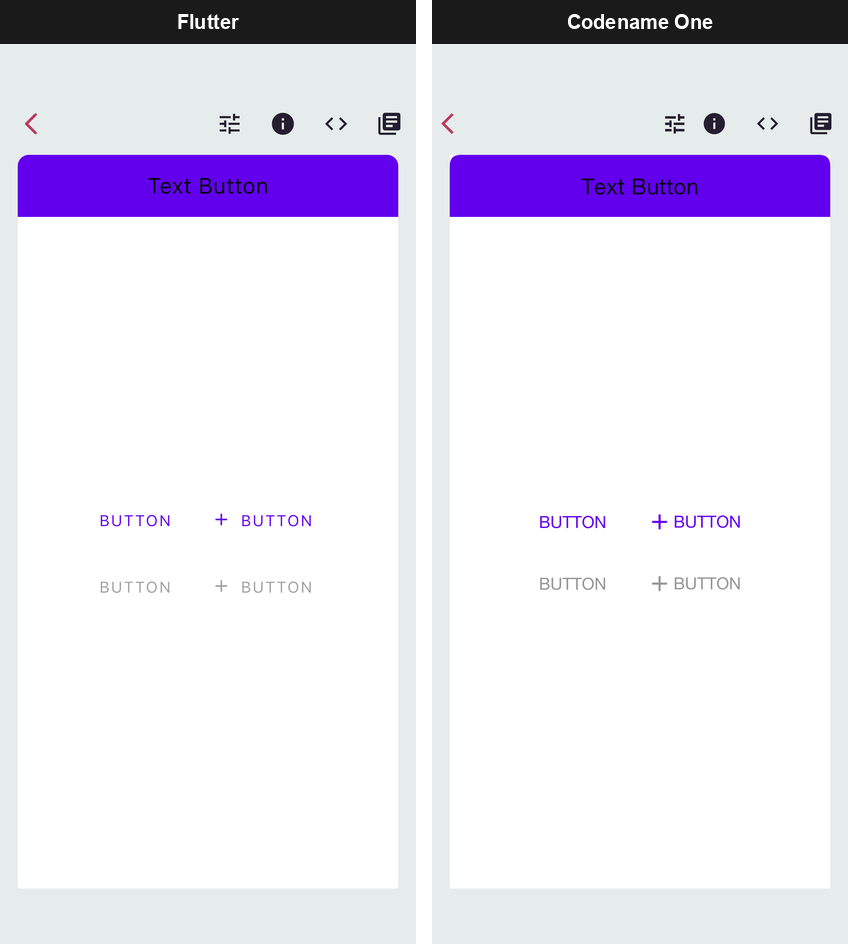
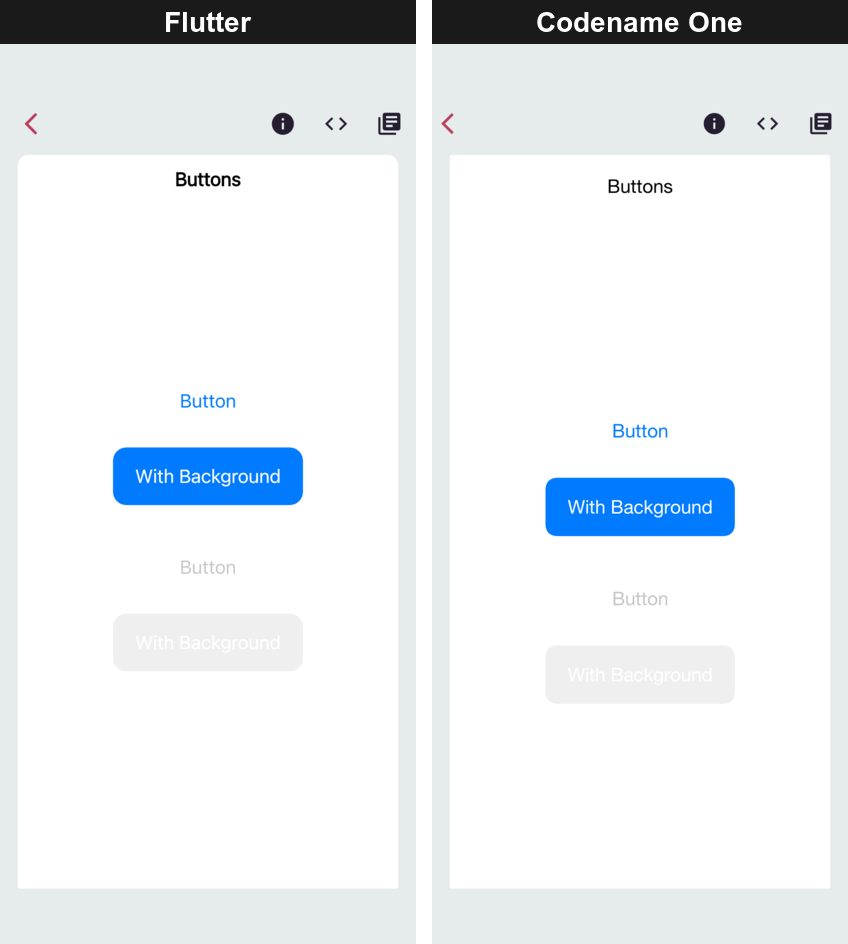
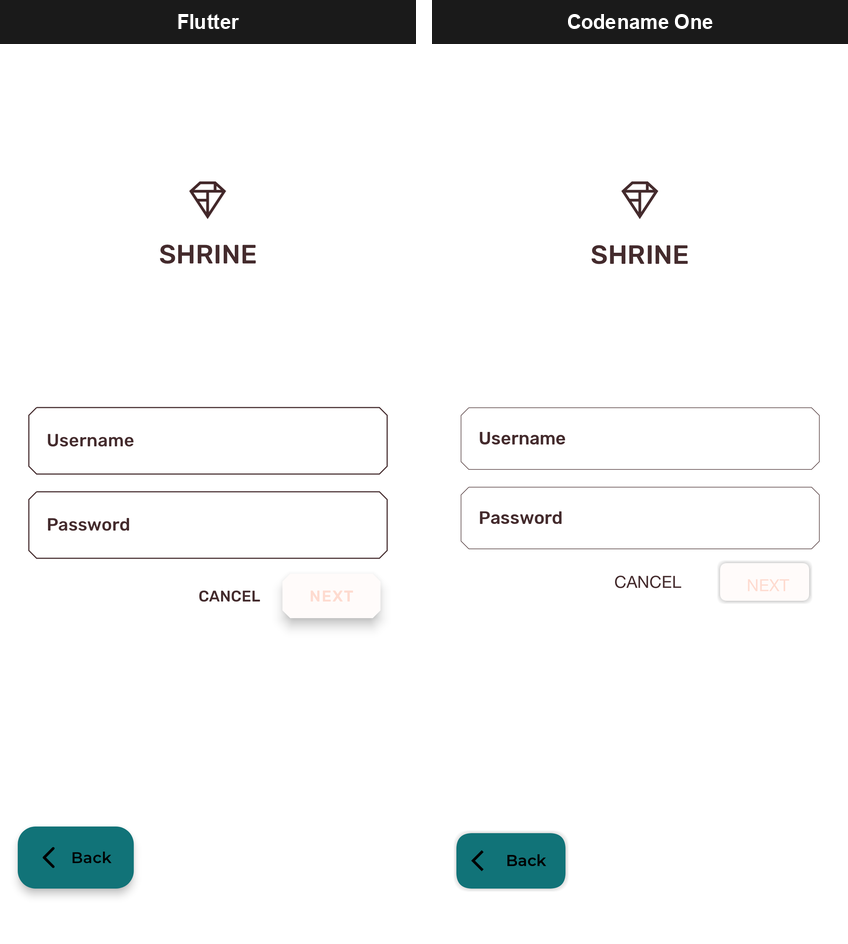
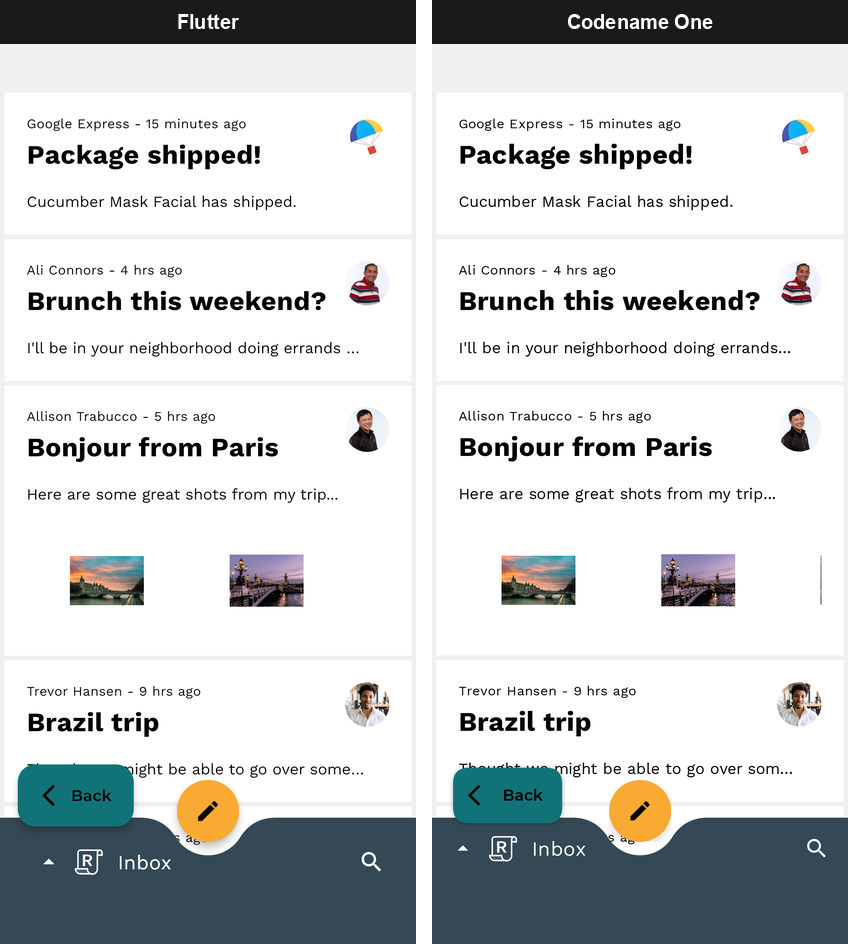
The Codename One side is a real Codename One component tree, not a picture of
one: it uses the theme, the event dispatch thread, the accessibility tree and
the native build like any other Codename One screen, and it can share a Form
with hand-written Codename One code.
Importing a Flutter application
One command brings a Flutter project into a Codename One project:
mvn cn1:import-flutter-project -Dcn1.flutter.import=/path/to/flutter_app
Run it in a project generated from the Codename One archetype or the initializr. It does what wiring Flutter in by hand would take:
Copies the Dart source in
libintocommon/src/main/flutter.Copies every asset and font
pubspec.yamldeclares, including whole asset directories and the assets of the packages the application depends on, which it finds through the project’s.dart_tool/package_config.jsonor the pub cache.Adds the Flutter runtime to
common/pom.xmland makes sure the build translates the Dart.Writes the application’s entry class so that it runs the Dart
main(). A class that was already there is saved beside it with a.pre-flutter-importsuffix.Carries the application name and version over from
pubspec.yaml.
It then lists the application’s pub dependencies and says which of them
Codename One provides. A package is provided one of two ways. A pure Dart
package is copied and transpiled with the application, file by file, as far as
the application’s imports reach into it. A plugin, or a package the runtime
implements natively (provider, intl, go_router, firebase_auth and the
others in Plugin coverage), is provided by a stub pack: Dart
declarations of the package’s API backed by Java. A dependency listed as not
covered is the first thing to look at if a screen misbehaves.
The import report
The same report is written as JSON to common/target/flutter-import-report.json,
for a script or a CI step to read. Each package has a status (covered or
unsupported), the note or the reason, and the application’s own files that
reach it. An unsupported package that’s only unsupported because of something
it depends on carries the chain that verdict came through, ending with the
package that’s unsupported itself:
{"package": "ui_kit", "status": "unsupported",
 "note": "depends on vector_graphics_compiler, which needs dart:ffi",
 "cause": "needs dart:ffi",
 "chain": ["ui_kit", "vector_graphics_compiler"],
 "reachedFrom": ["lib/login/login_screen.dart"]}
The report also lists, under googleFonts, every Google Fonts family the
application names. The google_fonts stub draws only fonts bundled with the
application, so those are the families to add as assets.
A few kinds of imports are resolved rather than reported:
A conditional import (
if (dart.library.html) …) takes the branch for a library the runtime has, so a web-only branch and everything it imports are never read.A plugin that implements only desktop or web platforms is transpiled as Dart. Its calls into the platform answer
MissingPluginException, as they would on a mobile device in Flutter.
Parameters that are accepted and not applied
Some stub parameters are accepted so the application compiles, and then have no effect: an HTTP header a media player can’t send, a fit mode an image renderer lacks. A call that passes one gets a build warning at that argument:
[WARNING] src/main/flutter/feed/post.dart:[41,6] 'httpHeaders' of networkUrl is accepted but not applied on Codename One (dart2java:W0002)
Re-running the command later picks up changes made on the Flutter side. A file you edited after the earlier import is left as you edited it, and a file the Flutter project no longer has is removed.
No Dart or Flutter SDK is needed to build the result. The transpiler is Java and
runs as part of the normal Maven build. The command reads the pub cache only to
find package assets, so run flutter pub get once in the Flutter project if it
reports a package it can’t find.
Migrating an entire application
After the import, the Dart is the application: the entry class calls the
Dart main(), whose runApp mounts the widget tree as the root of a Form.
Build and run it like any Codename One application, in the simulator or for a
device.
FlutterUI.runApp is the same call from Java, the analog of Flutter’s own
runApp. It installs the Material base theme, because the widget tree is
expected to be the whole UI and to look the way its author intended:
// runApp mounts the tree in a Form of its own and shows it. Unlike
// wrap(), this installs the Material base theme, because the widget
// tree is expected to be the whole UI.
FlutterUI.runApp(new Text("The entire application"));
A port is mostly a question of how much of the Dart language and of the Flutter libraries the application uses. The transpiler reports what it can’t handle rather than guessing: a construct outside the supported subset fails the build with a code naming the feature, so the gaps are a list to work through rather than a runtime surprise. At runtime, a widget that isn’t implemented is recorded through the error inventory instead of drawing nothing.
Migrating a single form
The same build can carry Dart screens inside an application otherwise written in Codename One, so a migration can go one screen at a time in either direction.
Put the Dart files under common/src/main/flutter; the import command does
this, or copy them by hand. Each Dart widget class becomes a Java class of the
same name in com.codename1.generated.flutter, with its parameters as
constructor arguments in declaration order and the widget key first. A Dart
MyHomePage({super.key, required this.title}) is created from Java as
new MyHomePage(null, "Inbox").
FlutterUI.wrap inflates the widget into a plain Container, which goes
anywhere an ordinary component can:
Form dashboard = new Form("Dashboard", BoxLayout.y());
dashboard.add(new Label("Written in Codename One"));

// A Dart widget tree, compiled to Java at build time. wrap() returns
// an ordinary Container, so it is added like any other component.
dashboard.add(FlutterUI.wrap(new Text("Rendered from Dart")));

dashboard.add(new Button("Also Codename One"));
dashboard.show();
The wrapped widget is a component like any other: it takes part in the parent’s layout, scrolls with it and is styled by the same theme. It doesn’t install the Material base theme, so a Dart screen dropped into an existing form won’t restyle the rest of it.
A wrapped widget isn’t inside a navigator, so it has no Overlay of its own.
Dart code that calls Overlay.of(context) from inside it gets the same error
it would get outside a Navigator on Flutter; show such a screen as a route
of its own instead.
Calling between Java and Dart
Java and Dart run in the same application, on the same thread, so calls between them are ordinary method calls. There are three ways to make them, and the first is the one a Flutter developer already knows.
Platform channels
A Flutter application talks to its platform code through MethodChannel and
EventChannel from package:flutter/services.dart. Those work unchanged: the
Dart side compiles unchanged, and the platform side, which is Kotlin or Swift in
a Flutter project, becomes Java in the Codename One project. The Java classes
in com.codename1.flutter.platform mirror Flutter’s Android
io.flutter.plugin.common API, so Android handler code ports by changing its
imports.
Dart calling Java. The Dart side invokes a method on a named channel:
// Calls the Java handler registered with MethodChannel.setMethodCallHandler
// on the platform side (FlutterInteropSnippets.answerDartWithAJavaHandler).
final batteryChannel = MethodChannel('com.example.app/battery');

Future<int> getBatteryLevel() async {
  final level = await batteryChannel.invokeMethod('getBatteryLevel');
  return level as int;
}
A Java handler registered under the same channel name answers it:
MethodChannel channel = new MethodChannel("com.example.app/battery");
channel.setMethodCallHandler(new MethodChannel.MethodCallHandler() {
    @Override
    public void onMethodCall(MethodCall call, MethodChannel.Result result) {
        if ("getBatteryLevel".equals(call.method())) {
            result.success(87);
        } else {
            result.notImplemented();
        }
    }
});
result.error(…) reaches Dart as a PlatformException, and
result.notImplemented(), or no handler at all, as a
MissingPluginException, as on Flutter. The handler doesn’t have to answer
before it returns: keep the Result and complete it when the answer arrives.
Java calling Dart. The direction reverses with the same two classes. Dart registers a handler on the channel:
// Answers calls the Java side makes with MethodChannel.invokeMethod
// (FlutterInteropSnippets.invokeADartRegisteredHandler).
void installBatteryRefreshHandler() {
  batteryChannel.setMethodCallHandler((MethodCall call) async {
    if (call.method == 'refreshBatteryLevel') {
      return getBatteryLevel();
    }
    throw MissingPluginException();
  });
}
Java invokes it and gets the reply through a callback:
MethodChannel channel = new MethodChannel("com.example.app/battery");
channel.invokeMethod("refreshBatteryLevel", null, new MethodChannel.Result() {
    @Override
    public void success(Object result) {
        System.out.println("Dart replied: " + result);
    }

    @Override
    public void error(String errorCode, String errorMessage, Object errorDetails) {
        System.out.println("Dart reported an error: " + errorCode);
    }

    @Override
    public void notImplemented() {
        System.out.println("no Dart handler is registered");
    }
});
Events from Java to Dart. An EventChannel carries a stream of events: a
sensor reading, a download’s progress, a message from a server. Java pushes
them through the EventSink it receives when Dart starts listening:
EventChannel channel = new EventChannel("com.example.app/sensor");
final EventChannel.EventSink[] activeSink = new EventChannel.EventSink[1];
channel.setStreamHandler(new EventChannel.StreamHandler() {
    @Override
    public void onListen(Object arguments, EventChannel.EventSink events) {
        activeSink[0] = events;
    }

    @Override
    public void onCancel(Object arguments) {
        activeSink[0] = null;
    }
});

// Called whenever a new reading arrives, from wherever that is.
EventChannel.EventSink sink = activeSink[0];
if (sink != null) {
    sink.success(42.5);
}
Dart listens to the stream as it would on Flutter:
// Listens to events the Java side pushes through an EventSink
// (FlutterInteropSnippets.pushEventsFromAJavaStreamHandler).
final sensorChannel = EventChannel('com.example.app/sensor');

StreamSubscription<dynamic> listenToSensorReadings(void Function(double value) onReading) {
  return sensorChannel.receiveBroadcastStream().listen((event) {
    onReading(event as double);
  });
}
onListen runs when the first listener subscribes and onCancel when the last
one cancels, so a sensor or a connection is only active while something is
listening.
Values cross the channel in the types each side expects, as Flutter’s message codec does:
| Dart | Java |
|---|---|
|
|
|
|
|
|
|
|
Every handler runs on the event dispatch thread, and a reply is always delivered asynchronously, never inside the call that asked for it, as on Flutter.
Calling Dart functions directly
Without a channel, Java can call transpiled Dart directly. Each Dart file
becomes a class named after it, with Lib appended: lib/greeting.dart
becomes LibGreetingLib, and its top-level functions are public static methods
of that class. Dart’s main is renamed main$.
String greeting = LibGreetingLib.greet("World");
System.out.println(greeting);
This is the quickest way to reach Dart logic that has no UI, a parser or a pricing rule, from Java. Channels are the better boundary for code that a Flutter build must also keep running, because the Dart side doesn’t change.
Sharing state and callbacks
A ValueNotifier or ChangeNotifier is an ordinary Java object on the
Codename One side. Java code that holds one can set its value or call
notifyListeners(), and every Dart widget listening to it, through
ValueListenableBuilder or AnimatedBuilder, rebuilds.
Callback parameters work the other way: an onPressed or onChanged that a
Java caller passes into a Dart widget’s constructor is a Java lambda, and the
Dart code calls it.
How it fits together
The pipeline has three stages, and each is an ordinary build step you can run and inspect on its own.
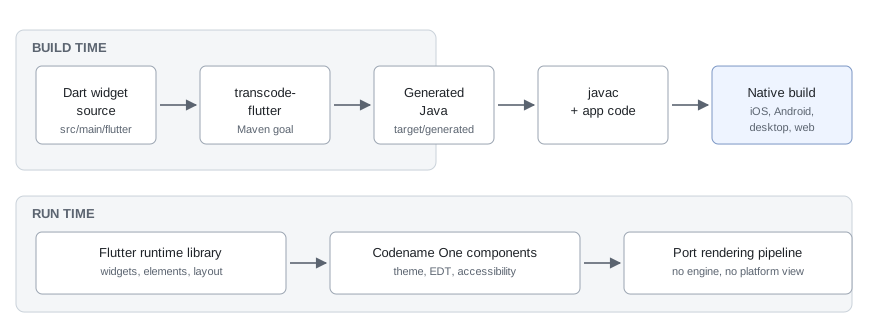
Dart widget source in src/main/flutter is read by the transcode-flutter
goal during generate-sources. It emits Java into
target/generated-sources/flutter, which the normal compile phase picks up.
At runtime those generated classes call into the Flutter runtime library,
which implements the widget, element and render-object model on top of
Codename One containers.
The key design point is where the boundary sits. The runtime reimplements Flutter’s layout and composition model — constraints down, sizes up, elements reconciled against widgets — but it doesn’t reimplement Flutter’s rasterizer. Painting is Codename One’s, which is what makes the output a real Codename One component tree rather than a texture.
The goal is bound in every project generated from the archetype and does
nothing while src/main/flutter doesn’t exist. To wire a project by hand
instead of importing, add the runtime dependency to the common module, where
generated projects already carry it commented out:
<dependency>
    <groupId>com.codenameone</groupId>
    <artifactId>codenameone-flutter-runtime</artifactId>
    <version>${cn1.version}</version>
</dependency>
The generated package and the paths are configurable:
| Property | Meaning |
|---|---|
| Where the Dart lives. Defaults to |
| Where the generated Java is written. Defaults to
|
| The package the generated classes are emitted into. Defaults to
|
Localization and right-to-left layout
GlobalMaterialLocalizations.delegate and GlobalCupertinoLocalizations.delegate
supply English, Spanish and Hebrew strings for the built-in widgets, picked by the
locale’s language code; any other language falls back to English. Your own
delegates and ARB-generated localizations work as they do in Flutter.
Under a right-to-left Directionality, rows,
wraps, AlignmentDirectional, stacks, text alignment, list tiles and app bars are
mirrored, and the directional arrow and chevron icons swap. A plain Alignment
never mirrors, as in Flutter.
Plugin coverage
These are the pub packages the runtime provides, and how. A package that’s not listed and is pure Dart is transpiled from its own sources.
| Package | Backed by | Accepted and not applied |
|---|---|---|
| The Identity Toolkit REST API: email and password, anonymous accounts, and
Google, Apple and OAuth credentials exchanged through | Phone sign-in, multi-factor, account linking |
|
|
|
|
|
|
| Logged events and | |
| The Firebase AI Logic REST API, Gemini through Google AI or Vertex AI, with the App Check token and the signed-in user’s ID token | Function calling, |
| The debug provider’s token, from the | Play Integrity, DeviceCheck and App Attest: there is no attestation, so they yield no token |
|
| |
| The runtime’s navigator: routes, redirects, | |
|
|
|
|
| |
|
| The |
|
|
|
| No frame extraction or transcoding in the core: every thumbnail call fails,
and | |
|
| A POST body, |
|
|
|
| The native open and save dialogs | |
|
| |
|
| HEIC and WebP where the platform can’t encode them |
| The Google Geocoding REST API, keyed by the | |
| Mixpanel’s HTTP ingestion API, with | |
| An in-app browser that watches for the callback URL | |
| A Codename One emoji grid with recents and search |
|
|
| |
| Nothing: | |
|
|
Writing a stub pack
A package the runtime doesn’t provide can be provided by a stub pack of your own, in the application or in a library jar. A pack has two parts.
The Dart half is a file under META-INF/dart/ on the compile class path — in an application, common/src/main/resources/META-INF/dart/. It declares the
package’s API with external members, and names the Java class behind each type
with @JavaName. The cn1:covers line tells the import report that the pack
stands in for the package:
// cn1:package lottie
// cn1:covers lottie Lottie.asset over a Codename One animation
@JavaName('com.codenameone.developerguide.flutter.Lottie')
class Lottie extends Widget {
  @Unapplied('fit')
  external static Lottie asset(String name, {double? width, double? height,
      bool repeat, BoxFit? fit});
}
Stub types share one namespace. When two packages export the same name — the
AppleProvider of firebase_app_check and of firebase_ui_oauth_apple — give
each file a // cn1:package <package> line: a library then sees the declaration
of the package it imports, and a class of the application’s own with the same
name is never shadowed by a stub of a package it doesn’t import.
The Java half is an ordinary class with the members the declarations map to:
public class Lottie extends StatelessWidget {
    private String name;

    public static Lottie asset(String name, Double width, Double height,
            Boolean repeat, Object fit) {
        Lottie l = new Lottie();
        l.name = name;
        return l;
    }

    @Override
    public Widget build(BuildContext context) {
        // Play the animation; a label stands in for it here.
        return new Text(name);
    }
}
The mapping rules:
Named parameters become positional Java parameters, in the order they’re declared. A parameter the call leaves out is passed as
null.intisLong(orlongwhen it can’t be null),doubleisDouble,boolisBoolean,ListandMaparedart.core.DartListanddart.core.DartMap,FutureandStreamaredart.async.Futureanddart.async.Stream, and a function is adart.runtime.Funcsinterface.A constructor whose parameters are all named is a public no-argument constructor plus one method per parameter, named after it, which the generated code calls for each argument passed.
An instance getter is a method with no arguments. A static getter is a public static field.
@Unapplied('a, b')on a constructor or method names the parameters that are accepted and not applied, so that the build warns where one is passed.
Every stub on the class path shares one namespace, so a type that another stub
already declares mustn’t be declared again. The transpiler ignores the import
of the package itself. For a pack outside the application, pass its jar to the
import with -Dcn1.flutter.stubPacks=path/to/pack.jar so that the report counts
it.
How the numbers are measured
The benchmark lives in scripts/flutter-bench. It builds the Flutter Gallery
both ways on each platform and measures both builds on the same machine, and
continuous integration runs it on every change, publishing the numbers to the
pull request and to the port status page.
What it reports, per platform:
| Metric | What it means |
|---|---|
Installed size | The sum of the artifact’s file lengths, which is what the user’s device gives
up. Not |
Executable code | Every compiled binary in the artifact, added together. Counting only the main executable is wrong on iOS, where a Flutter application’s own code isn’t in the executable at all — it’s in the frameworks beside it. |
Download size | The artifact compressed, because that’s what a store ships. |
Cold start | Wall time from launching the process to the first frame being on the screen, measured from outside so neither runtime is trusted to time itself. |
Memory at rest | The platform’s own accounting for a settled, idle application. |
Three rules keep the numbers honest, and each exists because the obvious alternative produced a flattering result:
Interleaved rounds. One launch of each build, alternating, repeated. A machine that gets busier halfway through then penalizes both builds equally instead of whichever happened to run second, and start-up and memory are judged round by round: the ratio is the median of the per-round ratios.
Start-up is a bracket where the two runtimes report different events. On the web, Flutter’s earliest marker fires before its first frame is rasterized while Codename One’s fires once the frame is on the screen, so the benchmark takes Flutter’s figure as a range and computes the ratio from the end least favorable to Codename One.
A platform that can’t be measured says so. iOS start-up and memory are reported as not measured rather than taken from a simulator, for the reason given above.
To run it locally against builds you already have:
python3 scripts/flutter-bench/run_bench.py --list

python3 scripts/flutter-bench/run_bench.py --platform macos \
    --cn1-app     /path/to/Bench.app \
    --flutter-app /path/to/gallery.app \
    --json out/macos.json --markdown out/macos.md
--list also reports which platform adapters have been exercised end to end,
which isn’t the same question as which ones exist. The charts in
Smaller, faster and lighter than Flutter are rendered from the benchmark’s result files by
scripts/flutter-bench/render_doc_charts.py.