A Kotlin Multiplatform (KMP) module whose user interface is written with
Compose Multiplatform builds as a Codename One application. The shared
commonMain code is compiled unchanged, the composables render as Codename
One components, and the result ships to every Codename One target: iOS,
Android, the web, macOS, Windows and Linux (as native binaries with no JVM),
watchOS and tvOS.
Motivation
Kotlin Multiplatform with Compose Multiplatform is the toolkit closest to Codename One’s own model: one codebase, one declarative UI, logic shared between every client. It’s a good way to write an application. Codename One takes that code further — onto more platforms, into a smaller and faster application, and next to a Java API that every target shares.
Compose Multiplatform runs on Kotlin/Native on iOS and links its own drawing
engine into the application. Codename One takes the JVM half of a KMP project
instead. kotlinc already compiles commonMain to ordinary class files for
Android and the desktop. Those classes, together with the real Compose runtime
and the real kotlinx.coroutines, are exactly what Codename One’s translator
reads. Only the UI layer — androidx.compose.ui, foundation and
material3 — is replaced, by one written over Codename One components and
Graphics.
The same application, built from the same commonMain both ways and measured
on the same iPhone simulator, with Compose Multiplatform as 100%. The second
bar is the same screens written in Java against Codename One directly, which
the next section explains:
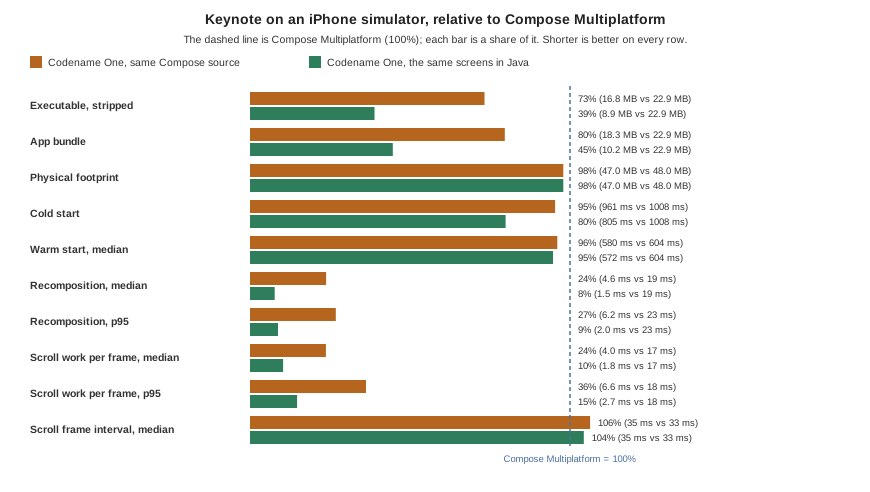
The same Compose code runs in a quarter of the CPU time. A state change is drawn in 4.6 ms against 19.2 ms, and one step of scrolling in 4.0 ms against 17.0 ms. Both keep pace with the display, so the difference is headroom: for heavier screens, older devices and battery.
The executable is 27% smaller (16.8 MB against 22.9 MB) and the bundle 20% smaller, although the Codename One one carries the whole iOS port.
Start-up is faster, 961 ms against 1008 ms cold and 580 ms against 604 ms warm.
Memory is level, 47 MB of physical footprint against 48 MB.
The benchmark, its method and how to run it are in scripts/kmp-bench in the
Codename One repository. These are simulator numbers; they show where each
runtime spends CPU in identical code, not a device’s frame rate.
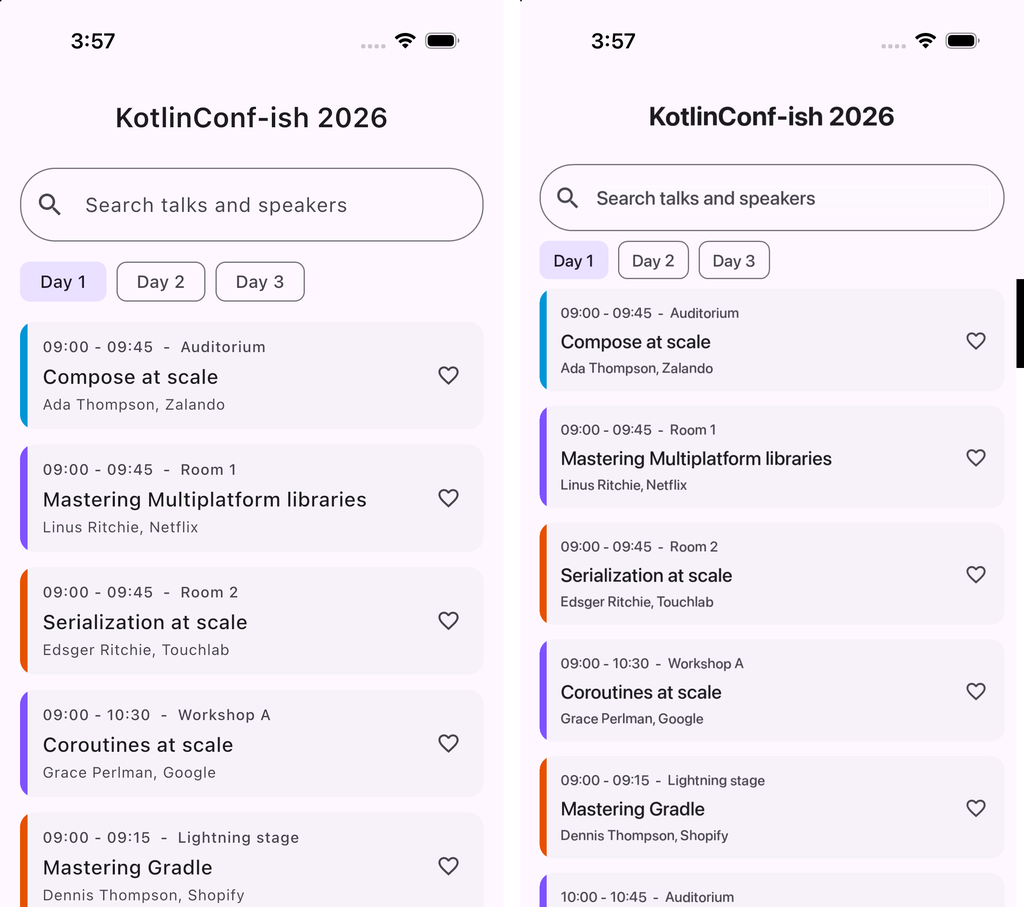
Beyond size, the composables become real components, so a Compose screen
uses the platform’s own text input and accessibility, can sit inside a
Codename One form next to any other component, and reaches every Codename One
API directly — push notifications, in-app purchase, the native maps, the
backend — with no expect/actual plumbing per platform.
The same build also reaches targets Compose Multiplatform’s UI doesn’t run
on: watchOS, tvOS, and Windows, Linux and macOS as native binaries with no JVM
to install. The Codename One backend runs the same Kotlin on the server, so a
data class or validation rule in commonMain is shared by the app and the
service that feeds it.
Dropping to Java where it pays
A Compose screen and a Codename One screen are the same kind of object at run
time — a component in a form — so an application doesn’t have to choose one
for all its screens. Kotlin calls every Codename One class directly, and a Java
class can sit beside the composables in the same module. Compose
Multiplatform has no such floor: below commonMain there is a different
language and a different UI toolkit on every platform.
The benchmark measures what that floor is worth. JavaBench.java in
scripts/kmp-bench/app/java is the Keynote screens written against Codename
One directly, timed by the same steps. Its list is an InfiniteContainer,
which makes cards a batch at a time as the scroll nears the end — as
LazyColumn composes only what comes into view — and rebinds a card it has
already made instead of building another. It ships no Kotlin standard
library, no Compose runtime and no coroutines:
A state change is drawn in 1.5 ms, thirteen times faster than Compose Multiplatform’s 19.2 ms and three times faster than the Compose build.
A step of scrolling takes 1.8 ms, against 17.0 ms for Compose Multiplatform.
The executable is 8.9 MB, 39% of Compose Multiplatform’s 22.9 MB, and the bundle is 10.2 MB.
Memory is level with both, at 47 MB.
The time gap is mostly the price of the reactive model. A composition records the state it read, compares what it emits against what it emitted last time and applies the difference; an imperative update sets three labels on a card that already exists. The size gap is Kotlin: the Java build carries neither the Kotlin standard library nor the Compose runtime.
Nor does the declarative form buy readability. Here is one session card both ways. The Compose version, from the benchmark:
@Composable
fun SessionCard(time: String, title: String, speaker: String,
                favorite: Boolean, onFavorite: () -> Unit) {
    Card(Modifier.fillMaxWidth()) {
        Row(verticalAlignment = Alignment.CenterVertically) {
            Column(Modifier.weight(1f).padding(12.dp)) {
                Text(time, style = MaterialTheme.typography.labelMedium)
                Text(title, style = MaterialTheme.typography.titleMedium)
                Text(speaker, style = MaterialTheme.typography.bodySmall)
            }
            IconButton(onFavorite) {
                Icon(if (favorite) Icons.Default.Favorite else Icons.Default.FavoriteBorder, null)
            }
        }
    }
}
And in Codename One, with the look in the theme’s CSS where a designer can change it:
public class SessionCard extends Container {
    public final Label time = new Label("", "SessionTime");
    public final Label title = new Label("", "SessionTitle");
    public final Label speaker = new Label("", "SessionSpeaker");
    public final Button heart = new Button("", "Favorite");

    public SessionCard(Runnable onFavorite) {
        super(new BorderLayout(), "SessionCard");
        add(BorderLayout.CENTER, BoxLayout.encloseY(time, title, speaker));
        add(BorderLayout.EAST, heart);
        heart.addActionListener(e -> onFavorite.run());
    }

    public void bind(String when, String talk, String by, boolean favorite) {
        time.setText(when);
        title.setText(talk);
        speaker.setText(by);
        FontImage.setMaterialIcon(heart, favorite
                ? FontImage.MATERIAL_FAVORITE : FontImage.MATERIAL_FAVORITE_BORDER);
    }
}
The Java card says what happens and when: the components are made once,
bind fills them, a tap calls back as onFavorite does. Nothing reruns
behind the code’s back, so a breakpoint in bind stops exactly when a card
shows a session — the question a recomposition count leaves open.
It tests as directly. A component is an ordinary object, so a unit test makes one, binds it and presses its button, with no test rule, semantics tree or tags kept only for the test:
import com.codename1.testing.AbstractTest;
import com.codenameone.developerguide.kmp.SessionCard;

public class SessionCardTest extends AbstractTest {
    @Override
    public boolean runTest() throws Exception {
        int[] taps = {0};
        SessionCard card = new SessionCard(() -> taps[0]++);
        card.bind("09:00  -  Hall A", "Keynote", "A. Speaker, Codename One", false);

        assertEqual("Keynote", card.title.getText());

        card.heart.released();   // a tap
        assertTrue(taps[0] == 1, "the heart reports the tap");
        return true;
    }
}
The card’s components are public final fields, so the test reads them
directly. It
runs in the simulator with mvn cn1:test, like every other Codename One test.
A hot list, a custom chart or a screen that has to fit a watch is where the imperative path pays first; nothing stops a team writing every screen that way.
One platform API on every target
The expect/actual declarations a KMP project writes per platform are
mostly calls Codename One already makes the same everywhere. Composable code
calls each of them as an ordinary Kotlin function:
Push notifications, in-app purchase and subscriptions, and home-screen widgets and live activities.
Crash protection and App Shield hardening, as build options rather than per-platform SDKs.
Storage, SQLite, networking, the camera, location, sharing and the native maps, with one implementation per platform maintained in Codename One.
The targets go past phones and desktops too: Apple Watch and Wear OS from the same project as the phone application, CarPlay and Android Auto, tvOS, embedded Linux boards with no X11 and no JVM, the browser, and the server-side backend.
Quick start
Create a Codename One application (for example at https://start.codenameone.com) and import the KMP project into it:
mvn cn1:import-kmp-project -Dcn1.kmp.import=/path/to/MyKmpApp
The goal copies the module’s commonMain and its JVM source set (jvmMain,
else desktopMain) into common/src/main/kmp, and rewrites the
application’s main class so that it shows the module’s root composable. Two
options cover projects it can’t decide alone:
-Dcn1.kmp.module=composeAppThe module to import, when more than one has a
src/commonMain.-Dcn1.kmp.entry=com.example.AppThe fully qualified root composable, when
commonMaindeclares no single@Composable fun App().
The Android and iOS source sets aren’t copied. They call those platforms
directly, and Codename One supplies both. A JVM file whose main opens a
desktop window (application { Window { App() } }) is left out too: the
generated main class starts the application instead.
Then build and run as usual:
mvn cn1:run                         # the simulator
mvn cn1:build -Dcodename1.platform=ios   # an iOS build on the build server
Gradle
A Gradle application needs the Compose compiler plugin,
id("org.jetbrains.kotlin.plugin.compose") at the application’s Kotlin
version, applied next to the Codename One plugin. The build stops with the
line to add when it’s missing.
convert-to-gradle writes it for you. The Codename One settings plugin adds
Google’s Maven repository, limited to the androidx.* groups, which is where
the Compose runtime is published.
Placing the sources by hand
common/src/main/kmp/commonMain/kotlin and common/src/main/kmp/jvmMain/kotlin
are ordinary Kotlin source roots. The archetype’s compose profile turns on
whenever common/src/main/kmp exists: it adds codenameone-compose-compat,
applies the Compose compiler plugin and sets both kotlinc’s jvmTarget and
javac’s source and target to 11, because the Compose runtime’s inline functions are
JVM 11 bytecode. The Compose compiler plugin’s version must equal the Kotlin
version, which is why both come from one property.
The entry point
A composition is shown in a ComposeForm, or embedded anywhere as a
ComposeView, which is an ordinary Codename One Container:
class MyApp : Lifecycle() {
    override fun runApp() {
        ComposeForm { LayoutScreen() }.show()
    }
}
Or beside other components:
val form = Form("Mixed", BorderLayout())
form.add(BorderLayout.NORTH, Label("Codename One"))
form.add(BorderLayout.CENTER, ComposeView { ListScreen() })
form.show()
Both live in com.codename1.compose. From Java, a ComposeView is created
by a small Kotlin function that returns one, since a composable lambda can
only be written in Kotlin.
How the build works
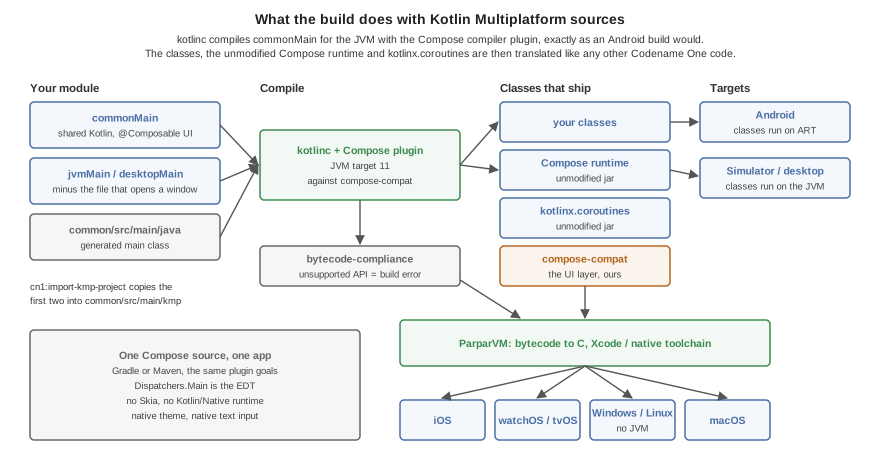
There is no transpiler. kotlinc compiles the sources for the JVM, with the
Compose compiler plugin, against compose-compat. The application’s
classes, the unmodified Compose runtime, kotlinx.coroutines and
compose-compat are then handled like any other Codename One code: the
bytecode compliance check runs over them, and ParparVM translates them to C
for iOS, the watch, TV and the native desktop targets. Android runs the
classes on ART and the simulator on the JVM.
androidx/compose/ is never relocated, not even when the
Android compatibility layer is active in the
same application: the Compose runtime the application was compiled against
is the one it runs.
How a composable becomes components
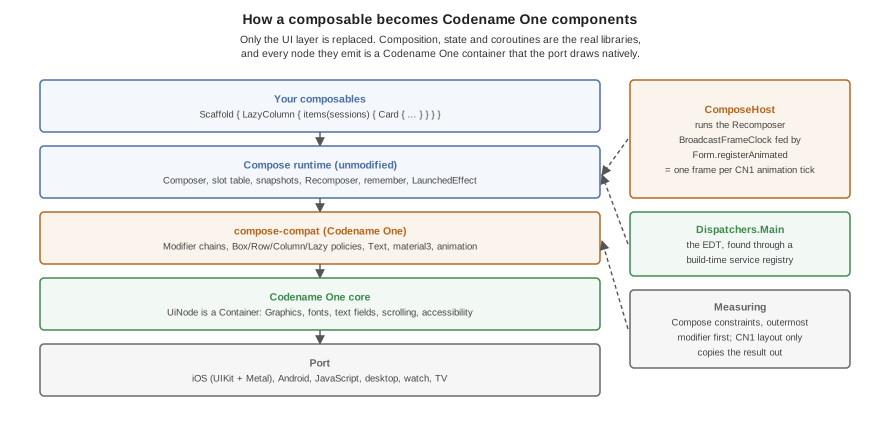
Composition, snapshots, remember, LaunchedEffect and recomposition are
the real Compose runtime’s. What it emits are UiNode objects, each a
Codename One Container:
Measuring is Compose’s. A node walks its modifier chain outermost first under Compose constraints (
Box,Row/Columnand leaf policies). The Codename One layout pass only copies the result out, soweight,fillMaxWidth,wrapContentSizeand intrinsic padding behave as they do in Compose.Frames come from the Codename One animation loop.
ComposeHostruns theRecomposerwith aBroadcastFrameClockthatForm.registerAnimatedticks, sowithFrameNanos,animateFloatAsStateandAnimatedVisibilityrun in step with every other Codename One animation, and an idle screen costs nothing.Dispatchers.Mainis the EDT. kotlinx.coroutines finds its main dispatcher through a service file. There is no service loader on the device, so the translator compiles that file into a registry at build time.Lazy lists compose what’s in view.
LazyColumnandLazyRowcompose each item as its own composition when it comes within a quarter of a view of the window and dispose of it half a view past it.scrollToItemworks on items that were never measured.The system bars are respected.
TopAppBar,CenterAlignedTopAppBarandNavigationBarpad themselves by the display’s safe area, read when they’re measured, so a notch or a home indicator that the native view reports late still moves them.
Supported API
compose-compat covers what typical application screens use. Anything else
is a build error (see below), never a silent no-op.
- Layout
Box,Row,Column,Spacer,LazyColumn,LazyRow,Arrangement,Alignment,PaddingValues,Canvas.- Modifiers
size (
size,width,height,fillMax*,wrapContent*,In,required,defaultMinSize,aspectRatio),padding,offset,weight,background,border,clip,alpha,drawBehind,clickable,combinedClickable,verticalScroll,horizontalScroll,testTag.- Text
Text,BasicText,TextField,OutlinedTextField,BasicTextField,TextStyle,FontWeight, the Material 3 type scale.- Material 3
MaterialThemeandColorScheme,Scaffold,Surface,TopAppBar,CenterAlignedTopAppBar,NavigationBarandNavigationBarItem,Card,ElevatedCard,OutlinedCard,Button,ElevatedButton,FilledTonalButton,OutlinedButton,TextButton,IconButton,FloatingActionButton,ExtendedFloatingActionButton,AssistChip,FilterChip,Checkbox,Switch, the progress indicators, dividers,IconwithIcons.Filled,Icons.OutlinedandIcons.AutoMirrored.- Animation
AnimatedVisibility,animateFloatAsState,animateDpAsState,animateColorAsState,rememberInfiniteTransitionwithanimateFloat.- Images
ImagewithImageVectorandContentScale.
LazyColumn(reverseLayout = true) throws: it’s not implemented.
Unsupported API is a build error
The bytecode compliance check runs over the compiled classes. A composable or
modifier that compose-compat doesn’t provide is a reference to something
that doesn’t exist, and the build reports it under its original name with
the source line, before anything is translated. Port such a screen by
replacing the call, or by writing the missing piece in the application with
the supported building blocks — most custom components are a Box with a
drawBehind.
Testing
Compose screens are tested the way any Codename One screen is: a
ComposeView is a component, so screenshot tests and the component inspector
see it like any other. The Codename One test application
(scripts/hellocodenameone) carries Compose screens under
common/src/main/kmp — layout and modifiers, typography and buttons, a
Scaffold over a LazyColumn of cards, and state with LaunchedEffect and
AnimatedVisibility — and its KmpCompat* screenshot tests compare them on
every platform the test suite runs on.
Troubleshooting
- The Compose compiler plugin reports a Kotlin version mismatch
The plugin and kotlinc are different versions. Take both from one property.
- kotlinc or javac reject JVM 11 bytecode or inline functions
The module is compiling below JVM 11. The
composeprofile sets it: check thatcommon/src/main/kmpexists and that nothing in the pom overrideskotlin.compiler.jvmTarget.- The Gradle build stops asking for
org.jetbrains.kotlin.plugin.compose Add the plugin line shown in the Gradle section.
Incremental compilation failedafter changing the Kotlin versionKotlin’s incremental cache from the old compiler is in
target. Build once withclean.