MediaManager and MediaPlayer
MediaPlayer is a peer component, understanding this is crucial if your application depends on such a component. You can learn about peer components and their issues here.The MediaPlayer allows you to control video playback. To use the MediaPlayer you need to first load the Media object from the MediaManager.
The MediaManager is the core class responsible for media interaction in Codename One.
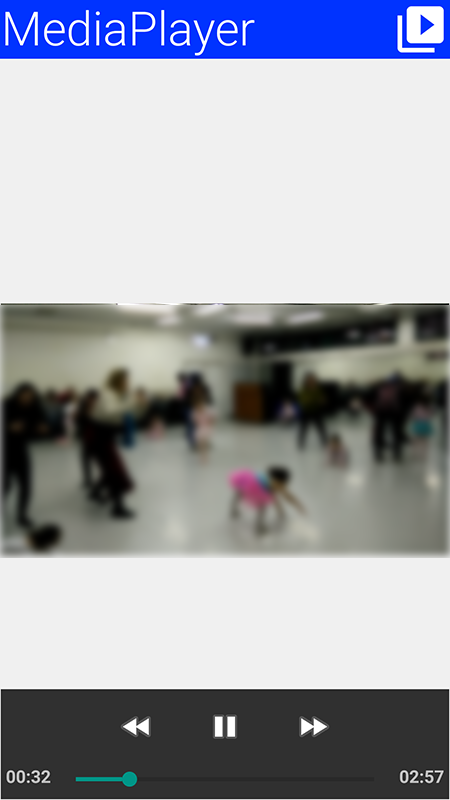
MediaManager.In the demo code below you use the gallery functionality to pick a video from the device’s video gallery:
final Form hi = new Form("MediaPlayer", new BorderLayout());
hi.setToolbar(new Toolbar());
Style s = UIManager.getInstance().getComponentStyle("Title");
FontImage icon = FontImage.createMaterial(FontImage.MATERIAL_VIDEO_LIBRARY, s);
hi.getToolbar().addCommandToRightBar("", icon, (evt) -> {
    Display.getInstance().openGallery((e) -> {
        if(e != null && e.getSource() != null) {
            String file = (String)e.getSource();
            try {
                Media video = MediaManager.createMedia(file, true);
                hi.removeAll();
                hi.add(BorderLayout.CENTER, new MediaPlayer(video));
                hi.revalidate();
            } catch(IOException err) {
                Log.e(err);
            }
        }
    }, Display.GALLERY_VIDEO);
});
hi.show();
PCM Audio Buffers, Mixing, and Effects
AudioBuffer stores raw interleaved float PCM samples in the [-1, 1] range, and WAVWriter writes those samples to a WAV file.
The portable live PCM source in Codename One is microphone capture: create an AudioBuffer with MediaManager.getAudioBuffer(…), then create a recorder with MediaRecorderBuilder.redirectToAudioBuffer(true). The builder’s path value is the buffer key in this mode; it isn’t a file path.
String bufferKey = "voice-buffer";
AudioBuffer livePcm = MediaManager.getAudioBuffer(bufferKey, true, 8192);
livePcm.addCallback(buffer -> {
    float[] frame = new float[buffer.getSize()];
    buffer.copyTo(frame);
    // Process or copy this frame before the next callback arrives.
});

Media recorder = MediaManager.createMediaRecorder(
        new MediaRecorderBuilder()
                .path(bufferKey)
                .samplingRate(44100)
                .audioChannels(1)
                .redirectToAudioBuffer(true));
recorder.play();

// Later:
recorder.cleanup();
MediaManager.releaseAudioBuffer(bufferKey);
When the VideoIO API is available, it can also produce PCM from a prerecorded video file. VideoIO.getVideoIO().openReader(path).readAudio() returns the decoded audio track as an AudioBuffer, so video audio can be mixed or processed with the same APIs shown below. VideoIO support is platform-gated with VideoIO.isSupported(), and JavaScript currently reports no decoded audio track even though frame decoding and encoding are supported.
Codename One still doesn’t expose a standalone portable decoder that converts an arbitrary prerecorded audio-only file, such as MP3 or AAC, into an AudioBuffer without going through a video container API. Use the normal Media APIs to play those files. If you need offline PCM editing for audio-only formats, decode them before passing samples to Codename One, or add a platform decoder API for that format.
When you need to combine PCM clips before writing or playing them, use AudioMixer. It creates a sample-accurate timeline on one sample clock. Each track must use the same sample rate and channel count as the mixer. Track offsets are supplied in milliseconds and are rounded to the nearest sample frame on the mixer clock; if you already know the exact frame position, use addTrackAtFrame(…).
The mixed buffer is clipped to the normalized PCM range [-1, 1], so it can be passed directly to WAVWriter. The mixer doesn’t resample or convert channel layouts; downsample or otherwise convert source buffers before adding them if they’re not already on the target clock.
AudioEffects provides small platform-neutral PCM transforms that compose with the mixer:
AudioBuffer voice = AudioEffects.normalize(livePcm, 0.9f);
AudioBuffer brighter = AudioEffects.equalize(voice,
        0.8f,  // low band gain
        1.0f,  // mid band gain
        1.25f  // high band gain
);

AudioBuffer karaoke = AudioEffects.removeCenter(stereoMusic);
AudioBuffer centeredSpeech = AudioEffects.isolateCenter(stereoInterview);
AudioBuffer voiceEnhanced = AudioEffects.midSide(stereoInterview, 1.4f, 0.6f);
equalize(…) is a simple three-band tone shaper for lightweight cleanup and demos. removeCenter(…), isolateCenter(…), and midSide(…) use classic stereo mid/side processing. They can reduce, isolate, or enhance centered dialog only when the source is stereo and the voice is actually centered. These methods aren’t source-separation, speech-isolation, or noise-reduction APIs.
AudioMixer and the simple buffer-wide AudioEffects operations use the com.codename1.util.Simd float-array API internally when the current platform supports it. Stateful filters, such as the equalizer, stay scalar because each sample depends on the previous filter state. You can force scalar behavior for diagnostics with AudioMixer.setSimdOptimizationsEnabled(false) or AudioEffects.setSimdOptimizationsEnabled(false).