Codename One answers three questions about the surrounding devices, under
com.codename1.nearby: how far away one is and in which direction
(com.codename1.nearby.ranging), which one is yours
(com.codename1.nearby.companion), and how to send it something
(com.codename1.nearby.transport).
They’re three packages rather than one because referencing a package is the
whole opt-in. The build server decides what native machinery an app gets by
scanning bytecode for these prefixes, so an app that only wants to know how far
away its keyring tag is pays for ranging alone — no Play Services dependency,
no local network prompt, no companion permissions. Referencing
com.codename1.nearby itself costs nothing; it holds only the shared value
types.
| Capability | iOS | Android | Simulator and desktop | JavaScript |
|---|---|---|---|---|
Precision ranging, peer to peer | yes (U1 chip, iPhone 11 and later) | yes (UWB hardware) | simulated | simulated |
Ranging an accessory | yes (Nearby Interaction Accessory Protocol) | yes (join the session it names) | simulated | simulated |
Direction as well as distance | where the hardware provides it | where the hardware provides it | simulated | simulated |
Companion association | yes (iOS 18 and later) | yes (Android 8 and later) | simulated | simulated |
Presence notifications | — | yes (Android 12 and later) | simulated | simulated |
Device-to-device transport | Apple devices only | Android devices only | simulated loopback | simulated loopback |
Connection authentication token | — | yes | — | — |
Branch on the capability queries — Ranging.isSupported(),
Ranging.getCapabilities(), CompanionDevices.isSupported(),
NearbyTransport.isSupported() — rather than on platform detection. Ranging in
particular is absent on plenty of current phones, so treat it as an enhancement
to a feature that also works without it rather than as the feature itself.
Every callback in this family arrives on the EDT.
Three Things Worth Knowing Before You Design Around This
The transport doesn’t cross ecosystems. Underneath are Google’s Nearby
Connections on Android and Apple’s MultipeerConnectivity on iOS, which share no
wire protocol. An iPhone and an Android phone will never discover each other
here, however the app is written. Nothing in the API hides that, because an API
that looked portable and never found the peer would be worse than an honest
limitation. When both ends aren’t the same platform, two things that do
work across the divide are already in the framework:
com.codename1.bluetooth.le.L2capChannel for a raw byte stream over BLE, and
com.codename1.io.bonjour plus ordinary sockets when both devices share a
Wi-Fi network.
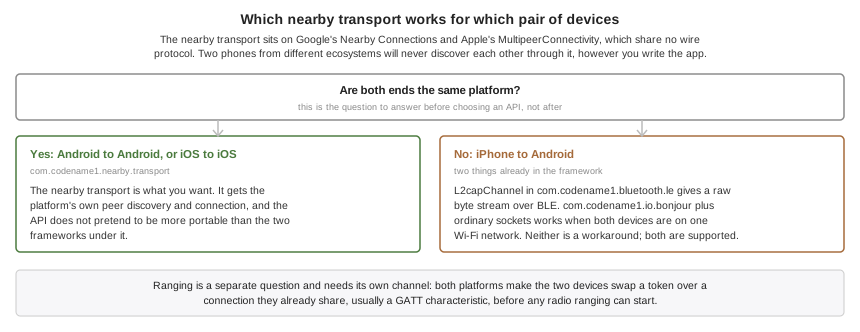
Ranging needs com.codename1.bluetooth, or something like it. Both platforms
require the two devices to swap a token over a channel they already share
before any radio ranging can begin. A GATT characteristic is the usual channel.
The two APIs are designed to be used together.
Background ranging is opt-in and needs Apple’s permission. On iOS it requires
the com.apple.developer.nearby-interaction entitlement, which has to be
enabled on the App ID before it will sign. Codename One never injects it on its
own, because an entitlement the App ID doesn’t carry fails codesigning with an
error naming the entitlement and not the reason it appeared. Set
ios.nearby.background=true once the capability is enabled, and note that
RangingCapabilities.isBackgroundRangingSupported() reports false until then.
Ranging: How Far, And Which Way
Ultra-wideband measures distance by timing a radio round trip, which is worth about ten centimeters. That’s a different kind of answer from a Bluetooth signal-strength estimate, which is worth a few meters on a good day and swings when someone puts a hand over the phone.
A session is prepared, then started. There’s no honest one-call form, because the token exchange has to happen between the two:
if (!Ranging.isSupported()) {
    return;                       // no ultra-wideband radio on this device
}
Ranging.prepareSession(RangingRole.CONTROLLER).onResult((session, err) -> {
    if (err != null) {
        return;
    }
    // 1. publish our token however the two apps already talk
    characteristic.write(session.getLocalToken().toByteArray());

    // 2. when theirs arrives, start measuring
    session.addRangingListener(new RangingAdapter() {
        public void updated(RangingUpdate u) {
            if (u.hasDistance()) {
                label.setText(Math.round(u.getDistance(RangingUnit.CENTIMETERS)) + " cm");
            }
            if (u.hasDirection()) {
                arrow.setAngle(u.getAzimuth());
            }
        }
    });
    session.start(RangingToken.fromByteArray(theirToken));
});
One session ranges one peer. That’s a hard limit of Apple’s
NINearbyPeerConfiguration rather than a simplification, so an app tracking
several peers prepares several sessions.
Pick a role even though iOS ignores it: Android needs exactly one controller, and choosing costs nothing on the other side.
Every field of a RangingUpdate except the timestamp is optional, and they drop
out independently. A peer directly behind the phone commonly reports a distance
with no direction, and a peer at the edge of range reports neither — so guard
each read with its has method rather than assuming a sentinel. There’s no
zero-argument getDistance(): meters read as feet is the accident that
convention exists to prevent.
Azimuth is degrees in the range -180 to 180, zero straight ahead and positive to
the right; elevation is -90 to 90, positive above the device. Android reports
both angles natively. iOS reports a unit direction vector instead and the port
derives the angles from it, so the same code reads the same on both;
getDirectionVector() still hands back the untouched vector where there is one.
A peer that walks away produces peerRemoved and the session stays alive, ready
to resume if it comes back — gray the UI out rather than tearing it down. A
session that dies for good produces invalidated and can’t be restarted.
Ranging An Accessory
A third-party ultra-wideband tag isn’t a phone, and the two platforms disagree about what talking to one means.
On iOS there is a defined handshake. The accessory publishes a blob of configuration data over its own channel, and the session answers with bytes that have to travel back before the accessory begins ranging:
Ranging.prepareSession(RangingRole.CONTROLLER).onResult((session, err) -> {
    if (err != null) {
        return;
    }
    session.addRangingListener(listener);
    session.startAccessory(configurationFromTheAccessory)
            .onResult((shareable, failure) -> {
                if (failure == null) {
                    characteristic.write(shareable);   // forward it back
                }
            });
});
Android has no equivalent protocol. There, an accessory simply names the channel
and session to join, so build a token from what it published and call start:
RangingToken tag = RangingToken.forUwbAddress(address, channel, preambleIndex,
        sessionId, sessionKey);
session.start(tag);
startAccessory fails with NearbyError.NOT_SUPPORTED on Android, and a token
built by forUwbAddress is rejected on iOS. A token is opaque and never
portable between the two platforms; RangingToken.fromByteArray says so rather
than handing garbage to a native call.
Companion Devices: Which One Is Yours
Associating isn’t pairing. It’s the app telling the operating system that a particular accessory belongs to it, through a chooser the OS draws and the user picks from, and getting privileges back that an ordinary Bluetooth scan doesn’t carry: the OS watches for the device instead of the app, scanning stops needing location permission on Android, and the user sees one honest prompt naming one device.
AssociationRequest request = new AssociationRequest.Builder()
        .addFilter(DeviceFilter.bleService("180D"))
        .build();
CompanionDevices.associate(request).onResult((device, err) -> {
    if (err == null) {
        Preferences.set("sensor", device.getId());
        CompanionDevices.startObservingPresence(device.getId());
    }
});
An association outlives the app: it survives restarts and reboots, and ends only
when the app drops it, the user revokes it in system settings, or the app is
uninstalled. Persist CompanionDevice.getId() and look the device up again on
the next launch instead of asking the user to pick it twice.
CompanionDevice.getAddress() is the same handle
BluetoothLE.getPeripheral(String) takes, which is what makes an association
useful rather than decorative.
Ask for CompanionProfile.GENERIC unless the device is a watch, a
head-mounted display or a computer. A profile is a request for elevated
privileges as much as a description, and the specific ones cost the user a
stronger prompt. The build scanner can’t see which profile a request asks for,
because it arrives as an enum constant, so name it yourself: set
android.nearby.watchProfile, android.nearby.computerProfile or
android.nearby.glassesProfile to true for whichever of
CompanionProfile.WATCH, COMPUTER and GLASSES you use. Each declares that
profile’s own permission, and without it Android rejects the association
before the chooser opens — which looks to the user like nothing happened.
Profiles arrived at different Android versions: WATCH at 12, COMPUTER at
13, GLASSES at 14. Asking for one the running device doesn’t have fails with
NearbyError.NOT_SUPPORTED rather than associating without it. A profile is a
request for elevated privileges, and an association that lacks them without
saying so is worse than one that didn’t happen. Fall back to
CompanionProfile.GENERIC yourself if that’s what you want.
Two platform differences to design around. Presence notifications are Android
only: AccessorySetupKit reports an accessory being added to or removed from the
app’s set, which isn’t the same event as it coming into range, so
startObservingPresence answers false on iOS and an app that needs live
proximity there should scan with com.codename1.bluetooth. And AccessorySetupKit
only ever discovers Bluetooth services an app declared up front, so set
ios.nearby.accessoryServices to a comma-separated list of the service UUIDs
your accessories advertise — without it the picker finds nothing on iOS, and
the build log says so.
Register the presence listener from your app’s init() rather than from a form.
Android may start the process to deliver a sighting and nothing else, with no
form on screen, and a listener that a form registers doesn’t exist yet at that
point. An event that arrives before any listener is registered is held and
replayed to the first one that registers, so a wake-up isn’t lost, but only the
64 most recent are kept.
Presence doesn’t run your code the moment a device comes into range. Android
can start the process for the companion service alone, and Codename One
doesn’t run an application’s init() there — a form has nowhere to live in a
service. Your listener hears about the sighting, in order, when the app next
initializes. Treat presence as a record of what happened while the app was away rather than
as a background execution mechanism; for work that must happen without the
app, use the background features in the notifications chapter.
Transport: Sending Something
NearbyTransport.addTransportListener(new TransportAdapter() {
    public void endpointFound(Endpoint e) {
        NearbyTransport.requestConnection(e, "Shai's phone");
    }
    public void connectionRequested(IncomingConnection r) {
        // show r.getAuthenticationToken() on both screens first
        r.accept();
    }
    public void connected(Endpoint e) {
        NearbyTransport.send(e, Payload.fromBytes(data));
    }
    public void payloadReceived(Endpoint e, Payload p) {
        process(p.getBytes());
    }
});
NearbyTransport.startAdvertising("chat", "Shai's phone", TransportStrategy.CLUSTER);
NearbyTransport.startDiscovery("chat", TransportStrategy.CLUSTER);
getAuthenticationToken() is a short string both devices derive from the
connection’s own key exchange, so a device relaying between them can’t make both
ends show the same value. Showing it on both screens and asking whether they
match is what makes the pairing trustworthy; skipping that step is a choice to
trust whoever answered first.
It’s empty on iOS. MultipeerConnectivity exposes nothing to derive one from, and a token computed from the service name and the display names would be one a relay can reproduce at both ends — a check that looks like a defense and isn’t. An iOS app that needs to know who it’s talking to has to establish that itself, over a channel the relay doesn’t control.
Answer every connectionRequested. You don’t have to answer inside the callback — showing the token and waiting for the user is the whole point, and the
request stays live until you call accept() or reject() — but a request
that’s never answered at all holds radio resources open on both sides until the
far end times out. If nothing is listening when a request arrives, it’s
rejected for you, so the far end learns immediately instead of waiting.
The strategy you pass to startAdvertising and startDiscovery is a limit, not
a hint. Under POINT_TO_POINT a second connection is refused with
NearbyError.BUSY on either side, and under STAR the discovering side holds
one connection while the advertising side accepts many. CLUSTER is the only
one with no limit. Disconnect before connecting elsewhere.
On iOS, list your service ids at build time. The service id becomes a Bonjour
service type there, and iOS browses only the types an app declared in its
Info.plist — a type that isn’t declared produces no peers and no error. The
build can’t see the strings you pass to startAdvertising, so name them in
ios.nearby.serviceType as a comma-separated list. Miss one and the call fails
with a message telling you which id to add, which beats an app that finds
nothing and says nothing.
The platform restricts the type to fifteen characters of lowercase letters,
digits and hyphens, so a reverse-DNS string that’s legal on Android is folded
to fit: com.example.chat becomes something like com-exampl-jd3q. The last
four characters are derived from the whole id, because the fold alone is lossy — com.example.chat and com.example.charts both reduce to
com-example-cha, and without the suffix two unrelated apps would discover
each other’s peers. Case doesn’t split a service: Chat and chat are the
same id and get the same type. The build log names every type it declared.
Byte payloads are capped at NearbyTransport.getMaxPayloadSize(), a few
kilobytes on both platforms; anything larger goes as a file payload, which
streams and reports progress. Call NearbyTransport.stop() when the feature’s
UI closes — both platforms keep the radios busy until something says stop.
A terminal PayloadStatus.SUCCESS means the bytes reached the peer, not that
they were handed to the radio. Watch for it rather than treating a resolved
send() as delivery: the resource resolves when the platform accepts the
payload, which is earlier. If the peer disappears between the two you get
FAILURE, so every send reaches one terminal status or the other.
Developing Without Hardware
The simulator, the desktop ports and the JavaScript port carry a working
implementation rather than a stub, and report
NearbyAvailability.LOCAL_ONLY so an app can tell the developer its peers are
not real. Almost none of a ranging feature is about radios — laying out the
screen, animating an arrow, deciding what to show while the direction drops out,
handling the peer walking away — and a port that answered NOT_SUPPORTED would
make every line of it testable only on a pair of phones.
Two things it does that a mock wouldn’t. It never completes inline, because code written against an implementation that answers instantly races the moment it meets one that doesn’t. And its peers move, along a bounded random walk, because a constant 1.5 m would let an app ship with a distance label that flickers unreadably against real hardware.
What it won’t do behind your back is drop a peer or suspend a session at random. Those are real events an app must handle, but a simulation that fired them unpredictably would make every test using it flaky, so they’re controls the simulator drives instead.
Build Hints
| Hint | Default | What it does |
|---|---|---|
| derived from the package name | Comma-separated list of the service ids the app passes to |
| unset | Comma-separated Bluetooth service UUIDs the association picker may discover. Required for the picker to find anything on iOS. |
|
| Requests the |
|
| Declares the watch companion profile permission, for an app that associates with |
|
| The same for |
|
| The same for |
Everything else is automatic. Referencing a package links its frameworks, injects its privacy strings and adds its permissions; referencing none of them changes nothing about the app.