Codename One includes two full-document editors. Use
RichTextArea when users
compose formatted prose and the application stores HTML. Use
CodeEditor for source code,
configuration files, queries, or any text that benefits from syntax highlighting, line numbers,
completion, and diagnostics. Both are lightweight Codename One components and share the same editing,
selection, scrolling, undo, and platform-input infrastructure. When you only need to display
formatted text — no editing — use
RichTextComponent, the
read-only, word-wrapping renderer described later in this chapter; it reuses the same document model
and styling engine.
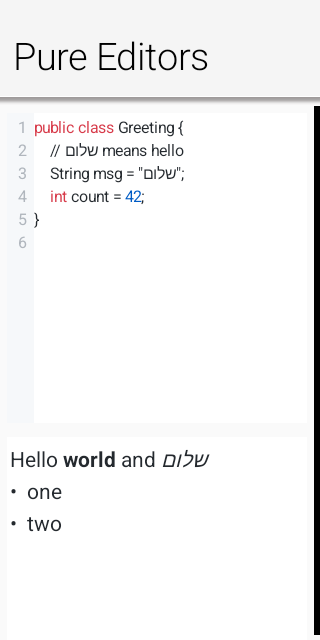
Editor architecture and backend selection
Both components extend
AbstractEditorComponent.
The public components send semantic commands and queries to one of two backends:
A port can provide a native peer through
CodenameOneImplementation.createNativeEditorPeer(…).Otherwise the components use the pure Codename One engine in
com.codename1.ui.editor. It paints text, selections, carets, gutters, diagnostics, and completion UI withGraphicsandFont, and it drives keyboard and IME input through the low-level text-input contract.
Backend selection is transparent to application code. isNativeEditor() reports the native-peer case.
The pure engine is the default renderer on every platform; there is no browser fallback.
Editor initialization can be asynchronous for a native peer. Commands issued immediately after
construction are queued. Use onReady(Runnable) or a ready listener when work must run only after the
backend exists. Reads use callbacks (getHtml(…), getText(…), and getCursorPosition(…)) so
the same application code works with either backend.
The editor package
The com.codename1.ui.editor package separates editing mechanics from feature-specific rendering.
EditorDocument owns normalized UTF-16 text and line offsets. EditorView owns the caret, selection,
composition range, scrolling, hit testing, clipboard commands, and undo transactions. CodeView and
RichView extend that surface instead of creating independent input implementations.
The code layer adds incremental tokenization, palettes, completion, diagnostics, indentation, and the
line-number gutter. The rich layer keeps InlineStyles, RichBlocks, hyperlink targets, and image
runs parallel to the text. Every mutation, including undo and redo, updates those parallel models in
the same transaction. HtmlImporter and HtmlSerializer are model adapters; they don’t implement a
second HTML tokenizer. Fragment parsing and entity decoding go through the framework’s tolerant
HTMLParser, which extends XMLParser. The parser’s fragment mode retains modern attributes such as
data-* while the legacy HTMLComponent path keeps its existing validation behavior.
EditorHost is the narrow bridge between a view and its owner. It starts and stops platform text
input, pushes updated editing state to the port, and reports semantic editor events. This split lets
the same document and interaction engine run inside the full editors and inside the lightweight
EditField component.
Focus, change events, and editability
focusEditor() moves focus into the editing surface and opens the virtual keyboard when appropriate.
blurEditor() relinquishes focus and dismisses the active platform input session. setEditable(false)
keeps the document visible while preventing edits; CodeEditor.setReadOnly(true) is the code-oriented
equivalent.
Register an addChangeListener(…) listener to observe user edits and programmatic mutations. Avoid
saving on every keystroke when serialization or storage is expensive; debounce the listener, then read
the document through the asynchronous callback.
Platform text input and input methods
The pure editor doesn’t treat a key release as text. Modern input can come from a virtual keyboard,
autocorrect, dictation, handwriting, a hardware keyboard, or an input method editor (IME). The platform
therefore drives a
TextInputClient with
semantic operations:
commitText(…)inserts final text, including accepted autocorrect and dictation results.setComposingText(…)replaces the current marked-text range while an IME is still composing.finishComposing()finalizes that range.deleteSurroundingText(…)implements soft-keyboard deletion without manufacturing key codes.onKeyCommand(…)carries navigation, selection, clipboard, undo, and redo commands.Geometry methods map UTF-16 offsets to caret and selection rectangles so native candidate windows, selection handles, and accessibility UI align with the lightweight rendering.
TextInputConfig tells the
port which keyboard constraint, return-key action, autocorrection, capitalization, and multiline
behavior the client needs. Rich prose enables normal language assistance; source editing disables
autocorrection and automatic capitalization. The immutable
TextInputState returns the
authoritative text, selection, and composing range to the port after each edit.
TextInputState.getSelectionStart() and getSelectionEnd() return an ordered range for existing
input bridges. getSelectionAnchor() and getSelectionFocus() retain direction: a backward
selection has an anchor greater than its focus. The Apple bridge uses those directional getters;
UIKit normalizes its native range, while macOS retains the anchor alongside AppKit’s ordered range.
On macOS, pure editors receive word movement and deletion, visual line and paragraph boundaries,
document boundaries, and page movement through onKeyCommand(…). AppKit interprets the key event first. Paragraph boundary commands use MOD_ALT with KEY_HOME or KEY_END.
Paragraph selection uses MOD_ALT with KEY_UP or KEY_DOWN and retains MOD_SHIFT. The editor owns
its visual line layout; the port waits for its updated state before replaying later native edits.
Logical word commands carry MOD_ALT; spatial AppKit word-left/right commands use KEY_WORD_LEFT and
KEY_WORD_RIGHT and follow the rendered directional runs. Document Home/End commands carry MOD_CTRL, and selection commands
also carry MOD_SHIFT. KEY_SCROLL_PAGE_UP and KEY_SCROLL_PAGE_DOWN scroll the viewport without changing the caret or
selection; they’re distinct from caret-moving KEY_PAGE_UP and KEY_PAGE_DOWN, which use cumulative
line heights and visual columns for rich content. Fallback geometry snapshots sample around the active
selection focus, including backward selections. Word navigation classifies Unicode letters, decimal
digits and underscore consistently across ports. Combining marks inherit their base character’s
classification, so emoji variation selectors stay attached during word deletion. It keeps surrogate pairs intact. It doesn’t perform dictionary segmentation. Boundary word deletions are no-ops.
Character movement remains on the native composed-character path so accents, emoji variation
selectors and ZWJ sequences stay intact. Unmodified character movement collapses a selection to its
ordered edge. Select All explicitly creates a forward selection before later shift-arrow commands.
These callbacks don’t change the legacy TextArea editing path.
The native Linux port binds this contract to GTK’s
GtkIMContext. The document stays in the lightweight
canvas while GTK handles composed text and input-method candidate UI. Navigation, deletion,
clipboard, and undo shortcuts are delivered as semantic commands. Native TextField/TextArea
editing takes over the input session when one of those fields starts native editing. A dialog’s
initially focused editor can bind before its native window is shown. Temporary native window focus
loss cancels an unfinished composition and pauses input without discarding the component’s session;
returning to that window resumes it. A GTK text composition ending without a commit restores the original
selection instead of finalizing a deletion. Pure editors implement
TextInputClient.CompositionCancellation to restore rich attributes and undo state as well as text.
Custom clients can implement the same optional contract; the fallback restores text and selection
through their existing composition methods. Explicit commits work whether GTK ends the composition before
or after the commit callback.
Linux queues native input onto the EDT with a session identifier and edit sequence. Callbacks from a
closed session are discarded. The port supplies surrounding text only after Java has acknowledged
all queued edits; an older state update can’t overwrite the latest context. Password and sensitive
fields don’t expose surrounding text to the input method. Autocorrect enables spelling and completion
hints; password, sensitive and non-predictive fields suppress them. Numeric password fields request
GTK’s PIN purpose. Explicit capitalization constraints take precedence over the boolean fallback.
GTK’s character-based
composition and deletion offsets are converted to UTF-16. Deletion requests for a disconnected range
that doesn’t touch the caret are declined because deleteSurroundingText can’t represent them.
Input-method availability depends on the GTK modules installed on the user’s system. Local GTK
composition tests don’t certify every installed input-method engine or a complete language-specific editor.
All offsets in this contract are UTF-16 indices, matching Java String, Android Editable, and Apple
string indices. The document canonicalizes CRLF and bare CR line endings to LF before it updates the
caret, undo history, formatting runs, or platform state. Port authors must deliver composition updates
on the EDT and must stop the input session when the client loses focus.
TextInputClient, TextInputConfig, and TextInputState are general port-level APIs. Custom
lightweight editing components can implement the same protocol, but ordinary applications normally use
RichTextArea or CodeEditor and don’t bind an input client directly.Lightweight fields with EditField
TextArea and TextField keep their established native editing behavior. When an application wants
Codename One to retain control of painting, selection, scrolling, focus, and clipboard handling for a
plain field, use
EditField. It offers an API
familiar from TextField — hint text, constraint, single-line or multiline mode, rows and columns,
data-change listeners, and action events — but renders and edits entirely through the pure
com.codename1.ui.editor engine, with no native peer. Adoption is opt-in per component; existing
TextField and TextArea usages are unaffected.
EditField title = new EditField("", "Title", TextArea.ANY);
title.setSingleLineTextArea(true);
title.setColumns(80);

EditField notes = new EditField();
notes.setSingleLineTextArea(false);
notes.setRows(5);
notes.setColumns(30);
EditField extends EditorView directly, so selection, caret navigation, arrow-key movement, undo,
and clipboard commands are the same mechanics the full editors use. A single-line EditField fires
its action event on the return key and strips embedded newlines; a multiline EditField grows to its
configured row count. Because there is no native overlay, the field behaves identically on every
platform that implements the low-level text-input contract.
Selection, bidirectional text, and scrolling
On touch devices, a tap places the caret, a long press selects a word, and draggable handles adjust the selection. The loupe follows a handle or long-press placement gesture. A normal one-finger drag scrolls the document and doesn’t turn the swipe into a selection. On desktop, mouse drag selects text, double-click selects a word, triple-click selects a line, and the mouse wheel or trackpad scrolls the document. Standard command/control shortcuts handle copy, cut, paste, select all, undo, and redo.
Hebrew, Arabic, and mixed left-to-right/right-to-left lines use Unicode bidirectional layout. Glyph painting, hit testing, caret movement, and selection rectangles share the same visual runs. Set the component’s RTL flag to choose the paragraph base direction.
RichTextArea
RichTextArea accepts and returns an HTML fragment. The importer maps common paragraph, heading,
blockquote, preformatted, list, link, image, bold, italic, underline, strike-through, color, highlight,
and relative-size markup into a document model. getHtml(…) emits canonical HTML from that model; it
preserves meaning rather than the input’s exact whitespace, tag aliases, or attribute order.
Form hi = new Form("Compose", new BorderLayout());
RichTextArea editor = new RichTextArea();
editor.setPlaceholder("Write something...");
editor.setHtml("<h2>Trip itinerary</h2><p>Meet at the <b>main lobby</b>.</p>");

Toolbar tb = hi.getToolbar();
tb.addCommandToRightBar("B", null, e -> editor.bold());
tb.addCommandToRightBar("I", null, e -> editor.italic());
tb.addCommandToRightBar("List", null, e -> editor.insertUnorderedList());
tb.addCommandToRightBar("Save", null, e ->
        editor.getHtml(html -> Log.p("User wrote: " + html)));

hi.add(BorderLayout.CENTER, editor);
hi.show();
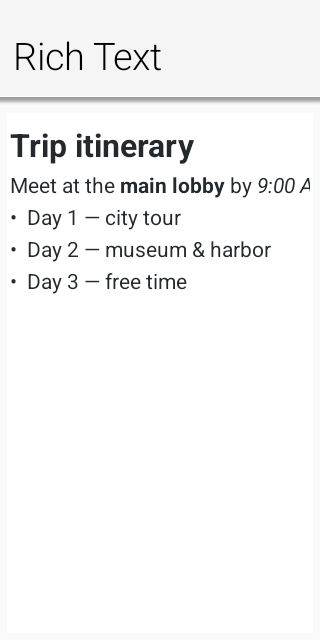
The formatting methods act on the current selection: bold(), italic(), underline(),
strikeThrough(), ordered and unordered lists, indentation, alignment, foreground and highlight
colors, block formats, and font sizes. queryCommandState(…) keeps toolbar toggles synchronized with
the selection. removeFormat() clears inline formatting; undo() and redo() restore text together
with inline styles, paragraph attributes, links, and image runs.
Use setHtml(…) to replace the document and insertHtml(…) to insert a fragment at the selection.
Fragment insertion retains its formatting and block structure. createLink(url) stores the target in
the model, and removeLink() removes it. insertImage(url) accepts normal URLs, data URIs, and supported
application resources; the source is retained so getHtml(…) can emit an img element when the
document is saved and reloaded.
HTML, RTF, Markdown, and AsciiDoc
setContent(…) and insertContent(…) accept a RichTextFormat. HTML is parsed directly with the
shared HTMLParser. Markdown and AsciiDoc use their own bidirectional model adapters; they never pass
through HTML. Headings, emphasis, inline code, links, images, lists, quotes, and literal blocks are
mapped directly to the rich model and serialized directly back with getMarkdown(…) or
getAsciiDoc(…). The RTF importer likewise maps paragraph breaks, Unicode escapes, bold, italic,
underline, strike-through, and skips metadata destinations such as font and color tables.
Editing and reading the same format returns canonical output for that format. Requesting a different
output format performs an explicit model conversion, just as getHtml(…) canonicalizes a visual
rich-text document.
editor.setContent("# Release notes\n\nThis is **ready**.", RichTextFormat.MARKDOWN);
editor.insertContent("{\\rtf1\\ansi {\\i pasted notes}}", RichTextFormat.RTF);
editor.insertContent("== Details\n\n* Portable\n* Lightweight", RichTextFormat.ASCIIDOC);
Rich paste uses ClipboardContent, a MIME-keyed container exposed by Display.copyToClipboard(…)
and Display.getClipboardContent(). RichTextClipboardData is its convenience subtype for
text/plain, text/html, text/rtf, text/markdown, and text/asciidoc. A writer publishes all
representations in one operation and a reader selects the richest format it understands; plain
EditorView consumers use text/plain. Copying a rich selection publishes canonical HTML, RTF,
Markdown, AsciiDoc, and the required plain fallback. Java SE publishes native DataFlavor values,
Android publishes native plain and HTML clip data, the JavaScript port uses ClipboardItem when the
browser allows it, and iOS publishes pasteboard types. A port that only has a text clipboard still
publishes plain text externally and retains the complete ClipboardContent for in-application use.
The negotiation API belongs at the implementation boundary, not inside RichTextArea. Port authors
override clipboard handling in CodenameOneImplementation and return the formats actually present on
the system clipboard. Applications can use the same API for domain-specific formats without changing
the editor.
A password, a one-time code or a recovery key shouldn’t linger on the clipboard.
ClipboardContent.setSensitive(true) marks a copy as sensitive: Android 13 and newer keep its text
out of the copy preview and the keyboard’s suggestions (ClipDescription.EXTRA_IS_SENSITIVE), and
iOS publishes it local only, so Universal Clipboard never sends it to the user’s other devices. The
simulator and the browser have no such marker. setClearAfter(millis) takes the copy off the
clipboard again after that time. iOS hands the expiry to the pasteboard, which removes the copy even
if the application was suspended or closed meanwhile. The other ports clear it from the application
when the time is up, and only if the application copied nothing else since; Android also checks that
the clip on the clipboard is still its own, so a later copy from another application stays.
RTF is also recognized when a clipboard provider returns it as a string beginning with an RTF header. Format import is intentionally a practical interchange subset, not a layout-compatible word processor: unsupported RTF destinations and advanced Markdown or AsciiDoc extensions degrade to the supported text and structure rather than controlling document layout.
Read-only rich text with RichTextComponent
RichTextComponent (in com.codename1.ui) is the read-only counterpart to RichTextArea. It renders
multi-styled, word-wrapped text — headings, bold, italic, underline, strike-through, inline code,
colored and highlighted spans, per-paragraph alignment and indentation, ordered and unordered lists,
block quotes, preformatted blocks, inline images, and tappable hyperlinks — without any of the editing
machinery. It sits between a single-style SpanLabel (one style for the whole component) and a full
BrowserComponent (a native web view): a lightweight native component that keeps a distinct style per
character, measures and paints text directly, and reports an accurate height-for-width preferred size,
so it embeds cleanly inside ordinary layouts. It’s the modern replacement for the deprecated
HTMLComponent.
It shares the editor’s document model and the RichRunPainter styling primitive, so styled text
rendered read-only matches what the editor produces for the same content.
Content is supplied in any of the interchange formats the rich model understands, or built up programmatically from styled runs:
RichTextComponent view = new RichTextComponent();

// From Markdown, HTML, or any RichTextFormat:
view.setMarkdown("# Trip summary\n\n"
        + "Departs **09:40**, arrives *11:15*. See the [itinerary](app://itinerary) for details.\n\n"
        + "- Window seat\n"
        + "- Carry-on only");
// view.setHtml("<h1>Trip summary</h1><p>Departs <b>09:40</b> ...</p>");
// view.setContent(source, RichTextFormat.ASCIIDOC);

// Or assembled run by run with editor TextStyle values:
RichTextComponent built = new RichTextComponent();
built.append("Status: ", TextStyle.DEFAULT)
        .append("confirmed", TextStyle.DEFAULT.withBold(true).withForeColor(0x1a7f37));

form.add(view);
Hyperlinks in the content fire an ActionListener whose event source is the link target string, so the
application decides what a link means:
view.addLinkListener(e -> Display.getInstance().execute((String) e.getSource()));
The component resolves inline images through an ImageResolver, keeping image loading and caching policy
in the application rather than the component. Return null to render a placeholder:
view.setImageResolver(src -> myImageCache.get(src));
By default (SizeMode.SHRINK) the component is exactly as tall as its wrapped content at the width it
is given, which is ideal inside a scrollable Form. SizeMode.SCROLL instead keeps the size the
parent assigns and scrolls the content vertically. setTextAlign(…) overrides the alignment of every
paragraph, and preferredSizeForWidth(width) is a stateless height-for-width query for custom layout
managers.
RichTextArea — imported HTML is document data, not a
browser page; validate link targets and image sources with the application’s own rules.CodeEditor
CodeEditor provides incremental highlighting for java, kotlin, javascript, python, css,
xml, json, and c. It includes a line-number gutter, light and dark palettes, automatic bracket and
quote closing, tab expansion, automatic indentation, horizontal and vertical scrolling, and read-only
viewing.
Form hi = new Form("Editor", new BorderLayout());
CodeEditor editor = new CodeEditor();
editor.setLanguage("java");
editor.setTheme("light");          // or "dark"
editor.setShowLineNumbers(true);
editor.setText("public class Main {\n\n}");
hi.add(BorderLayout.CENTER, editor);
hi.show();
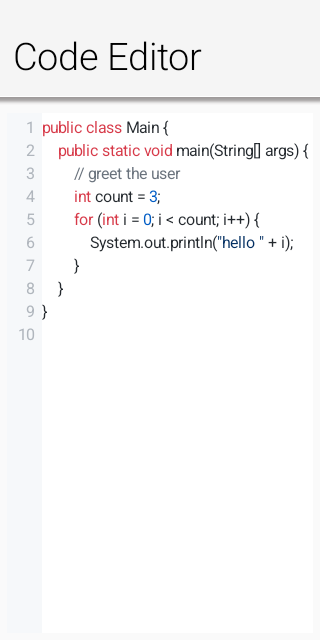
Choose the language with setLanguage(…), select "light" or "dark" with setTheme(…), toggle
the gutter with setShowLineNumbers(…), and configure indentation with setTabSize(…).
insertAtCursor(…) replaces the active selection, while getCursorPosition(…) reports the current
UTF-16 caret offset asynchronously.
The Codename One Playground uses CodeEditor directly for its Java and CSS source panes. This
uses the same language highlighting, line-number gutter, keyboard navigation, diagnostics, and
diagnostic tooltips available to applications. Compiler diagnostics are passed to
setDiagnostics(…) with their source ranges; status messages use lightweight Codename One
components beneath the editor. The Playground doesn’t install or bundle a separate editor engine.
Source editing disables platform spelling and autocorrection; the only wavy underlines the editor
draws are diagnostics supplied through setDiagnostics(…).
Custom syntax highlighters
Built-in languages use grammar-specific incremental lexical analyzers. JSON doesn’t accept single-quoted
strings, CSS doesn’t interpret // as a comment, XML tracks tags and attributes, Python carries
triple-quoted strings across lines, and C-family numeric prefixes are validated by radix. These rules
are lexical by design; a compiler or language server remains the authority for diagnostics.
Third-party libraries can register a SyntaxHighlighter under any language ID. The highlighter
receives one line and the state returned for the preceding line, then returns ordered token spans and
the next state. Tokens can use the built-in semantic kinds or provide explicit light and dark RGB
colors. Registration is global and the pure renderer invokes the Java highlighter directly, so a
custom language needs no platform-specific grammar.
SyntaxHighlighter properties = (line, state) -> {
    List<SyntaxToken> tokens = new ArrayList<>();
    int equals = line.indexOf('=');
    if (equals > 0) {
        tokens.add(new SyntaxToken(0, equals, SyntaxToken.PROPERTY,
                0x005cc5, 0x9cdcfe));
    }
    return new SyntaxHighlightResult(tokens, 0);
};
CodeEditor.registerSyntaxHighlighter("properties", properties);

CodeEditor editor = new CodeEditor("properties", "accent=#0a66c2");
Asynchronous code completion
A CodeCompletionProvider receives the complete source and caret offset, then delivers proposals
through its callback. The callback can run after a local analysis or network/language-server request;
the editor doesn’t block the EDT while proposals are produced.
editor.setCompletionProvider((sourceEditor, code, cursor, results) -> {
    List<CodeCompletion> proposals = new ArrayList<>();
    proposals.add(new CodeCompletion("println(String value)", "println()")
            .setType("method")
            .setDetail("void"));
    proposals.add(new CodeCompletion("private").setType("keyword"));
    results.onSucess(proposals);
});
Return an empty list or null to dismiss the popup. A proposal can use different display and insertion
text, plus a type badge and detail string.
Diagnostics
setDiagnostics(…) accepts 1-based source ranges. Errors, warnings, and informational entries appear
under only the supplied character range, with a gutter marker for the affected line. Hover the range
or marker on desktop, or tap it on touch devices, to display its message.
editor.setDiagnostics(Arrays.asList(
        new CodeDiagnostic(6, 9, 6, 16, "Cannot resolve method prinln")
                .setSeverity(CodeDiagnostic.ERROR),
        new CodeDiagnostic(3, 5, "Value is never read")
                .setSeverity(CodeDiagnostic.WARNING)
));
Replace the list whenever a compiler, linter, or language server publishes a newer analysis. Passing an empty list clears the current diagnostics.
Port integration checklist
The pure engine drives the editors on every platform, so a port must implement the low-level
text-input contract: isTextInputSupported(), startTextInput(…), updateTextInputState(…), and
stopTextInput(…) in CodenameOneImplementation. The binding must distinguish committed from
composing text, preserve UTF-16 offsets, map native navigation and clipboard actions to
TextInputClient.KEY_*, update native selection state after programmatic edits, and anchor candidate
UI with the supplied caret geometry.
Some native protocols, including iOS UITextInput, request geometry synchronously on the native
UI thread. That thread must not wait for the Codename One EDT: the EDT may already be waiting for
native drawing or font measurement. The iOS port captures an immutable TextInputGeometry on the
EDT when starting or updating input and after painting layout or scroll changes, then answers native
geometry queries from that snapshot. Native selection changes also refresh the snapshot after the
editor scrolls its caret into view.
Custom editors can implement TextInputGeometry.Provider to collect visible caret positions in a
single layout pass. getGeometrySnapshot() runs on the EDT and returns a non-null immutable
snapshot. Caret records contain a UTF-16 document offset followed by absolute screen pixel
coordinates {offset, x, y, width, height}; selection rectangles use {x, y, width, height}.
Include visible insertion positions in document order, including line endpoints, and supply the
active caret as the fallback for offsets outside the snapshot. The default capture samples a
bounded range around the visible area and caret. Editors with expensive per-offset geometry should
provide their own snapshot to avoid repeating layout work for each character.
The built-in EditorView, CodeView and RichView collect their visible geometry by line and
font run. Font.getTextRunPositions(text, rtl) lets the Apple ports shape each run once with Core
Text, including styled and directional runs, instead of measuring thousands of prefixes on every
input update. Other ports have a compatibility fallback. Editor subclasses that change character
measurement should override measureLineCaretPositions() alongside measureColumnX().
A port with a better platform editor can instead supply a native peer and implement the existing semantic command/query channel. In both cases application code, change listeners, ready handling, and asynchronous queries remain the same.