Two quite separate things are called VPN support, and conflating them wastes a great deal of time.
The first is asking the operating system to run a standard tunnel — an
IKEv2 configuration the platform implements itself, which your app installs,
starts, stops, and watches. That’s portable, needs a capability any paid
developer account can switch on, and is what almost every app that says
"connect to VPN" actually wants. It’s com.codename1.vpn.profile, and it’s
what this chapter is mostly about.
The second is shipping a tunnel of your own that receives raw IP packets and
decides what to do with them. That’s com.codename1.vpn.tunnel. It runs on
Android with no configuration at all, and on iOS behind a build hint and an
entitlement Apple grants case by case; the section below covers both, and what
to write so the loop you wrote is the loop that runs on either.
| Capability | iOS | Android | Simulator and desktop | JavaScript |
|---|---|---|---|---|
Install a managed IKEv2 profile | yes | yes (Android 11 and later) | simulated | — |
IPsec with a pre-shared key | yes | — | simulated | — |
Connect, disconnect, observe status | yes | yes (Android 11 and later) | simulated | — |
Always-on / on-demand | yes | yes | simulated | — |
A tunnel your app implements | yes (see below) | yes | simulated | — |
Detect that some VPN is active | yes | yes | yes | — |
Branch on Vpn.isSupported() and Vpn.getCapabilities() for the managed
profile, and on Tunnels.isSupported() for a tunnel of your own, rather than
on the platform. Every callback arrives on the EDT.
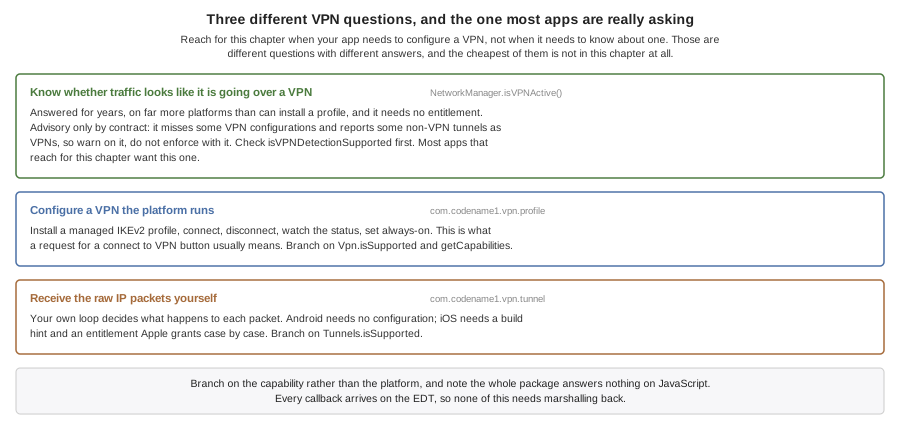
Detecting A VPN Is A Different Question, And Already Answered
If all you want to know is whether this device’s traffic looks like it’s going
over a VPN, NetworkManager.isVPNActive() has answered that for years, works on
far more platforms than can install a profile, and needs no entitlement at all.
Check isVPNDetectionSupported() first, because not every platform implements
it.
Its own contract calls the answer advisory: the platform APIs and interface-name heuristics behind it miss some VPN configurations and report some non-VPN tunnels as VPNs. Warn on it, log it, degrade on it — but don’t build enforcement on it, because both kinds of mistake are available to it and neither is rare enough to design around.
if (NetworkManager.getInstance().isVPNActive()) {
    // traffic is being tunnelled by something
}
Reach for this chapter only when your app needs to configure a VPN, not when it needs to know about one.
Installing And Running A Managed Profile
if (!Vpn.isSupported()) {
    return;                          // no managed VPN on this platform
}
VpnProfile profile = new VpnProfile("vpn.example.com")
        .protocol(VpnProtocol.IKEV2)
        .remoteIdentifier("vpn.example.com")
        .localIdentifier("alice")
        .usernamePassword("alice", secret)
        .displayName("Acme Corporate");

Vpn.install(profile).onResult((ok, err) -> {
    if (err instanceof VpnException
            && ((VpnException) err).getError() == VpnError.USER_DECLINED) {
        return;                      // ordinary outcome, not a failure
    }
    if (err == null) {
        Vpn.start();
    }
});
Three things about that code are worth spelling out.
The user may be asked, and you can’t skip the asking. The platform shows a
system prompt when it wants consent, and neither lets an app avoid it. A
declined prompt fails with VpnError.USER_DECLINED, which is an ordinary
outcome and not something to report as an error — the snippet treats it as a
normal return.
It isn’t a prompt on every install, though. Android asks once and remembers, so replacing a profile in an app the user has already approved goes through with nothing shown. Be ready for the prompt; don’t build a flow that depends on it appearing, and don’t tell the user a dialog is coming.
One configuration per app. Both platforms give an app a single managed
configuration, so install replaces whatever was there rather than adding to
it.
The platform keeps the secret. A profile read back with Vpn.load()
describes the configuration but its getPassword() is always null, because the
password lives in the platform keychain and is never handed back. Use
isPasswordKnown() to tell a profile built without a password from one that
was loaded, where the
platform kept it".
Watching the tunnel is a listener, and worth having: it can go down without your app asking.
Vpn.addStatusListener(status -> {
    switch (status) {
        case CONNECTING:
            ui.showConnecting();
            break;
        case CONNECTED:
            ui.showConnected();
            break;
        default:
            ui.showOffline();        // it can drop without being asked
            break;
    }
});
Note the states aren’t decoration either. CONNECTING can last as long as a
real negotiation takes, and an app that only watches for CONNECTED looks
frozen for the duration.
Where The Platforms Disagree
Android needs version 11. VpnManager and Ikev2VpnProfile arrive in API
30. Codename One doesn’t raise your app’s minSdkVersion for this — a
feature that can report itself absent isn’t worth cutting off older devices
for — so Vpn.isSupported() answers false below that and your app needs a
path for it.
Android offers IKEv2 only. There is no pre-shared-key IPsec equivalent in
the managed profile API. A profile asking for VpnProtocol.IPSEC is refused
with INVALID_CONFIGURATION rather than installed as something else without
comment.
Starting isn’t the same as connected. On Android the platform accepts the
start request and reports nothing further, so a successful start() means the
request was accepted, not that the tunnel is up. Watch the status.
A Tunnel Your App Implements
If your VPN speaks a protocol the platforms don’t implement — anything that
isn’t IKEv2 or IPsec — you write the packet loop yourself, in Java, once.
Extend VpnTunnel and hand it to Tunnels.start.
Tunnels.isSupported() answers true on Android, true on an iOS build that
generated the extension, and false everywhere else — including an iOS build
that didn’t ask for one, which is every iOS build by default. Ask it, and
keep a path for the answer being no: Tunnels.start refuses with
NOT_SUPPORTED rather than pretending.
The addresses in a TunnelSetup are read before the platform is asked. An
address, a route or a DNS server that isn’t an IP literal fails the start
with INVALID_CONFIGURATION, and the message names the field. A setup with
no address at all fails the same way, because a link with no address isn’t
one a platform can establish. That check runs in Tunnels.start on every
platform, so a setup the simulator accepts is a setup a device accepts.
On Android the tunnel runs inside a VpnService in your app’s own process.
The instance you passed to Tunnels.start is the instance that runs, and
everything it closed over is still there.
On iOS it runs inside a Network Extension: a separate process with its own
bundle identifier, its own provisioning profile and a hard memory limit. The
build generates that extension for you — a target of its own, carrying a
virtual machine, running the class you name in ios.vpn.tunnel.class.
The extension is its own translation, rooted at your tunnel rather than at
your app. That’s what makes it possible at all: an app extension compiles
with APPLICATION_EXTENSION_API_ONLY, and the iOS port’s own natives call
UIApplicationMain and [UIApplication sharedApplication], which an
extension may not touch — so a target carrying the application’s translation
couldn’t be built. Rooted at the tunnel it carries what the tunnel reaches,
and the application shell is simply not in it.
The extension has no networking stack. It carries the translated program
and the virtual machine, and nothing else — so com.codename1.io.Socket,
ConnectionRequest and everything else that reaches
Util.getImplementation() finds nothing there. ParparVM’s java.net is URI
and URL; there are no sockets in it either.
What an iOS tunnel can do, then, is everything that happens on the device:
see every packet, inspect it, rewrite it, drop it, answer it with forward.
That covers filtering, local DNS, per-destination decisions and anything else
your own code can decide from the packet and from TunnelSetup.data.
What it can’t do is relay to a remote VPN server, because it has no way to open the connection. On Android it can — the tunnel runs in your app’s own process, where the implementation is installed — so the same tunnel class is not equally useful on both. Write the relay behind an interface if you need one platform to do it and the other to fall back.
A Mac Catalyst slice reports the tunnel unsupported, and that’s deliberate:
the extension target is built for the iOS destination only, so the Mac app
has no provider to start. Tunnels.isSupported() answers false there, and
the managed profile in com.codename1.vpn.profile still works.
Which turns the advice below into a build error rather than a disappointment.
Write the tunnel as though it ran in a process of its own, because it does:
no statics you set, no Display, no open connections, and the tunnel
constructed fresh with none of them — iOS constructs it, so it needs an
accessible no-argument constructor. A tunnel that reaches for your app’s
other classes drags them into this translation, and the ones backed by
native code fail the extension’s link, naming the symbol they wanted. That
includes a NativeInterface from a cn1lib: the extension carries the
translated program and the virtual machine, and nothing the port or a
library hand-wrote.
Two things are yours to arrange, and neither is something a build can do for
you. Apple grants com.apple.developer.networking.networkextension case by
case rather than from the developer portal, so setting ios.vpn.tunnel=true
is you saying you hold it — an App ID without it fails codesigning with an
error naming the entitlement and not the reason it appeared.
Both App IDs need it, which surprises people. The extension carries the
entitlement because it is the provider; the app carries it because
NETunnelProviderManager — what Tunnels.start uses to save the
configuration and start the tunnel — is Network Extension API too. Signing
only the .appex leaves the app unable to start its own tunnel: every
attempt fails with a permission error. The build writes the entitlement into both, and refuses before the
archive if either profile doesn’t grant it.
And the extension signs under its own App ID, <packageName>.vpntunnel, so a
device archive needs a provisioning profile for that identifier passed as
ios.appext.CN1VpnTunnel.provisioningData or .provisioningURL, exactly as
the Call Directory extension does. Override the identifier with
ios.vpn.tunnel.buildSettings.PRODUCT_BUNDLE_IDENTIFIER if you must; it has
to stay inside the app’s own namespace, because Apple rejects an embedded
extension that isn’t.
TunnelSetup.data exists for that reason, and the rule worth taking away
follows from it:
Everything the tunnel needs arrives through
VpnTunnel.onStart.Anything it reaches for outside that becomes a static, which works while the tunnel shares the app’s process and goes missing the moment it doesn’t.
When the iOS half lands it will also need the
com.apple.developer.networking.networkextension entitlement, which Apple
grants case by case rather than self-serve.
Developing Without Hardware
The simulator and the desktop builds run a simulated configuration store that tunnels nothing, so an install flow, a status screen and a reconnect button can all be built without a device or a server.
A packet tunnel runs there too, over a loopback: Tunnels.start calls your
onStart, packets you feed in reach onPacket, and what you forward comes
back out where a test can read it. The transport is fake and the packet loop
is the real one, which is what makes a tunnel testable at all — neither
platform lets you run one on a desktop.
Like the call simulation it keeps the awkward orderings: connecting passes
through CONNECTING, and a profile read back has no password, because a
simulation that handed the secret back would let code depend on something no
device does.
The Simulate → VPN menu scripts the failures:
Decline The Next Install Prompt — the outcome apps routinely treat as impossible.
Refuse The Credentials On Connect — the install and the connection fail in different places for different reasons, and apps commonly handle only the first.
Drop The Tunnel — a tunnel going down without being asked.
Every item is also callable from a test with CN.execute("vpn:itemN").
Build Hints
| Hint | Default | What it does |
|---|---|---|
| injected as | The Personal VPN capability. Enable it on the App ID or the app won’t sign. |
|
| Generates the packet tunnel extension. Also your assertion that the App ID holds the Network Extension grant; see above. |
| none | Which |
| none | The extension’s own provisioning profile, base64, for a device archive. |
| none | Overrides a build setting on the generated target, as the other extensions' equivalents do. |
Referencing com.codename1.vpn.profile links NetworkExtension.framework and
injects the Personal VPN entitlement with no hint at all.
Codename One never injects com.apple.developer.networking.networkextension
from a class reference. Apple grants it case by case rather than self-serve,
and an entitlement an App ID doesn’t carry fails codesigning with an error
naming the entitlement and not the reason it appeared. That’s why the hint
exists at all rather than the package alone turning the extension on: the
hint is the assertion that both App IDs hold the grant, and it’s on that
assertion — and only then — that the build writes the entitlement into the
app and into the extension.
Android needs no hints. Referencing the package adds the VpnService, its
BIND_VPN_SERVICE declaration and the foreground-service permissions the
platform requires to keep a tunnel running.